What to run before uploading a bulk file
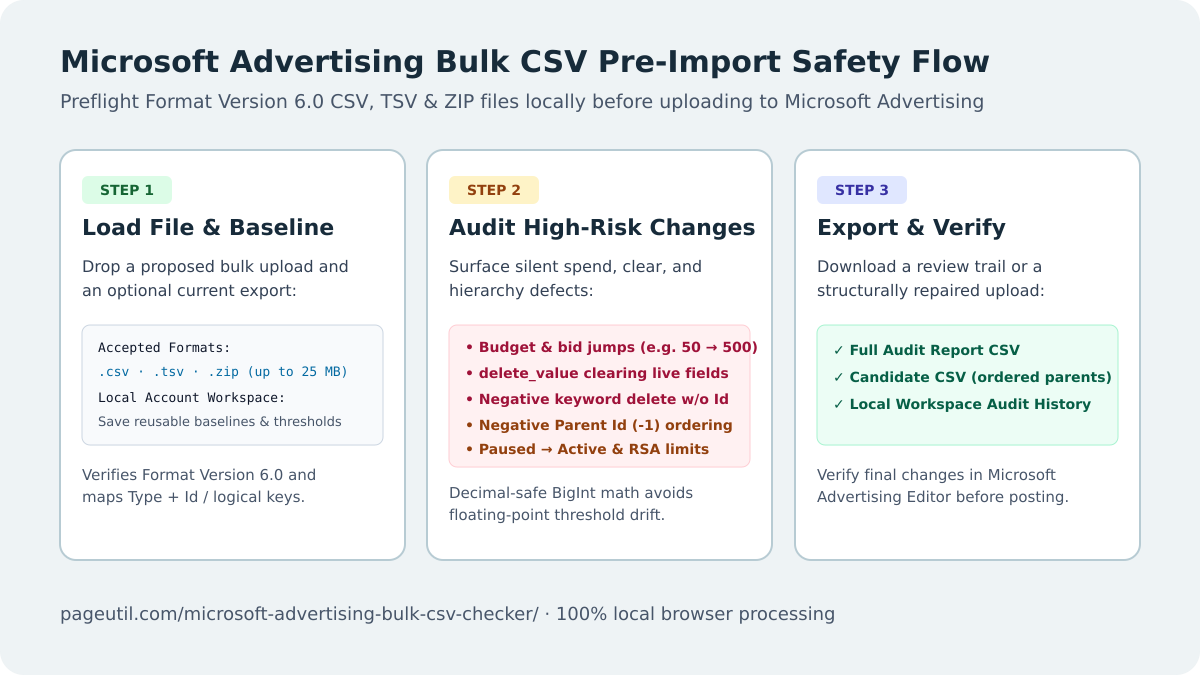
Download a fresh account export from Microsoft Advertising (Bulk Download in the web UI or via the Bulk API, which defaults to a ZIP-compressed CSV or TSV in Format Version 6.0).
Open Microsoft Advertising Bulk CSV Checker. Select or create a local Account Workspace if you manage multiple client accounts, then load your proposed bulk file (.csv, .tsv, or .zip up to 25 MB).
Load your current account export into the optional baseline field—or click Save as account baseline once so recurring weekly uploads compare against that stored snapshot automatically in your browser’s IndexedDB.
Set your workspace risk thresholds (default 2× warning and 5× critical for daily budgets and bids, plus an optional hard daily budget ceiling) and click Check bulk file.
Worked example: catching five silent hazards in one upload
A single nine-row update can look clean in Excel while carrying five separate Microsoft Advertising Bulk 6.0 failure modes. The synthetic snippet below mirrors the built-in high-risk example in PageUtil:
Row 2 raises Brand Search US daily budget from 50.00 to 500.00 (a 10.0× jump). Row 3 flips Non-Brand Winter from Paused to Active. Row 4 sets Tracking Template to delete_value, which clears an active template rather than leaving it untouched. Row 5 deletes a Campaign Negative Keyword while leaving Id blank, which can remove all negative keywords on that campaign. Rows 6–8 declare a new Keyword (-12) and Ad Group (-10) above their parent Campaign (-9), and row 9 references an unknown negative parent (-99).
Type,Status,Id,Parent Id,Campaign,Budget,Ad Group,Keyword,Match Type,Tracking Template
Campaign,Active,2001,1001,Brand Search US,500.00,,,,
Campaign,Active,2002,1001,Non-Brand Winter,120.00,,,,
Ad Group,Active,3001,2001,Brand Search US,,Core Brand,,,delete_value
Campaign Negative Keyword,Deleted,,2001,Brand Search US,,,free,Broad,
Keyword,Active,-12,-10,Spring Launch,,Launch Exact,spring boots,Exact,
Ad Group,Active,-10,-9,Spring Launch,,Launch Exact,,,
Campaign,Active,-9,1001,Spring Launch,75.00,,,,
Keyword,Active,-13,-99,Spring Launch,,Orphan Group,orphan term,Phrase,| Risk Signal | What Microsoft Advertising Does | How to Resolve Before Import |
|---|---|---|
| Budget 50.00 → 500.00 (10.0×) | Applies the new daily budget immediately on active campaigns | Check decimal placement and confirm spend approval against baseline |
| Tracking Template = delete_value | Explicitly clears/resets the stored setting (unlike an empty cell, which leaves it unchanged) | Leave the cell blank if you want to keep the existing tracking template |
| Negative Keyword Status=Deleted, Id=(blank) | Can wipe all negative keywords associated with that Campaign or Ad Group | Supply the exact negative keyword Id to remove a single entry |
| Parent-after-child (-12 before -10 before -9) | Rejects dependent child rows when their newly created negative-Id parent appears later | Sort new parent rows above children (or use Candidate Upload CSV export) |
| Unknown negative Parent Id (-99) | Fails the child row because no parent in the file declares Id = -99 | Add the missing parent row with Id = -99 or switch to an existing positive Parent Id |
How to read the report and export a candidate file
Start with the Critical Risks filter. Every critical item represents either an immediate spend or data-loss hazard (budget spikes, delete_value clearing a populated baseline field, bulk negative-keyword deletion, or permanent entity deletion) or a structural error that causes partial upload failures (missing Format Version 6.0, duplicate IDs, unknown negative Parent Ids, or RSA character-limit breaches).
Inspect the Campaign Hierarchy Preview next to verify how many Ad Groups, Keywords, Ads, Negative Keywords, and Deletions are grouped under each campaign before anything reaches the platform.
Download the full Audit Report CSV if you need a client sign-off record or change ticket attachment. If the file has structural defects—such as a missing Format Version 6.0 row, Google Ads Editor header aliases like Max CPC or Criterion Type, formula-like text cells, or inverted negative-ID parent order—use Download candidate upload CSV. That export applies deterministic structural repairs only; it never auto-edits bids, budgets, statuses, or delete_value cells.
Free access, local workspaces, and privacy
PageUtil Microsoft Advertising Bulk CSV Checker is completely free with no account, subscription, or 100-row cap. All parsing, ZIP extraction, two-file comparison, and CSV exports run locally in your browser using Web Workers.
Agency workspaces, custom budget/bid alert thresholds, saved campaign baselines, and recurring audit logs are stored exclusively in your browser’s IndexedDB. You can export a workspace backup as JSON to move between machines or clear all local browser data with one click. No campaign names, budgets, or keywords are sent to PageUtil servers.
What to open next
If you also manage Google Ads alongside Microsoft Advertising, check Google-formatted sheets in Google Ads Editor CSV Validator.
Before adding new negative keywords across search campaigns, check whether they accidentally block active biddable keywords in Negative Keyword Conflict Checker.
If Excel corrupted UTF-8 characters or quoting before you reached the bulk checker, clean the raw file first in CSV Fixer.
Practical limits and final verification
This checker validates Format Version 6.0 syntax, core entity rules, negative reference keys, and two-file diffs against the baseline you supply. Unrecognised record types and newer extension columns are flagged as unverified pass-throughs rather than guessed.
A clean local report does not guarantee Microsoft Advertising will accept every row, approve ad copy under editorial policy, or enforce an intended spend cap. Because partial upload success is possible, import the reviewed file through Microsoft Advertising Editor or a small test batch first, inspect the result file’s Error column, and verify live campaign budgets and negative keywords in your account.
References
Use the linked specifications and product documentation to check behavior in your own environment.
Continue troubleshooting
- PageUtil vs Microsoft Advertising Editor for Bulk CSV Checks
- How to Fix Google Ads Editor CSV Import Errors
- How to find and resolve Google Ads negative keyword conflicts
- How to Validate Shopify Translation CSV and Prevent Overwrites
- How to Fix GA4 Cost Data CSV Import and UTM Matching Errors
- How to Fix Google Workspace Bulk User CSV Upload Errors
- How to Avoid Accidental Grade Overwrites in Moodle Gradebook CSV Imports
- How to Merge Recurring Microsoft Teams Attendance Reports
- How to Fix Azure DevOps Test Case CSV and Test Step Import Errors
- How to Check and Combine Windows Autopilot CSV Exports
- How to Preview Cloudflare Pages Header Rules Before Deployment
- How to Review Pinterest Bulk Pin Boards and Publishing Schedules
- How to Check Jira CSV Parent References and Hierarchy
- How to Check ShipStation Product CSV Updates Before Import
- How to Understand eBay Bulk Upload Results and Retry Failed Records
- How to Fix Google My Maps CSV Import and Coordinate Errors
- How to Fix Microsoft Teams Shifts Excel Import Errors
- How to Fix Webflow CMS CSV Import Reference and Slug Errors
- How to Fix Canva Bulk Create CSV and Spreadsheet Errors
- How to Clean and Split Email CSV for Klaviyo and Mailchimp
- How to Format and Map a Google Contacts CSV Import
- How to Fix Cloudflare Bulk Redirect CSV Errors
- How to Check a Google Business Profile Bulk Update CSV
- How to Explain a Stripe Payout That Does Not Match the Bank
- How to Fix a QuickBooks Bank CSV Import
- How to Fix CSV Encoding, Columns and Leading Zeros in Excel
- How to extract Word tables to Excel
- How to convert Excel formula commas and semicolons
Related tools
Frequently asked questions
What is the difference between a blank cell and delete_value in Microsoft Advertising bulk CSVs?
Leaving an optional field blank during an update generally instructs Microsoft Advertising to keep the existing value unchanged. Entering the reserved token delete_value explicitly clears or resets that setting.
Why can a single Campaign Negative Keyword deletion row wipe out all negative keywords?
Negative keywords cannot be edited in place—only added or deleted. When a Campaign Negative Keyword or Ad Group Negative Keyword row sets Status to Deleted with a Parent Id but leaves Id blank, Microsoft Advertising interprets that as a parent-scope deletion.
Why does row order matter for negative reference keys like -1 and -2?
Temporary negative Ids link newly created Campaigns, Ad Groups, and Keywords within the same upload. Microsoft Advertising processes rows sequentially for new dependencies, so every parent row must appear above any child row referencing its negative Id.
Can I upload a ZIP download directly from Microsoft Advertising?
Yes. Microsoft Advertising bulk downloads default to ZIP archives containing a CSV or TSV file. PageUtil extracts and validates .zip, .csv, and .tsv files locally up to 25 MB.
Are my saved baselines and agency workspaces uploaded to a server?
No. Workspaces, thresholds, saved baselines, and audit history stay strictly in your browser’s local IndexedDB storage and can be exported to JSON or wiped at any time.