When should you choose PageUtil or Microsoft Advertising Editor?
Microsoft Advertising Editor is Microsoft’s official free desktop application for syncing accounts, editing campaigns offline, running account-level validations, and posting revisions. It is the right environment for live account context and execution.
PageUtil fills a narrower pre-import gap: reviewing raw bulk CSV, TSV, or ZIP files—especially files generated by scripts, agencies, or spreadsheets—against a current account export or saved local baseline before anyone installs software, syncs a large account, or uploads directly to the web UI.
| Requirement | PageUtil | Microsoft Advertising Editor |
|---|---|---|
| Setup & access | Zero-install browser tool; no login required | Desktop application synced to Microsoft Advertising account |
| Two-file change risk audit | Built-in baseline diff for budget/bid multipliers, delete_value clears, and status flips | Shows pending local changes after importing into a synced account |
| Bulk schema & ID safety | Flags blank-Id negative-keyword wipes, negative Parent Id ordering, and Google Ads header aliases | Validates against live account state and platform rules |
| Recurring baselines & history | Local IndexedDB account workspaces, custom thresholds, and shareable Audit CSV | Live account sync; no standalone two-file CSV audit export |
| Posting live changes | Exports a reviewed candidate CSV only; never touches live accounts | Posts approved changes directly to Microsoft Advertising |
Is PageUtil free, and what else do you need?
PageUtil Microsoft Advertising Bulk CSV Checker is free to use without creating a PageUtil account, with no row-count paywall or download fee. Local agency workspaces, saved campaign baselines, custom budget/bid alert thresholds, and audit history are included for free in browser IndexedDB storage.
Microsoft Advertising Editor is also free from Microsoft, though it requires desktop installation and authenticated access to your Microsoft Advertising account. You still need Microsoft Advertising (via Editor, the web Bulk UI, or the Bulk API) to export your current baseline and post reviewed updates.
Compare the complete workflow rather than treating either tool as a replacement for the other. Consult Microsoft’s official documentation for current platform rules and limits.
About PageUtil and its free tools
A worked example to test the choice
Suppose an account manager prepares a weekly bulk CSV that raises Campaign A’s daily budget from 50.00 to 500.00, sets Tracking Template to delete_value on Ad Group B, and includes a Campaign Negative Keyword row with Status = Deleted and a blank Id. In a raw web upload, partial success can apply the 10× budget and clear the tracking template even if another row fails.
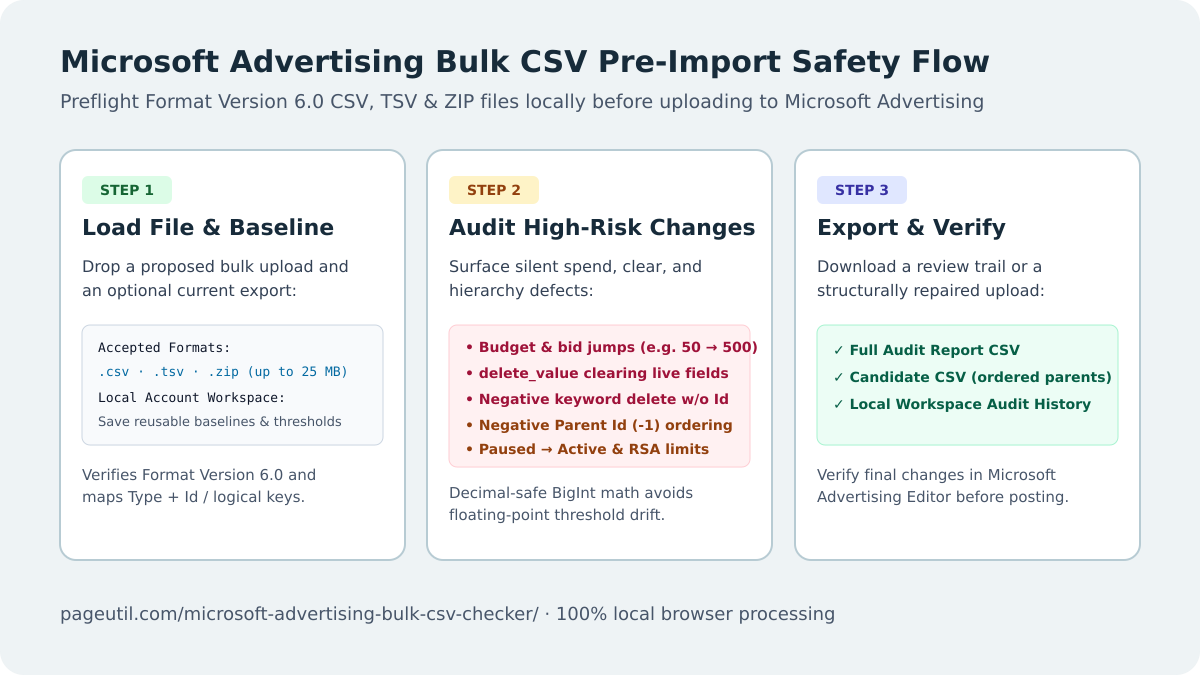
Running the file through PageUtil against the saved account baseline immediately isolates the 10.0× budget jump, displays the exact existing tracking template that delete_value will erase, and flags the blank-Id negative-keyword row as a possible bulk removal—producing a shareable Audit CSV before anyone opens Microsoft Advertising Editor.
How do you run the PageUtil workflow?
Open Microsoft Advertising Bulk CSV Checker.
Load your proposed .csv, .tsv, or .zip bulk file locally alongside a current account export (or enable your workspace’s saved local baseline). Review critical risks first—budget/bid multipliers, delete_value clears, blank-Id negative-keyword deletions, and parent-before-child negative reference keys. Export the Audit CSV for team sign-off or download the Candidate Upload CSV with deterministic structural fixes applied, then import into Microsoft Advertising Editor to post.
For the full step-by-step preflight procedure, read How to Check Microsoft Advertising Bulk CSV Updates Before Import.
What are the practical limits?
PageUtil inspects only the files you supply against a versioned core Format Version 6.0 schema subset. It cannot verify live account billing status, trademark or editorial policies, shared library state not included in your baseline export, or newer record types outside the core subset.
Browser processing is bounded at 25 MB and 100,000 rows per file. Very large enterprise accounts should split exports by campaign or use Microsoft Advertising Editor and the Bulk API directly.
What should you verify before using the result?
After importing a reviewed candidate file into Microsoft Advertising Editor or the web UI, inspect the pending changes summary—especially campaign budgets, paused-to-active status flips, and negative keyword counts—before posting. Keep the baseline export, Audit CSV, and Microsoft’s upload result file together so any partial failures can be retried deliberately.
Sources and comparison scope
Prepared on 22 November 2026 using the current PageUtil Microsoft Advertising Bulk CSV Checker workflow and official Microsoft Learn documentation. The example is synthetic. Microsoft Advertising Editor capabilities are described from official documentation; no comparative runtime benchmark is reported here.
Continue troubleshooting
- How to Check Microsoft Advertising Bulk CSV Updates Before Import
- PageUtil vs Google Ads Editor CSV Import Review
- Optmyzr Alternative for Negative Keyword Conflict Checks
- PageUtil vs Supermetrics for GA4 Cost Data Preparation
- PageUtil vs Google Business Profile Bulk Update Review
- PageUtil vs LinkedIn Offline Conversion CSV Import
- PageUtil vs Canva Bulk Create for CSV Preparation
- PageUtil vs Pinterest Bulk Upload CSV Checks
- PageUtil vs Google My Maps for CSV Location Preparation
Related tools
Frequently asked questions
Does PageUtil replace Microsoft Advertising Editor?
No. PageUtil is a zero-install pre-import safety checker and two-file CSV diff tool. Microsoft Advertising Editor remains the official desktop tool for syncing live accounts and posting changes.
Why check a bulk CSV in PageUtil before importing into Editor or the web UI?
PageUtil immediately highlights silent commercial risks—such as 5× budget jumps, delete_value clearing live tracking templates, blank-Id negative-keyword wipes, and parent-after-child negative reference keys—and exports a shareable Audit CSV without requiring account login.
Does PageUtil automatically edit my bids or remove delete_value cells?
No. The Candidate Upload CSV export applies deterministic structural fixes only (such as adding Format Version 6.0, reordering newly created negative-ID parents above children, and mapping standard header aliases). Bids, budgets, statuses, and delete_value cells require explicit human review.
Can agencies save separate baselines for multiple clients?
Yes. You can create multiple local Account Workspaces with separate saved baselines, custom budget/bid thresholds, and audit history in your browser’s IndexedDB, and export or import workspace backups as JSON.
Is the PageUtil tool free to use?
Yes. PageUtil Microsoft Advertising Bulk CSV Checker is free with no PageUtil account required, and all file processing stays locally on your device. You still use Microsoft Advertising or Microsoft Advertising Editor to export baselines and post approved changes.