What to run
Open QuickBooks CSV Validator and use the original bank export. The check stays in the browser. Choose the QuickBooks profile that matches the company file. QuickBooks Online, the United States date default, UK and Sole Trader, and a Desktop candidate are separate profiles because the published date guidance is not the same everywhere.
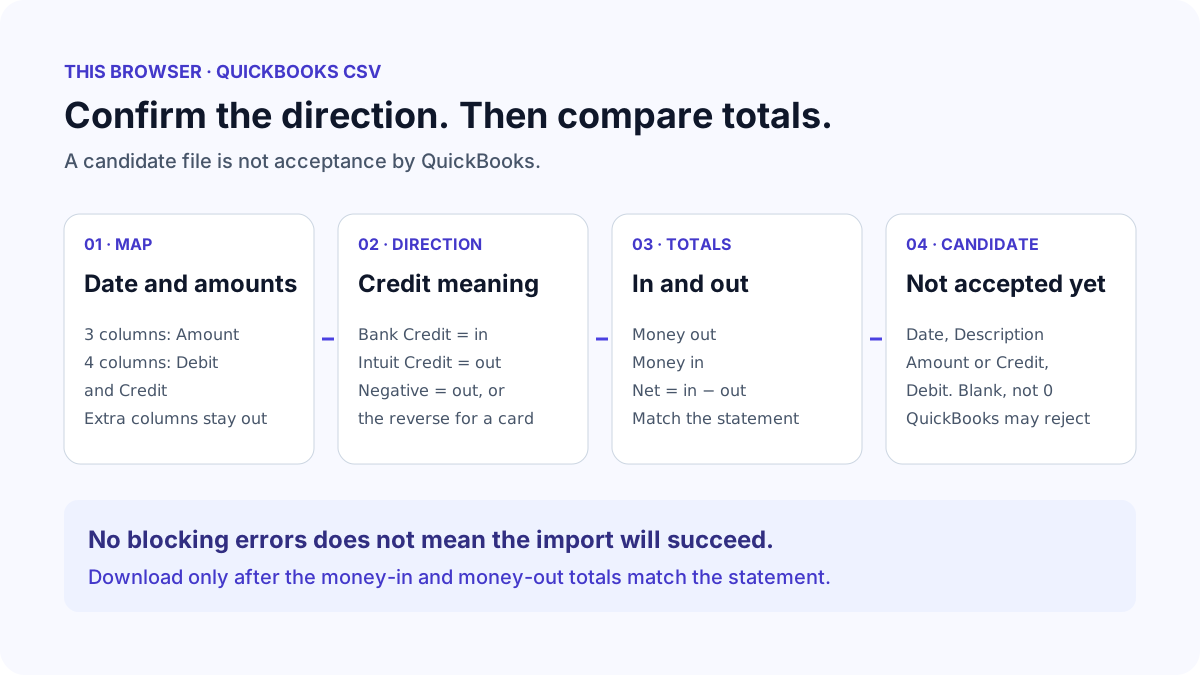
Leave the separator on auto unless the preview is one column. Choose the encoding only when the original file is not valid UTF-8. Windows-1252 covers many Western bank exports. Mark whether the first row is headings. Then choose 3 columns or 4 columns. A 3-column candidate is Date, Description, Amount. A 4-column candidate is Date, Description, Credit and Debit.
Map the date, the description and either one amount column or both a debit column and a credit column. For one amount column, say whether a negative number is money out. For two columns, say whether the source Credit column is money in, which is typical of a bank statement, or money out, which is Intuit's own 4-column example. The page shows both totals and does not choose the split for you.
Date,Description,Credit,Debit
20/11/2018,Example of a payment,100.00,
21/11/2018,Example of a deposit,,200.00
How to read the result
Money out and money in are the numbers to compare with the statement. In the 3-column file a negative amount is money out. In the 4-column file Intuit's example puts the payment in Credit and the deposit in Debit, and the other cell is blank rather than zero. If those totals are the opposite of the statement, switch the direction and look again. Do not download while they are reversed.
A zero amount, a row with both Credit and Debit filled, a negative number in a split column, a description that is only a number, or a date that contradicts the selected order blocks the candidate. The row stays in the list. The tool does not delete it to make the file look clean. Duplicate dates and descriptions are warnings, because a statement can contain two identical transactions.
Dates that can be read as either dd/mm/yyyy or mm/dd/yyyy stay warnings until one row proves the order, such as 20/11/2018. Intuit recommends dd/mm/yyyy. The upload screen still asks you to confirm the order, so the candidate and that choice must match. Special characters from the UK checklist block a description until you opt in to removing them, and the preview shows the changed text.
| What you see | What it means | What to do |
|---|---|---|
| Upload fails on a normal bank export | The bank uses more columns or the opposite credit meaning | Map only date, description and the amount columns, then confirm the totals |
| Every payment lands as a deposit | The sign or the Credit column was reversed | Switch the direction and match money out to the statement |
| A zero or 0.00 is rejected | Intuit says to leave unused amount cells blank and remove zero rows | Correct the source row. This check will not drop it |
| 01/02/2018 could be either order | Both the day and the month are 12 or less | Find a later day in the file or confirm the order from the statement |
| The description is a reference number | Intuit says to correct a description that is only a number | Put the payee text back in the description column |
What to open next
If the preview is one column, the separator is wrong, or names are garbled, open CSV Fixer on the same original file. It detects comma, semicolon, tab and pipe separators and decodes the original bytes. It does not decide which column is a QuickBooks debit. Bring the readable export back to the validator.
Download only after the approval checkbox. The file is UTF-8 with a byte order mark and Windows line endings, which is the usual way to save a CSV for the QuickBooks upload screen. The headings are exactly Date, Description and Amount, or Date, Description, Credit and Debit. The word amount is not added to Credit or Debit.
In QuickBooks, upload the candidate to the account that matches the file. A credit-card export can use the opposite sign because a payment reduces the card balance. Choose the credit card account there, not a bank account. Then compare the imported count and the money-in and money-out totals with the statement before you categorise anything.
Stop when
Stop when the candidate totals match the statement, the date order is the one you will select in QuickBooks, and every blocking row has been corrected in the source. Keep the original export. The candidate is a reformatted copy, not a receipt that QuickBooks has accepted.
Do not keep changing the direction until a later screen stops complaining. That can swap a whole month of transactions. QuickBooks Self-Employed is not given a separate CSV layout in the current Intuit article. A pass for QuickBooks Online does not establish that Self-Employed or Desktop will accept the file. Desktop imports are often QBO, QFX or OFX instead of this CSV.
References
Use the linked specifications and product documentation to check behavior in your own environment.
Continue troubleshooting
- How to Fix CSV Encoding, Columns and Leading Zeros in Excel
- How to Fix GA4 Cost Data CSV Import and UTM Matching Errors
- How to Fix Google Workspace Bulk User CSV Upload Errors
- How to Avoid Accidental Grade Overwrites in Moodle Gradebook CSV Imports
- How to Merge Recurring Microsoft Teams Attendance Reports
- How to Fix Azure DevOps Test Case CSV and Test Step Import Errors
- How to Check and Combine Windows Autopilot CSV Exports
- How to Preview Cloudflare Pages Header Rules Before Deployment
- How to Review Pinterest Bulk Pin Boards and Publishing Schedules
- How to Check Jira CSV Parent References and Hierarchy
- How to Check ShipStation Product CSV Updates Before Import
- How to Understand eBay Bulk Upload Results and Retry Failed Records
- How to Fix Google My Maps CSV Import and Coordinate Errors
- How to Fix Microsoft Teams Shifts Excel Import Errors
- How to Fix Webflow CMS CSV Import Reference and Slug Errors
- How to Fix Canva Bulk Create CSV and Spreadsheet Errors
- How to Clean and Split Email CSV for Klaviyo and Mailchimp
- How to Format and Map a Google Contacts CSV Import
- How to Fix Cloudflare Bulk Redirect CSV Errors
- How to Check a Google Business Profile Bulk Update CSV
- How to Fix Google Ads Editor CSV Import Errors
- How to Explain a Stripe Payout That Does Not Match the Bank
- How to extract Word tables to Excel
- How to convert Excel formula commas and semicolons
Related tools
Frequently asked questions
Why is Credit money out in the QuickBooks file?
Intuit's 4-column example puts the payment in the Credit column and the deposit in the Debit column. Many bank statements use those words the other way around. The validator will not guess which one you have.
Can I upload the file when the page shows only warnings?
You can download the candidate after confirming the totals. Warnings such as duplicate transactions or ambiguous dates still need a look. They do not prove that QuickBooks will accept the file.
Does this fix a QuickBooks Self-Employed import error?
It prepares the Online 3-column or 4-column candidate and lists the documented format problems. Self-Employed is not given a different layout in the current article, and a pass here is not acceptance by that product.
Should zero amounts be left as 0.00?
No. Intuit says to remove zeros and leave the unused Credit or Debit cell blank. A zero row is reported and kept in the source so a transaction is not deleted by the checker.