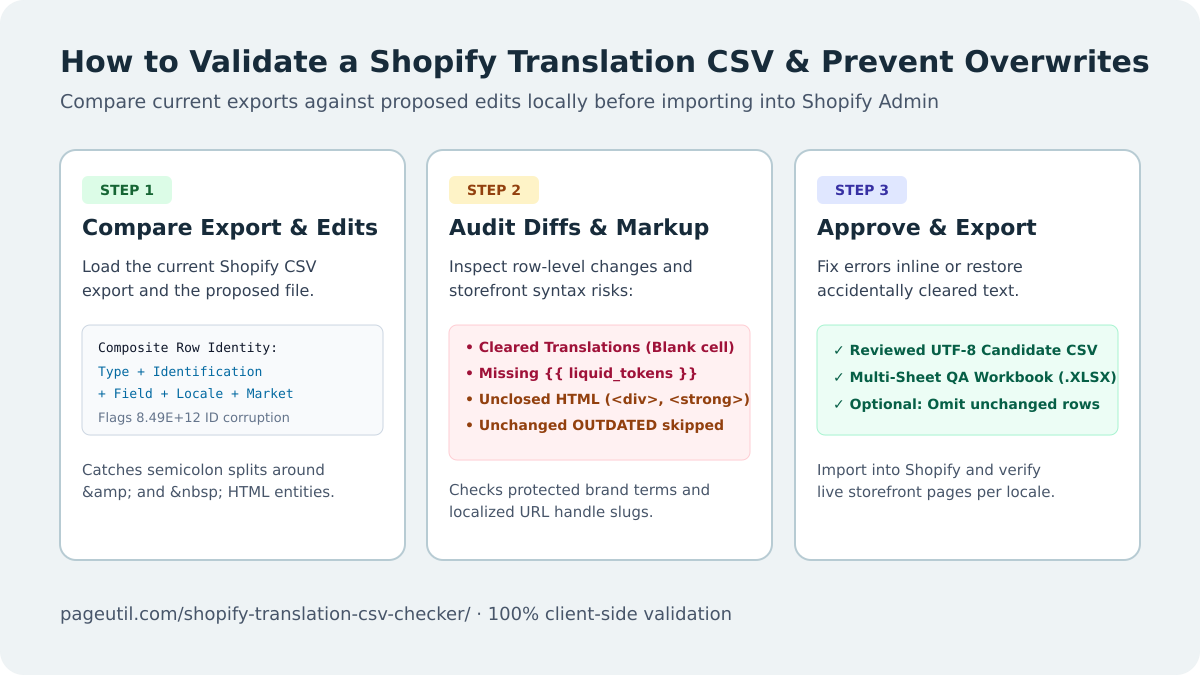
What to run
Export a fresh translation CSV from Shopify Admin (Settings → Languages → Export) so you have the current baseline state of your store.
Open Shopify Translation CSV Validator and load your current Shopify export into Step 1. If you have an edited spreadsheet from a localization agency or translator, load it into Step 2 to run a before-and-after comparison.
Optionally enter comma-separated brand names or product lines in Protected Brand & Glossary Terms so the checker flags rows where translators accidentally translated a protected trademark.
Download our synthetic practice files below to reproduce the exact edge cases covered in this guide without touching a live store.
- 01-current-shopify-translations-export.csv (Current Shopify baseline export)
- 02-proposed-translations-update.csv (Proposed update with placeholder, HTML, and clear errors)
- 03-semicolon-entity-split-and-scientific-id.csv (Semicolon HTML entity split & scientific notation ID)
- 04-clean-corrected-translations.csv (Corrected candidate file)
Type,Identification,Field,Locale,Market,Status,Default content,Translated content
PRODUCT,8492019384111,body_html,de,,TRANSLATED,"<p>Crafted from <strong>100% superfine wool</strong>. Ships in {{ shipping_days }} days.</p>","<p>Gefertigt aus <strong>100% extrafeiner Wolle</strong>. Versand in {{ shipping_days }} Tagen.</p>"
How to read the result
Every Shopify translation row is matched by its five-part composite identity: Type, Identification, Field, Locale, and Market. If a spreadsheet program converts a 13-digit Identification number into scientific notation (such as 8.49202E+12) or alters a field name, Shopify cannot match the record.
In comparison mode, inspect Cleared and Overwritten rows first. When a row exists in your import CSV with an empty Translated content cell where a translation previously existed, importing that row can remove the active storefront translation. Use the inline Approve Correction button to restore the baseline translation or omit unchanged rows.
Check for PLACEHOLDER_MISMATCH and HTML_STRUCTURE_MISMATCH findings. Missing Liquid tokens like {{ shipping_days }} or %{count}, unclosed HTML tags, or semicolon delimiter splits around HTML entities (&, ) break storefront layouts.
Review OUTDATED_SKIPPED_UNCHANGED warnings. Shopify skips any CSV row whose Translated content is identical to the currently stored translation, which means re-importing an unchanged translation will never clear an OUTDATED status flag.
| Finding Code | Storefront or Import Consequence | How to Resolve Before Import |
|---|---|---|
| TRANSLATION_CLEARED | Blank Translated content cell erases an active storefront translation | Restore the baseline translation or remove the cleared row if deletion was not intended |
| OUTDATED_SKIPPED_UNCHANGED | Shopify skips unchanged translations during CSV import and leaves Status as OUTDATED | Update the translated text in the CSV or review the outdated item in Shopify Translate & Adapt |
| PLACEHOLDER_MISMATCH | Missing {{ variable }} or %{count} token removes dynamic values or breaks theme strings | Copy the exact Liquid or interpolation token from Default content into Translated content |
| HTML_ENTITY_DELIMITER_SPLIT | Spreadsheet semicolon splitting breaks & or across extra columns | Re-export using comma (,) delimiters and RFC 4180 double quotes |
| SCIENTIFIC_NOTATION_ID | Excel truncates long resource IDs into 8.49E+12 so rows fail to match | Open and save IDs as text columns or export a QA Workbook (.XLSX) with text cells preserved |
What to open next
If your translation file was corrupted by legacy character encodings or unquoted delimiters in Excel, repair the structure first in CSV Fixer.
If you are also updating Shopify theme templates or checking whether a theme upgrade dropped section settings or custom CSS, compare your theme configuration files in Shopify Theme Settings Diff Checker.
If you manage international product feeds alongside storefront translations, validate localized feed attributes and GTINs in Google Shopping Feed Validator.
Stop when
Stop when Blocking Errors is zero, all Liquid placeholders and HTML tags match the default content structure, and every cleared or overwritten translation has been explicitly reviewed.
Remember that file validation checks CSV structure and text consistency; it cannot verify translation fluency, active Shopify Markets configuration, or live Liquid rendering on your storefront. Always spot-check representative product and collection pages after importing.
References
Use the linked specifications and product documentation to check behavior in your own environment.
Continue troubleshooting
- How to Detect and Recover Lost Shopify Theme Customisations After an Update
- How to Fix CSV Encoding, Columns and Leading Zeros in Excel
- How to Check Microsoft Advertising Bulk CSV Updates Before Import
- How to Fix GA4 Cost Data CSV Import and UTM Matching Errors
- How to Fix Google Workspace Bulk User CSV Upload Errors
- How to Avoid Accidental Grade Overwrites in Moodle Gradebook CSV Imports
- How to Merge Recurring Microsoft Teams Attendance Reports
- How to Fix Azure DevOps Test Case CSV and Test Step Import Errors
- How to Check and Combine Windows Autopilot CSV Exports
- How to Preview Cloudflare Pages Header Rules Before Deployment
- How to Review Pinterest Bulk Pin Boards and Publishing Schedules
- How to Check Jira CSV Parent References and Hierarchy
- How to Check ShipStation Product CSV Updates Before Import
- How to Understand eBay Bulk Upload Results and Retry Failed Records
- How to Fix Google My Maps CSV Import and Coordinate Errors
- How to Fix Microsoft Teams Shifts Excel Import Errors
- How to Fix Webflow CMS CSV Import Reference and Slug Errors
- How to Fix Canva Bulk Create CSV and Spreadsheet Errors
- How to Clean and Split Email CSV for Klaviyo and Mailchimp
- How to Format and Map a Google Contacts CSV Import
- How to Fix Cloudflare Bulk Redirect CSV Errors
- How to Check a Google Business Profile Bulk Update CSV
- How to Fix Google Ads Editor CSV Import Errors
- How to Explain a Stripe Payout That Does Not Match the Bank
- How to Fix a QuickBooks Bank CSV Import
- How to extract Word tables to Excel
- How to convert Excel formula commas and semicolons
Related tools
Frequently asked questions
Why does Shopify skip my OUTDATED rows when I re-import a translation CSV?
During CSV import, Shopify skips any row where the Translated content value is identical to the translation already stored on the resource. Because the row is skipped, its OUTDATED status is not refreshed.
Why did my HTML product descriptions break into extra columns in Excel?
HTML entities like & and end with a semicolon. If a spreadsheet editor is set to split columns on semicolons instead of commas, it splits the row in the middle of the HTML entity.
Does importing a manual CSV translation affect Shopify automatic translations?
Yes. Importing a translation via CSV saves it as a manual translation for that field and locale, which stops automatic translation from updating that field when the default language content changes later.
