What to run
In the Stripe Dashboard open Reporting, then Reports, then Payout reconciliation. Set the date range to the estimated arrival dates, not the dates the charges were created. Download the Itemized CSV from the Payout reconciliation section. Keep automatic payout id, currency, gross, fee, net and reporting category.
Open Stripe Payout Reconciliation and add that file. Optionally add the payout list, with one row per payout, its amount, currency and status. Optionally add a bank CSV with a date, a description and an amount. The check stays in the browser. A payments export, a balance summary and the summary download are rejected because they do not carry a payout id on every transaction.
Manual payouts and instant payouts are out of scope. Stripe does not attach a transaction batch to an instant payout, because you chose the amount. Do not expect this page to invent that batch.
automatic_payout_id,currency,gross,fee,net,reporting_category
po_example,usd,100.00,3.20,96.80,charge
How to read the result
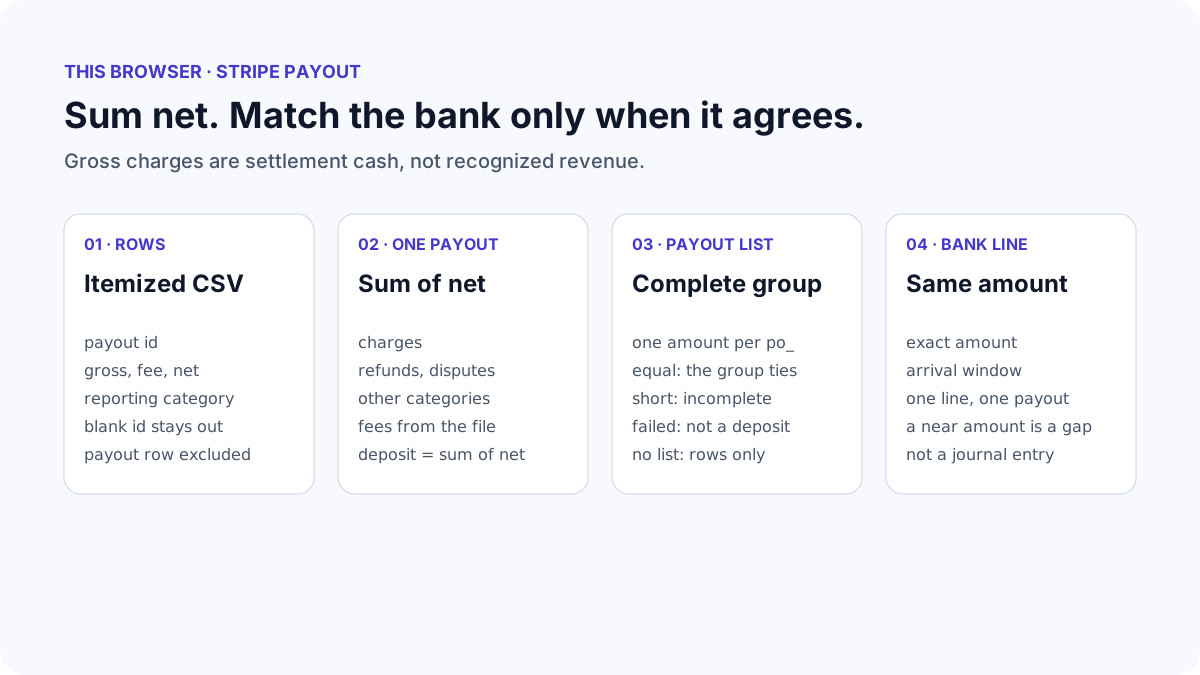
The expected deposit is the sum of net for one payout id and one settlement currency. The category table is the audit: every reporting category keeps its own gross, fee and net, including reserves, disputes, Connect transfers and names this page does not rename. The plain-language lines are gross charges, refunds, disputes, other activity and fees. They are shown only when they add back to that net.
Gross charges are cash settled in the payout. They are not recognized revenue, and a customer-facing amount in another currency is not converted or added. A refund or dispute in this payout may belong to a charge from an earlier payout. A row whose payout id is blank is unsettled and stays out of the deposit. A payout row is the transfer itself and is not added on top.
If the payout list amount and the sum of net differ, the group is incomplete. A download of only the charge category looks tidy and is short. No bank line is matched until those two amounts agree. A possible bank match is one line with the same amount, from one day before the estimated arrival through five days after. A near amount is a gap, not a match. A bank fee taken after Stripe sent the money is invisible to Stripe.
| What you see | What it means | What to do |
|---|---|---|
| Sum of net is less than the payout list | The itemized file is missing rows, often because one category was downloaded | Download the full Itemized CSV for the arrival dates |
| Refunds exceed this week's sales | The refund settled in this payout may belong to an earlier charge | Read the payout id, not the charge created date |
| The bank line is a few dollars short | The amount is not equal, so it is not matched | Ask the bank about a receiving fee. Do not force the Stripe total |
| Two payouts share an amount | The page will not choose a bank line | Use the trace id or the arrival date on the statement |
| The payout status is failed | That id is not a deposit | Look for the retry payout instead of adding this total again |
What to open next
If the CSV opens as one column or the text is garbled, open CSV Fixer on the original download. It detects the separator and the encoding. Bring the readable file back here. The fixer does not know which column is a Stripe payout.
A bank file that QuickBooks rejected can go to QuickBooks CSV Validator after you have read the payout. That page prepares a candidate import and does not post the Stripe charges, fees or deposit. Record the payout from the category nets you checked here, using your own accounting judgment.
Keep the original Stripe download. The summary CSV from this page is a view of those totals, not a substitute for the itemized report and not evidence the bank has cleared the funds.
Stop when
Stop when every paid payout you care about has a sum of net that equals the payout list, the category rows include the refunds, disputes and fees you expected, and any bank line you accept has the same amount. Unsettled rows remain on the Stripe balance until a later payout.
Do not clear the difference by calling gross revenue, by dropping an unfamiliar reporting category, or by matching a bank line that is merely close. Currency conversion, reserves and recognition of subscription revenue are not solved by this CSV. If the payout is manual or instant, use Stripe's balance transaction history and your own records instead of this grouping.
References
Use the linked specifications and product documentation to check behavior in your own environment.
Continue troubleshooting
- How to Fix GA4 Cost Data CSV Import and UTM Matching Errors
- How to Fix Google Workspace Bulk User CSV Upload Errors
- How to Avoid Accidental Grade Overwrites in Moodle Gradebook CSV Imports
- How to Merge Recurring Microsoft Teams Attendance Reports
- How to Fix Azure DevOps Test Case CSV and Test Step Import Errors
- How to Check and Combine Windows Autopilot CSV Exports
- How to Preview Cloudflare Pages Header Rules Before Deployment
- How to Review Pinterest Bulk Pin Boards and Publishing Schedules
- How to Check Jira CSV Parent References and Hierarchy
- How to Check ShipStation Product CSV Updates Before Import
- How to Understand eBay Bulk Upload Results and Retry Failed Records
- How to Fix Google My Maps CSV Import and Coordinate Errors
- How to Fix Microsoft Teams Shifts Excel Import Errors
- How to Fix Webflow CMS CSV Import Reference and Slug Errors
- How to Fix Canva Bulk Create CSV and Spreadsheet Errors
- How to Clean and Split Email CSV for Klaviyo and Mailchimp
- How to Format and Map a Google Contacts CSV Import
- How to Fix Cloudflare Bulk Redirect CSV Errors
- How to Check a Google Business Profile Bulk Update CSV
- How to Fix Google Ads Editor CSV Import Errors
- How to Fix a QuickBooks Bank CSV Import
- How to Fix CSV Encoding, Columns and Leading Zeros in Excel
- How to extract Word tables to Excel
- How to convert Excel formula commas and semicolons
Related tools
Frequently asked questions
Why does the payments export fail this check?
The payments export lists charges. It does not name the automatic payout that settled each balance transaction. The itemized payout reconciliation CSV has that payout id on every row.
Should I subtract fees from gross myself?
Use the net column. The page checks whether gross and fee agree with net, and the sign of the fee column is taken from the file. Withheld tax is already inside fee on Stripe's itemized report.
Does a possible match update my bookkeeping?
No. It means one bank line has the same amount near the estimated arrival, or one line contains the trace id. You still decide whether that line is the deposit.
What about a reserve or a Connect transfer?
Those reporting categories stay on their own rows and their net stays inside the expected deposit. They are not folded into processing fees or dropped to make the total look familiar.