Find and export the negative keywords that apply
Choose the campaign or ad group you want to audit before exporting. In Google Ads, open Keywords within Campaigns, then Negative keywords. Check the selected scope and table filters, use the download button above the table and choose CSV.
Check account-level negatives separately under Settings, Account settings, Negative keywords. For shared lists, open Tools, Exclusion lists, Negative keyword lists. Inspect the lists attached to the campaign and keep their names and campaign associations alongside the export.
Retain keyword text and match type. Keep campaign, ad group and shared-list information in your working copy so you can select the negatives that actually apply to each audit. Do not assume one filtered download includes every account or shared-list exclusion.
In PageUtil, use Audit scenarios & match settings and Positive & negative keyword lists. Upload the relevant CSV or TSV using Upload CSV. The importer recognises keyword and match-type columns; inspect the populated text boxes before running the check. For plain text, use one keyword per line, double quotes for phrase negatives and square brackets for exact negatives.
The checker compares the supplied lists; it does not fetch your Google Ads account or apply campaign associations from exported columns. Run separate audits where scopes differ. The downloaded audit and conflicts CSV files are review evidence, not ready-to-import campaign changes.
Keyword,Match type
free,Broad
free legal advice,Phrase
free lawyer,Exact
The silent revenue killer: What negative keyword conflicts are and why they occur
In Google Ads, pay-per-click (PPC) advertisers rely heavily on negative keywords to prevent their ads from showing on irrelevant, low-intent, or wasteful search queries. A negative keyword tells Google: if a user types a search that matches this term, do not enter my ad into the ad auction. When implemented effectively, negative keywords protect advertising budgets and raise return on ad spend (ROAS).
However, negative keywords introduce a dangerous failure mode known as a negative keyword conflict. A negative keyword conflict occurs when a negative keyword inadvertently matches and blocks one of your targeted positive keywords or profitable search queries. Because Google Ads does not send a real-time warning when an ad is suppressed by a negative keyword in campaign settings, conflicting keywords remain dormant for weeks or months, causing silent drops in conversions and lost revenue.
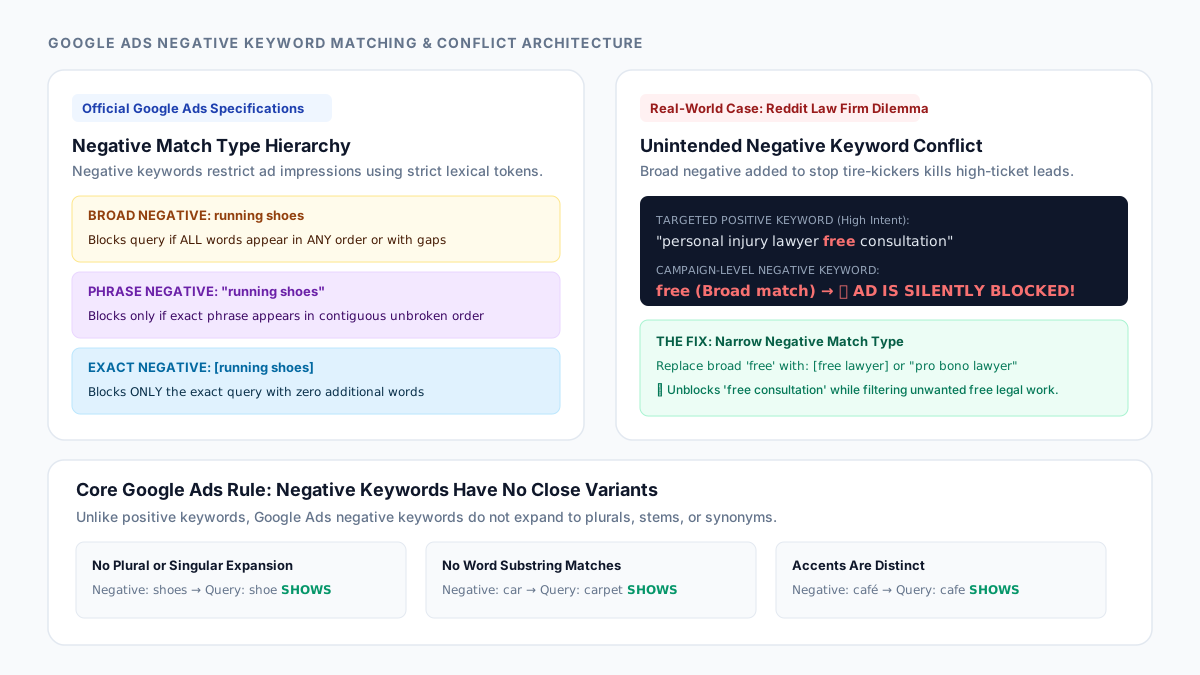
Consider two real-world PPC discussions that emerged in advertising communities in 2026. In July 2026, a legal marketing team launched a campaign offering "free consultation personal injury lawyer" and "free case review attorney." To their dismay, impression volume remained near zero. An audit revealed that a legacy account-wide negative keyword list contained the broad negative free, added years earlier to filter out pro bono inquiries. The broad negative free matched and blocked every single search query containing the word "free," completely shutting down the new campaign.
Similarly, in March 2026, e-commerce advertisers debated the inherent risks of broad match negatives on Reddit. An advertiser selling specialized running apparel added the broad negative running shoes to block shoe shoppers. Because broad match negatives match whenever all specified words appear in any order in the query, searches such as "nike running sneakers and shoes" and "trail running gear and shoes" were completely suppressed. Managing match types with precision is essential for avoiding catastrophic advertising blunders.
Google Ads negative match types: Broad, phrase, and exact mechanics
Unlike positive keywords—which undergo semantic matching, synonym expansion, and close-variant matching—Google Ads negative keywords follow strict, deterministic lexical matching rules. Understanding how Google evaluates negative match types is the foundation of preventing conflicts.
Negative Broad Match (Syntax: keyword): This is the default format when no quotes or brackets are specified. A negative broad match keyword blocks an ad if all terms in the negative keyword appear in the search query, regardless of the order of the words or whether other words are inserted between them. For example, negative broad running shoes blocks "blue running shoes," "shoes for running," and "running trail shoes." However, if even one word is missing (e.g. "running sneakers"), the ad will still show.
Negative Phrase Match (Syntax: "keyword"): Enclosed in double quotation marks, a negative phrase match keyword blocks an ad only if all terms appear in the search query in the exact same order with no words inserted between them. Words may appear before or after the phrase. For example, negative phrase "running shoes" blocks "cheap running shoes" and "running shoes sale," but will not block "shoes running" or "running trail shoes."
Negative Exact Match (Syntax: [keyword]): Enclosed in square brackets, a negative exact match keyword blocks an ad only if the search query matches the exact terms in the exact order, with no additional words before, after, or between. For example, negative exact [running shoes] blocks only the search "running shoes." It will not block "blue running shoes" or "running shoes on sale."
The Zero-Variant Rule: The single most important rule in Google Ads negative matching is that negative keywords do not match close variants, singular/plural forms, or misspellings. If you add negative [shoe], your ad can still serve on "shoes." If you add negative [cafe], your ad can still serve on "café." Negative matching evaluates literal character strings.
| Negative Match Type | Syntax | Google Matching Condition | Query: "red running shoes sale" | Query: "shoes for running" |
|---|---|---|---|---|
| Broad negative | running shoes | Blocks if all words present in any order | ❌ Blocked (both words present) | ❌ Blocked (order does not matter) |
| Phrase negative | "running shoes" | Blocks if words appear in exact order without gaps | ❌ Blocked (exact phrase present) | ✔ Ad Shows (words separated by "for") |
| Exact negative | [running shoes] | Blocks only if query has zero additional words | ✔ Ad Shows (contains extra words) | ✔ Ad Shows (contains extra words and wrong order) |
| Single-word broad | free | Blocks any query containing the word as a token | ✔ Ad Shows (word "free" absent) | ✔ Ad Shows (word "free" absent) |
| Leading minus | -"running shoes" | Stripped by Google Ads Editor; treated as phrase | ❌ Blocked (identical to phrase negative) | ✔ Ad Shows |
The PPC account hierarchy: Where negative keyword conflicts originate
In Google Ads, negative keywords can be applied across four distinct organizational tiers: account level, shared negative keyword lists, campaign level, and ad group level. A negative keyword placed at a higher tier cascades down to every lower tier, which frequently blinds campaign managers to existing restrictions.
Account-Level Negative Keywords: Added under Account Settings, these negatives apply across all Search, Shopping, and Performance Max campaigns in the account. While useful for blocking universal junk queries (such as "jobs," "login," "salary," or "wikipedia"), placing aggressive broad negatives at the account level is the leading cause of multi-campaign conflict disasters.
Shared Negative Keyword Lists: Managed in the Shared Library, negative keyword lists are applied to multiple campaigns simultaneously. When team members update a shared list to optimize Campaign A, they frequently forget that the same list is linked to Campaigns B, C, and D, inadvertently blocking positive keywords in unrelated product lines.
Campaign-Level vs Ad Group-Level Negatives: Campaign negatives govern all ad groups within that campaign. Ad group negatives, by contrast, are used for negative keyword sculpting—directing traffic to the most specific ad group by excluding overlapping terms. For example, in an ad group targeting general "running shoes," adding [women running shoes] as an exact negative directs female shoppers into the dedicated Women's Running Shoes ad group.
How to audit and resolve negative keyword conflicts with PageUtil
To diagnose and eliminate keyword conflicts across your PPC campaigns, open Negative Keyword Conflict Checker in your browser. The tool runs locally on your computer, meaning sensitive keyword lists, bid strategies, and client data never traverse the internet.
Step 1: Paste your positive target keywords or live search query report into the left box (up to 1,000 lines). You can paste raw text or click Upload CSV to import files directly exported from Google Ads or Google Ads Editor.
Step 2: Paste your negative keywords into the right box, retaining quotes for phrase negatives ("keyword") and brackets for exact negatives ([keyword]). Leading minus signs (-keyword) are automatically recognized and normalized.
Step 3: Click Check negative keyword conflicts. The tool instantly evaluates all cross-combinations against Google's official matching rules, reporting the total number of blocked keywords, the percentage of your target list affected, and the exact negative keyword responsible for each conflict.
Step 4: Resolve conflicts by match type sculpting. Rather than deleting a negative keyword entirely, narrow its match type. If broad negative free is blocking your profitable consultation query, change it to exact negative [free lawyer] or phrase negative "pro bono lawyer". This keeps tire-kickers filtered while restoring ad impressions for high-ticket consultations.
Step 5: Export the audit report. Click Download CSV report for the audit spreadsheet or Export conflicts CSV for the conflicting rows. Review the original campaign and negative-keyword scope before making changes in Google Ads; these reports are not Google Ads Editor import templates.
// Example: Resolving the Law Firm "Free" Negative Conflict

// BEFORE (Broad negative blocks all target queries containing "free"):
Negative: free
Positive Target: "personal injury lawyer free consultation"  -->  BLOCKED (0 impressions)
Positive Target: [free case evaluation car accident]        -->  BLOCKED (0 impressions)

// FIX (Sculpt negative into phrase and exact variations):
Remove: free (Broad)
Add:    [free lawyer]
Add:    "free legal advice"
Add:    "work for free"

// RESULT (Targeted queries are unblocked while non-commercial queries remain filtered):
Positive Target: "personal injury lawyer free consultation"  -->  ACTIVE (Ads Serve!)
Unwanted Search: "free legal advice online chat"             -->  BLOCKED
Common negative keyword traps: Plurals, 16-word limits, and list hygiene
When maintaining negative keyword lists in enterprise Google Ads accounts, keep these platform nuances in mind to maintain list integrity.
Singular vs Plural Mismatches: Because negative keywords do not match close variants, adding the negative broad shoes will block queries containing "shoes," but will allow queries containing "shoe." To fully exclude a product line, you must explicitly add both singular and plural forms to your negative list: shoe and shoes.
The 16-Word Limit: In Google Ads, search queries longer than 16 words are truncated during negative keyword evaluation. Any negative keyword term that appears after the 16th word of a search query will not trigger negative blocking. Keep your negative keywords concise (1 to 4 words).
Accented Diacritics and Ampersands: Google Ads treats accented characters distinctly. If your business is in international markets, remember that negative café will not block queries for "cafe." Similarly, Google treats the ampersand character (&) as distinct from the spelled-out word "and." A negative for "bed & breakfast" will not block searches for "bed and breakfast."
Cleaning List Duplicates: Over years of campaign management, negative keyword lists accumulate duplicate terms, redundant match types, and conflicting entries. Use Remove Duplicate Lines to clean bulk keyword exports before auditing for conflicts.
References
Use the linked specifications and product documentation to check behavior in your own environment.
Continue troubleshooting
Related tools
Frequently asked questions
Where can I find and export my negative keyword list in Google Ads?
Open Keywords, then Negative keywords for the relevant campaign or ad group and download the table. Also check account-level negatives and the shared lists attached to the campaign. Preserve match types and scope information, then upload only the applicable keywords to the checker.
What causes a negative keyword conflict in Google Ads?
A negative keyword conflict occurs when a negative keyword matches a positive keyword you are actively targeting. This happens most frequently when account-level or shared negative keyword lists contain broad match terms like 'free', 'cheap', or a product category that unintentionally overlaps with newer, high-intent campaign keywords.
How does broad match negative differ from regular positive broad match?
Positive broad match keywords expand aggressively to synonyms, misspellings, related searches, and user intent. In contrast, negative broad match keywords never expand to synonyms or misspellings; they only block searches that contain all the exact negative keyword words in any order.
Will exact match negative [running shoes] block searches for 'blue running shoes'?
No. Negative exact match only blocks queries that match the exact specified terms with no additional words before, between, or after. A search for 'blue running shoes' includes the extra word 'blue', so an exact negative [running shoes] will not block it.
Can I check negative keyword conflicts across multiple campaigns at once?
Only combine campaigns when the supplied negative list applies to every positive keyword being tested. The checker compares all supplied combinations and does not automatically apply campaign or ad-group associations from a CSV. Run separate scoped checks when different campaigns use different exclusions.