When should you choose PageUtil or Screaming Frog?
Screaming Frog documents using its crawler through a migration, including URL inventories and verification. PageUtil begins with supplied sitemaps or URL lists, which is useful for protected staging exports and a bounded inventory review. The source quality matters in both workflows. Missing child sitemaps can make a whole section appear to have disappeared.
| Requirement | PageUtil | Screaming Frog |
|---|---|---|
| Starting point | Supplied sitemap files, URLs or URL lists | Crawl and migration inventories |
| Primary question | Which declared URLs changed? | What does crawling reveal about the migration? |
| Completion | Review mappings and verify deployed URLs | Review crawl findings and verify intended behavior |
Is PageUtil free, and what else do you need?
PageUtil Sitemap Comparison is free to use without creating a PageUtil account. This covers the tool’s supported workflow and outputs; its technical limits still apply.
For Screaming Frog, check the licence and crawl limits for the size of the migration. A comparison of supplied sitemaps and an active site crawl have different input and resource requirements.
Compare the complete task, including preparation, review and destination access. Consult the linked provider documentation for current terms; no unverified competitor price is assumed here.
About PageUtil and its free tools
A worked example to test the choice
Production lists /help/install and /help/billing, while a staging sitemap lists only /help/install. Treat /help/billing as missing from the new inventory. Check whether the page exists on staging and whether its sitemap inclusion changed before deciding to create a redirect. If the hosts differ, explicitly map the before and after origins while preserving path details.
Before paths:        After paths:
/help/install        /help/install
/help/billing

Missing from after inventory: /help/billing
Next check: page existence and intended sitemap inclusion.
How do you run the PageUtil workflow?
Open Sitemap Comparison.
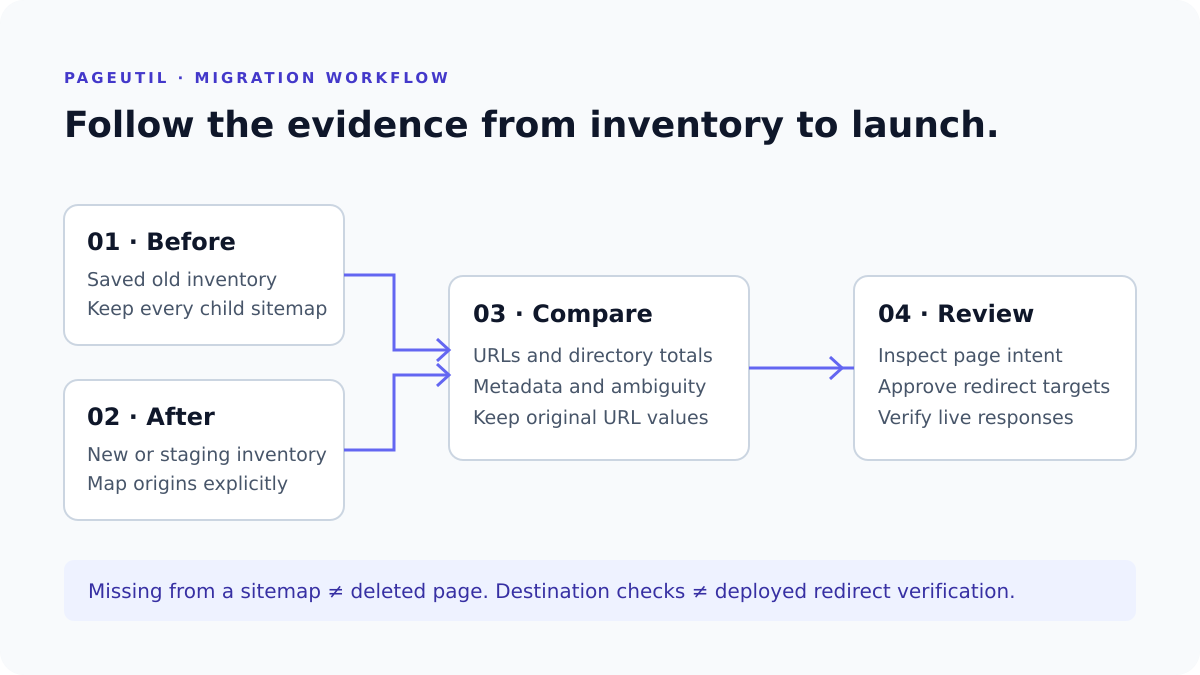
Collect the old inventory before removing the original CMS. Provide both sitemap sets or pasted URL lists to Sitemap Comparison. Resolve incomplete indexes and fetch failures first. Review directory counts, then individual added and removed URLs. Keep query strings, case and trailing slashes exact unless the migration deliberately changes them.
For the detailed procedure and interpretation, read How to Compare Sitemaps Before a Website Migration.
What are the practical limits?
A sitemap omission cannot establish deletion, a 404 or deindexing. A listed URL may redirect or fail when requested. Matching paths on staging and production also does not prove the pages contain equivalent content. A complete migration review needs intended destination mappings and deployed response evidence.
What should you verify before using the result?
Create a reviewed redirect map for genuinely moved content. After release, check old URLs, final destinations, canonical tags and representative internal links. Keep the baseline so later sitemap changes can be compared with the original migration scope.
Sources and comparison scope
Prepared on 18 November 2026 using the current PageUtil workflow and the linked official documentation, checked on 17–18 November 2026. The example is illustrative. Competitor descriptions are based on published documentation; this article does not report a comparative performance benchmark.
Continue troubleshooting
- How to Compare Sitemaps Before a Website Migration
- PageUtil vs Screaming Frog for Redirect Checks
- PageUtil vs Search Console for Indexing Report Comparisons
- PageUtil vs IndexNow Integrations for URL Submission
- PageUtil vs Manual Editing for Robots TXT Rules
- PageUtil vs Manual Apache Redirect Rules
- PageUtil vs Cloudflare Bulk Redirect CSV Import
- PageUtil vs Vercel Redirect Configuration Checks
- PageUtil vs Cloudflare Pages Header Configuration
- PageUtil vs Webflow CMS for CSV Migration Checks
Related tools
Frequently asked questions
Does a removed sitemap URL mean the page was deleted?
No. It means that URL is absent from the supplied later inventory. Check the page response and sitemap-generation rules.
Can I compare protected staging sitemaps?
Export the sitemap files and load them locally. Include the referenced child inventories when the source is an index.
Should I ignore trailing slashes during comparison?
Only if the migration deliberately treats them as equivalent. Otherwise retain exact URL distinctions and verify the intended canonical behavior.
Can sitemap comparison replace a full crawl?
It answers inventory questions from the supplied sources. A crawl adds response, content and link evidence that a sitemap alone cannot provide.
Is the PageUtil tool free to use?
Yes. PageUtil Sitemap Comparison is free to use without a PageUtil account. For Screaming Frog, check the licence and crawl limits for the size of the migration. A comparison of supplied sitemaps and an active site crawl have different input and resource requirements.