When should you choose PageUtil or Vercel redirects?
Vercel documents redirect configuration and several routing paths. A bulk CSV and a vercel.json rule set have different representation details. Identify the exact route through which you will deploy the rules before converting a two-column migration spreadsheet.
| Requirement | PageUtil | Vercel redirects |
|---|---|---|
| Preparation | Local CSV/JSON and route review | Project-specific redirect configuration |
| Conditions | Inspect the supported simulation scope | Apply actual routing and conditions |
| Completion | Retain expected outcomes | Verify deployed responses |
Is PageUtil free, and what else do you need?
PageUtil Vercel Redirects CSV Validator is free to use without creating a PageUtil account. This covers the tool’s supported workflow and outputs; its technical limits still apply.
Vercel project access and the relevant deployment configuration remain separate. Compare the supported redirect mechanism and current limits before preparing a large redirect inventory.
Compare the complete task, including preparation, review and destination access. Consult the linked provider documentation for current terms; no unverified competitor price is assumed here.
About PageUtil and its free tools
A worked example to test the choice
A source value is /search?q=shoes, but the configured rule mechanism matches the pathname separately from query conditions. Treat the path and query requirement explicitly using the destination’s supported configuration. A local text match on the whole URL would answer the wrong routing question.
How do you run the PageUtil workflow?
Open Vercel Redirects CSV Validator.
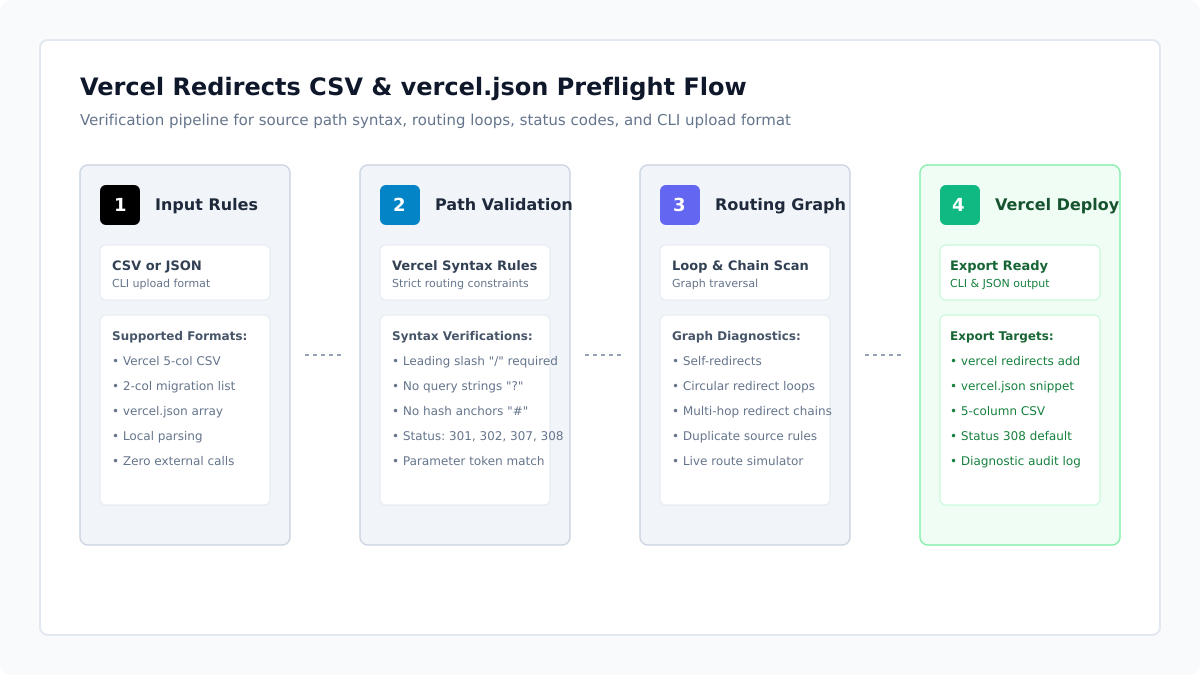
Load the supported CSV or JSON representation and review the interpreted rules. Resolve missing leading slashes, invalid settings and circular mappings. Test representative paths in the route simulator, then deploy through the intended Vercel configuration path and inspect real requests.
For the detailed procedure and interpretation, read How to Validate Vercel Redirects CSV and JSON Before Upload.
What are the practical limits?
A static simulation cannot reproduce every framework route, middleware condition or environment setting. A permanent redirect may preserve request methods differently from another status, so select and test the status required by the application.
What should you verify before using the result?
Check the old URL, final destination, query behavior and a nearby unmatched route. Keep the approved mapping and deployment version so later routing changes can be compared with the intended migration.
Sources and comparison scope
Prepared on 18 November 2026 using the current PageUtil workflow and the linked official documentation, checked on 17–18 November 2026. The example is illustrative. Competitor descriptions are based on published documentation; this article does not report a comparative performance benchmark.
Continue troubleshooting
- How to Validate Vercel Redirects CSV and JSON Before Upload
- Screaming Frog Alternative for Comparing Sitemaps
- PageUtil vs Screaming Frog for Redirect Checks
- PageUtil vs Search Console for Indexing Report Comparisons
- PageUtil vs IndexNow Integrations for URL Submission
- PageUtil vs Manual Editing for Robots TXT Rules
- PageUtil vs Manual Apache Redirect Rules
- PageUtil vs Cloudflare Bulk Redirect CSV Import
- PageUtil vs Cloudflare Pages Header Configuration
- PageUtil vs Webflow CMS for CSV Migration Checks
Related tools
Frequently asked questions
Can a query string be treated as part of every source path?
No. Use the matching mechanism documented for the chosen Vercel configuration and represent query conditions explicitly where required.
Does the local simulator reproduce middleware?
It models its supported rule subset. Verify middleware and framework interactions in the actual deployment.
Should I test the redirect destination too?
Yes. Confirm that it returns the intended content and does not redirect back through the source rule.
Can I upload any two-column spreadsheet directly?
Check the destination format and review any conversion into its required fields before deployment.
Is the PageUtil tool free to use?
Yes. PageUtil Vercel Redirects CSV Validator is free to use without a PageUtil account. Vercel project access and the relevant deployment configuration remain separate. Compare the supported redirect mechanism and current limits before preparing a large redirect inventory.