When should you choose PageUtil or Cloudflare Bulk Redirects?
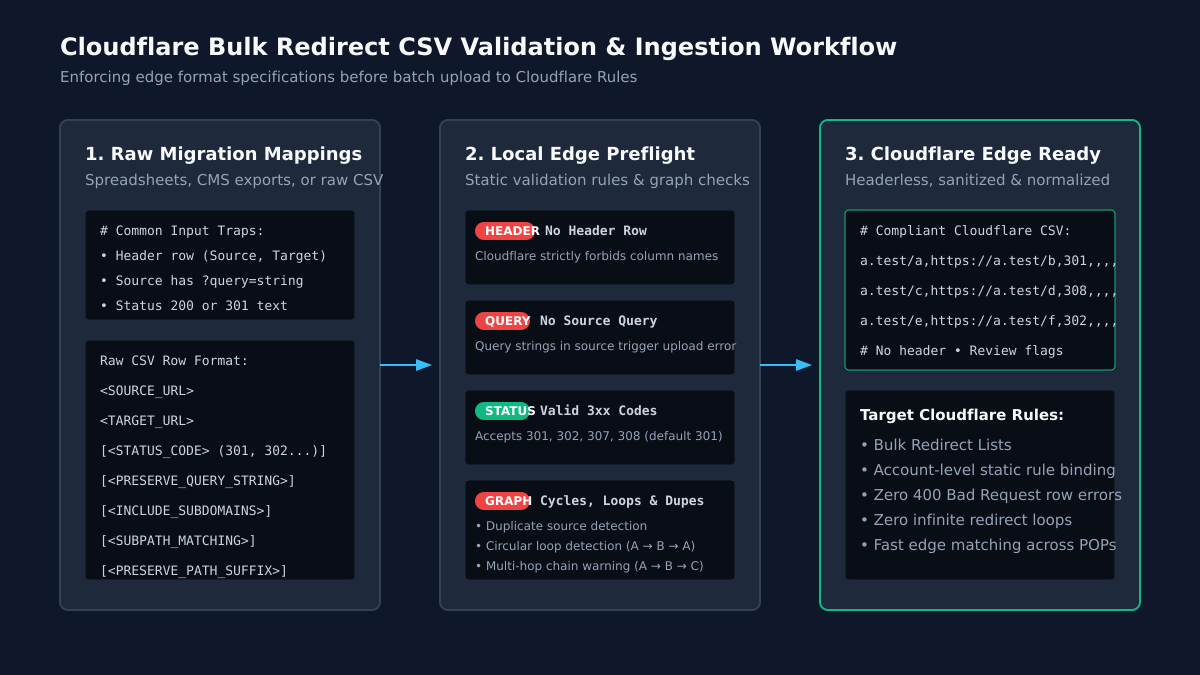
Cloudflare documents a specific positional CSV format and redirect parameters. A spreadsheet with friendly column headings may need preparation before import. Review query preservation, subpath behavior and status choices as intentional settings rather than accepting defaults without checking the migration requirements.
| Requirement | PageUtil | Cloudflare Bulk Redirects |
|---|---|---|
| File review | Local mapping and conflict inspection | Validate documented CSV import format |
| Activation | Prepare the reviewed candidate | Configure the list and redirect rule |
| Verification | Compare expected and observed URLs | Inspect deployed edge behavior |
Is PageUtil free, and what else do you need?
PageUtil Cloudflare Bulk Redirect CSV Validator is free to use without creating a PageUtil account. This covers the tool’s supported workflow and outputs; its technical limits still apply.
Cloudflare account access, current list limits and the enabled redirect rules remain separate. Check those limits against the full migration inventory before splitting or uploading candidate files.
Compare the complete task, including preparation, review and destination access. Consult the linked provider documentation for current terms; no unverified competitor price is assumed here.
About PageUtil and its free tools
A worked example to test the choice
One mapping sends example.com/a to example.com/b and a second sends /b back to /a on the same host. Each row can look reasonable in isolation, but together they describe a loop. Review the complete mapping set and any existing rules before importing.
How do you run the PageUtil workflow?
Open Cloudflare Bulk Redirect CSV Validator.
Load the proposed file, inspect column interpretation and review format findings. Resolve duplicate or conflicting sources and check graph-level loops. Inspect any proposed normalization or cleaned output against the original mapping. Import the reviewed file into Cloudflare and verify the associated rule is configured as intended.
For the detailed procedure and interpretation, read How to Fix Cloudflare Bulk Redirect CSV Errors.
What are the practical limits?
The local file cannot reveal every existing list, rule or application redirect in the account. Source-query handling and query preservation must follow Cloudflare’s documented contract. A successful CSV import is only one part of deploying redirects.
What should you verify before using the result?
Request representative old URLs after activation and compare their status and final destination with the approved map. Include a query-string case and an unaffected path. Reconcile the imported row count with the reviewed file.
Sources and comparison scope
Prepared on 18 November 2026 using the current PageUtil workflow and the linked official documentation, checked on 17–18 November 2026. The example is illustrative. Competitor descriptions are based on published documentation; this article does not report a comparative performance benchmark.
Continue troubleshooting
- How to Fix Cloudflare Bulk Redirect CSV Errors
- Screaming Frog Alternative for Comparing Sitemaps
- PageUtil vs Screaming Frog for Redirect Checks
- PageUtil vs Search Console for Indexing Report Comparisons
- PageUtil vs IndexNow Integrations for URL Submission
- PageUtil vs Manual Editing for Robots TXT Rules
- PageUtil vs Manual Apache Redirect Rules
- PageUtil vs Vercel Redirect Configuration Checks
- PageUtil vs Cloudflare Pages Header Configuration
- PageUtil vs Webflow CMS for CSV Migration Checks
Related tools
Frequently asked questions
Can I include a header row in the import file?
Use Cloudflare’s current documented CSV format. Review the exported candidate so friendly source headings do not become redirect entries.
Does a successful import activate every redirect?
The list must be used by the intended redirect rule and account configuration. Verify the deployed behavior.
Can two valid rows create a loop?
Yes. A destination can lead back to an earlier source through another row or an existing rule.
Should query preservation be a default decision?
Choose it from the migration requirements and test a representative URL with meaningful query parameters.
Is the PageUtil tool free to use?
Yes. PageUtil Cloudflare Bulk Redirect CSV Validator is free to use without a PageUtil account. Cloudflare account access, current list limits and the enabled redirect rules remain separate. Check those limits against the full migration inventory before splitting or uploading candidate files.