When should you choose PageUtil or Screaming Frog?
Screaming Frog documents redirect checking within its SEO Spider workflow. PageUtil provides a direct URL investigation. The relevant evidence is the response at each hop and the final destination, rather than merely finding a redirect status somewhere in the chain.
| Requirement | PageUtil | Screaming Frog |
|---|---|---|
| Starting point | One supplied URL investigation | Redirect checks within a crawl or list workflow |
| Evidence | Observed hops and final response | Crawl and redirect reports |
| Browser-specific behavior | Verify separately in the intended browser state | Verify with the required rendering and context |
Is PageUtil free, and what else do you need?
PageUtil Redirect Checker is free to use without creating a PageUtil account. This covers the tool’s supported workflow and outputs; its technical limits still apply.
For Screaming Frog, assess crawl scale and licence requirements. A focused URL trace is suitable for one reported chain; inventory-wide checking adds a different scope of work.
Compare the complete task, including preparation, review and destination access. Consult the linked provider documentation for current terms; no unverified competitor price is assumed here.
About PageUtil and its free tools
A worked example to test the choice
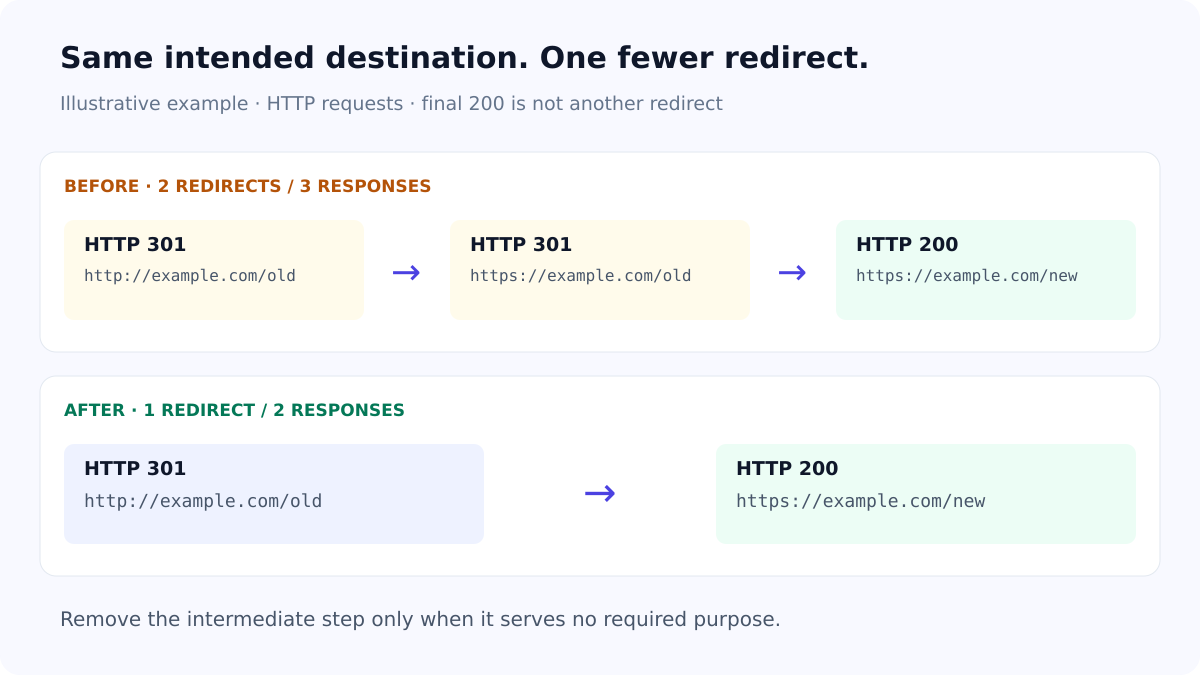
An old product URL redirects to an intermediate category and then to the new product. The final page may be correct while the extra hop remains unnecessary. Compare the intended mapping with the observed sequence, and check that the same rule does not accidentally redirect the destination back to the source.
How do you run the PageUtil workflow?
Open Redirect Checker.
Enter the old public URL and run the check. Read each status and Location destination in order. Compare the final address with the intended canonical URL. Test representative query strings, trailing slashes and HTTP/HTTPS variants. After changing a rule, repeat the same input and retain both observations.
For the detailed procedure and interpretation, read How to check and fix a redirect chain.
What are the practical limits?
The checking service’s network vantage can differ from a visitor’s browser. Script-based navigation, cookie rules, geolocation and login state may change the observed path. A static script hint cannot establish what a rendered browser will execute.
What should you verify before using the result?
Verify the final content and important browser navigation in addition to the HTTP chain. For a migration, check the full approved URL inventory using a workflow suited to its scale and keep failed cases visible until resolved.
Sources and comparison scope
Prepared on 18 November 2026 using the current PageUtil workflow and the linked official documentation, checked on 17–18 November 2026. The example is illustrative. Competitor descriptions are based on published documentation; this article does not report a comparative performance benchmark.
Continue troubleshooting
- How to check and fix a redirect chain
- Screaming Frog Alternative for Comparing Sitemaps
- PageUtil vs Search Console for Indexing Report Comparisons
- PageUtil vs IndexNow Integrations for URL Submission
- PageUtil vs Manual Editing for Robots TXT Rules
- PageUtil vs Manual Apache Redirect Rules
- PageUtil vs Cloudflare Bulk Redirect CSV Import
- PageUtil vs Vercel Redirect Configuration Checks
- PageUtil vs Cloudflare Pages Header Configuration
- PageUtil vs Webflow CMS for CSV Migration Checks
Related tools
Frequently asked questions
Is a 301 enough to prove a redirect is correct?
Check the destination, the remaining hops and final content. A permanent status can still send visitors to the wrong page.
Why does my browser show a different destination?
Cookies, scripts, authentication, geolocation or caching can change navigation. Reproduce the intended browser state.
Can a redirect loop involve several URLs?
Yes. Follow the complete sequence and look for a return to an earlier URL or repeated canonicalization rules.
Should I remove every extra hop?
Review the intended routing and ownership first. Where possible, make the approved old URL reach its intended final destination directly.
Is the PageUtil tool free to use?
Yes. PageUtil Redirect Checker is free to use without a PageUtil account. For Screaming Frog, assess crawl scale and licence requirements. A focused URL trace is suitable for one reported chain; inventory-wide checking adds a different scope of work.