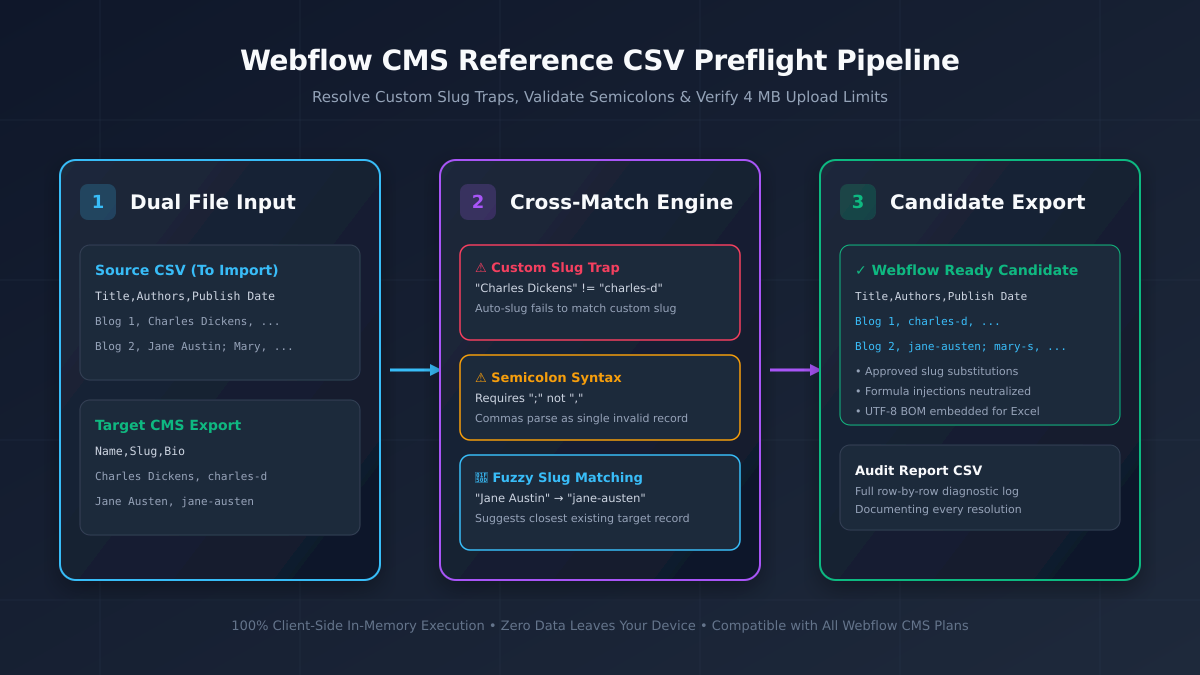
When should you choose PageUtil or Webflow CMS import?
Webflow documents CSV import and reference-field mapping. A display name and a custom slug can differ, and a multi-reference field has different representation rules from a single reference. Obtain authoritative exports for both sides before approving suggested replacements.
| Requirement | PageUtil | Webflow CMS import |
|---|---|---|
| Local evidence | Source and target collection exports | Actual collection fields and items |
| Reference review | Explicit type and approved matches | Import mapping and processing |
| Completion | Recheck candidate references | Inspect relationships and publication state |
Is PageUtil free, and what else do you need?
PageUtil Webflow CMS CSV Validator is free to use without creating a PageUtil account. This covers the tool’s supported workflow and outputs; its technical limits still apply.
Webflow workspace access, CMS plan limits and collection configuration remain separate. Compare the migration size and reference structure with the destination’s current capabilities.
Compare the complete task, including preparation, review and destination access. Consult the linked provider documentation for current terms; no unverified competitor price is assumed here.
About PageUtil and its free tools
A worked example to test the choice
An article references an author by a name that differs slightly from the target collection. A spelling suggestion can identify a candidate, but it cannot establish the correct person. Verify the target slug and author identity before accepting the replacement.
How do you run the PageUtil workflow?
Open Webflow CMS CSV Validator.
Load the source collection CSV and the referenced collection export with explicit name and slug fields. Select the actual reference column and its single or multi-reference type. Review unmatched values and approve only authoritative replacements. Recheck the candidate, then map fields in Webflow and inspect the import result.
For the detailed procedure and interpretation, read How to Fix Webflow CMS CSV Import Reference and Slug Errors.
What are the practical limits?
The checker focuses on references and basic structure rather than every Webflow field type. A target export can be stale, and importing an item does not establish that it is published. A missing authoritative match requires a content-owner decision.
What should you verify before using the result?
Inspect the resulting collection relationships and the intended publishing state. Check a sample with several references and one with a custom slug, then reconcile item counts and failures.
Sources and comparison scope
Prepared on 18 November 2026 using the current PageUtil workflow and the linked official documentation, checked on 17–18 November 2026. The example is illustrative. Competitor descriptions are based on published documentation; this article does not report a comparative performance benchmark.
Continue troubleshooting
- How to Fix Webflow CMS CSV Import Reference and Slug Errors
- Screaming Frog Alternative for Comparing Sitemaps
- PageUtil vs Screaming Frog for Redirect Checks
- PageUtil vs Search Console for Indexing Report Comparisons
- PageUtil vs IndexNow Integrations for URL Submission
- PageUtil vs Manual Editing for Robots TXT Rules
- PageUtil vs Manual Apache Redirect Rules
- PageUtil vs Cloudflare Bulk Redirect CSV Import
- PageUtil vs Vercel Redirect Configuration Checks
- PageUtil vs Cloudflare Pages Header Configuration
Related tools
Frequently asked questions
Can a similar author name be accepted automatically?
Verify the actual target person and slug. Similar spelling alone cannot establish identity.
Does a comma in a name create multiple references?
Use the destination’s multi-reference format deliberately. Punctuation inside a single name is still part of that value.
Does successful import mean the content is published?
Check the item’s actual publishing state in Webflow. Import and publication are separate workflow steps.
Can the checker look up missing live items?
It works from supplied exports. Refresh the target data or obtain the intended reference from the content owner.
Is the PageUtil tool free to use?
Yes. PageUtil Webflow CMS CSV Validator is free to use without a PageUtil account. Webflow workspace access, CMS plan limits and collection configuration remain separate. Compare the migration size and reference structure with the destination’s current capabilities.