When should you choose PageUtil or Google Search Console?
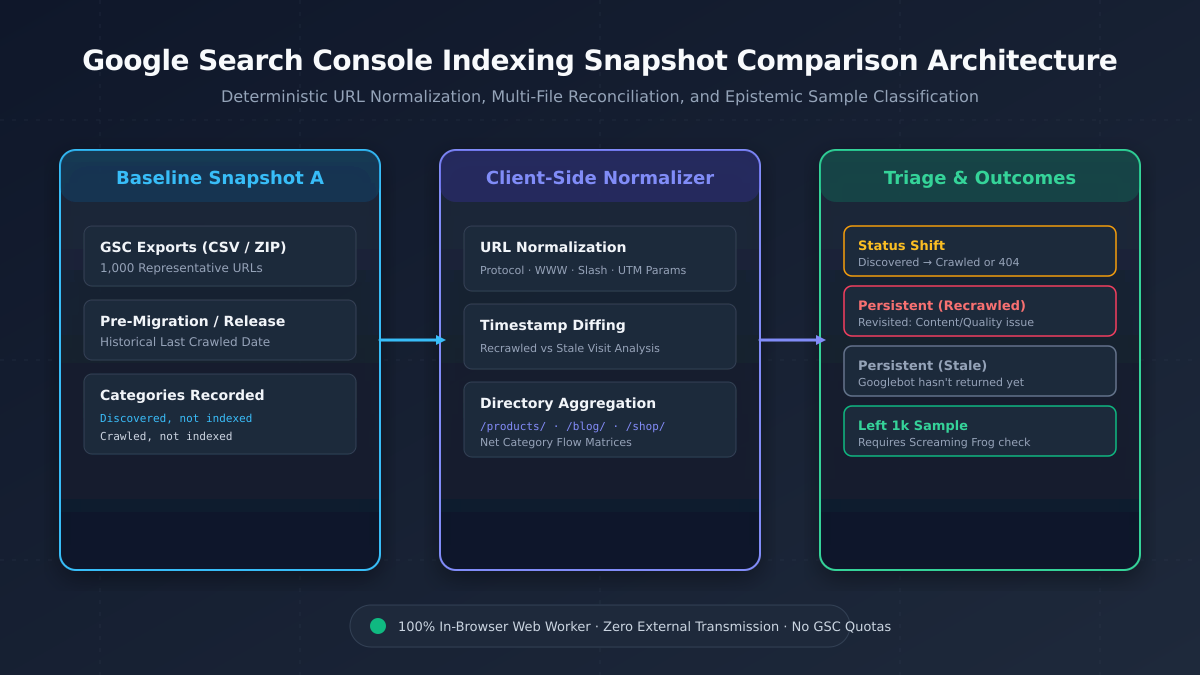
Search Console describes which pages Google can find and index and reports reasons for exclusion. Its example URL lists do not necessarily contain every affected URL. PageUtil’s comparison helps organize the evidence you saved, making the export date and selected issue important context.
| Requirement | PageUtil | Google Search Console |
|---|---|---|
| Historical comparison | Compare saved exports | Inspect available report history |
| Current Google evidence | Use the source platform | Page indexing and URL Inspection |
| Interpretation | Account for sample and scope changes | Read the report’s stated limits |
Is PageUtil free, and what else do you need?
PageUtil Google Search Console Indexing Comparison is free to use without creating a PageUtil account. This covers the tool’s supported workflow and outputs; its technical limits still apply.
Search Console property access remains necessary to obtain reports and use URL Inspection. A local snapshot comparison does not provide a replacement crawl or a complete history of every URL.
Compare the complete task, including preparation, review and destination access. Consult the linked provider documentation for current terms; no unverified competitor price is assumed here.
About PageUtil and its free tools
A worked example to test the choice
A URL appears in an earlier Crawled, currently not indexed export and disappears from the next export. It may have changed state, fallen outside the exported sample or moved to another issue. Check URL Inspection and the relevant current report before labeling it indexed.
How do you run the PageUtil workflow?
Open Google Search Console Indexing Comparison.
Export the same property, issue and comparable scope for each date. Load the baseline and comparison into PageUtil and review added, removed and changed rows. Keep the source dates with the results. Inspect representative changed URLs in Search Console and compare their actual page and canonical behavior.
For the detailed procedure and interpretation, read How to Troubleshoot GSC Indexing Status Changes.
What are the practical limits?
Disappearance from a sampled export cannot prove indexing. Google’s report dates and live page state can differ, and an indexing request does not guarantee inclusion. Current site responses provide complementary evidence.
What should you verify before using the result?
Keep a dated record of confirmed URL-level findings and the source export. Use that evidence to judge a specific change, such as fixing a canonical or blocked route, rather than assigning improvement from row counts alone.
Sources and comparison scope
Prepared on 18 November 2026 using the current PageUtil workflow and the linked official documentation, checked on 17–18 November 2026. The example is illustrative. Competitor descriptions are based on published documentation; this article does not report a comparative performance benchmark.
Continue troubleshooting
- How to Troubleshoot GSC Indexing Status Changes
- Screaming Frog Alternative for Comparing Sitemaps
- PageUtil vs Screaming Frog for Redirect Checks
- PageUtil vs IndexNow Integrations for URL Submission
- PageUtil vs Manual Editing for Robots TXT Rules
- PageUtil vs Manual Apache Redirect Rules
- PageUtil vs Cloudflare Bulk Redirect CSV Import
- PageUtil vs Vercel Redirect Configuration Checks
- PageUtil vs Cloudflare Pages Header Configuration
- PageUtil vs Webflow CMS for CSV Migration Checks
Related tools
Frequently asked questions
Does a missing export row mean the URL was indexed?
No. Sampling, scope or another status can explain the disappearance. Check current URL-level evidence.
Should I compare different issue exports?
Preserve the issue and scope explicitly. Different populations cannot support a simple before-and-after rate claim.
Does requesting indexing guarantee inclusion?
No. It requests consideration within Google’s processes. Verify the resulting status and page behavior.
What should I save for later comparison?
Keep the original export, property, issue, date and relevant filters so the next review can reproduce its scope.
Is the PageUtil tool free to use?
Yes. PageUtil Google Search Console Indexing Comparison is free to use without a PageUtil account. Search Console property access remains necessary to obtain reports and use URL Inspection. A local snapshot comparison does not provide a replacement crawl or a complete history of every URL.