When should you choose PageUtil or Power Platform CLI?
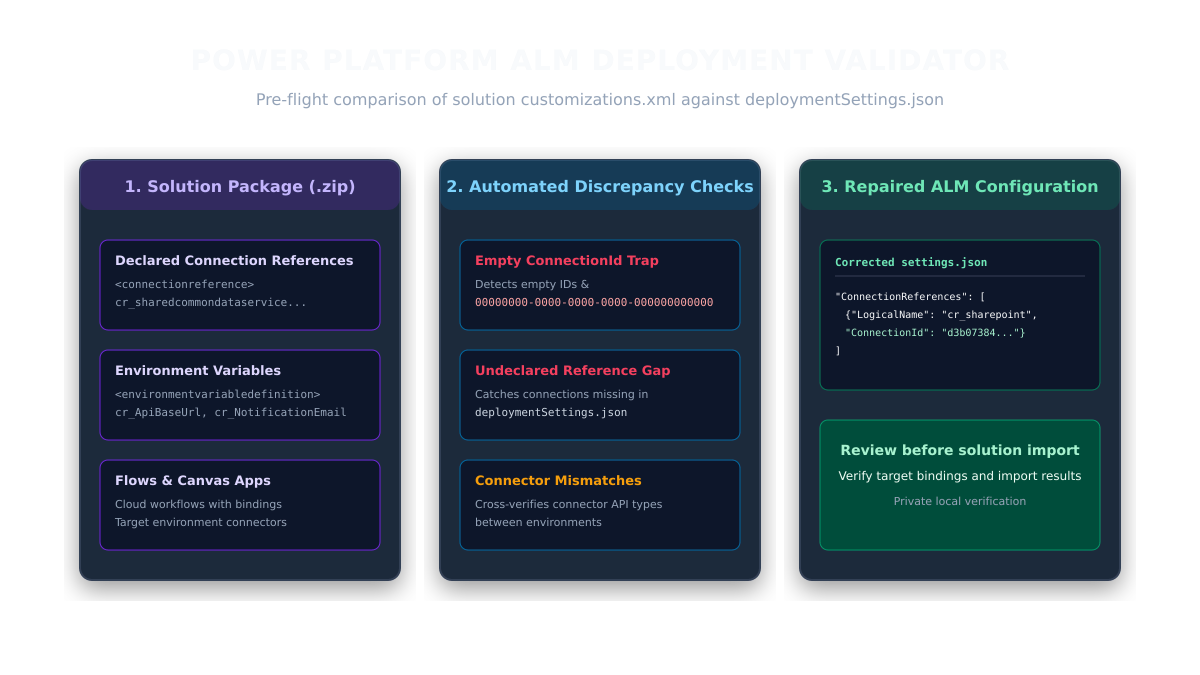
Microsoft documents pre-populating connection references and environment variables for automated deployments. A settings file can be valid JSON while referring to the wrong connector or leaving a target connection unresolved. Compare the exact solution version with its intended environment settings.
| Requirement | PageUtil | Power Platform CLI |
|---|---|---|
| Preparation | Cross-check supplied package and settings | Generate deployment settings |
| Environment context | Inspect supplied identifiers | Resolve actual connections and permissions |
| Execution | Produce reviewed settings evidence | Import and validate the solution |
Is PageUtil free, and what else do you need?
PageUtil Power Platform Deployment Settings Checker is free to use without creating a PageUtil account. This covers the tool’s supported workflow and outputs; its technical limits still apply.
Power Platform environment access, connection ownership and any required licences remain separate. A local settings check cannot provision or authorize the target connections.
Compare the complete task, including preparation, review and destination access. Consult the linked provider documentation for current terms; no unverified competitor price is assumed here.
About PageUtil and its free tools
A worked example to test the choice
A solution references a connector whose settings entry still contains a placeholder ConnectionId. Replace it with the actual target connection identifier obtained through the supported environment workflow. Inventing a GUID makes the text look complete while leaving the deployment unresolved.
How do you run the PageUtil workflow?
Open Power Platform Deployment Settings Checker.
Export the intended solution package and generate settings through the supported PAC workflow. Load both into PageUtil and inspect missing references, placeholders and mismatched connector identifiers. Review any generated template against actual target values. Run a controlled import and inspect the platform result.
For the detailed procedure and interpretation, read How to Fix Power Platform Deployment Settings and Connection Reference Errors.
What are the practical limits?
Local package analysis cannot confirm that the deployment identity can use the connection or that the connector is enabled in the target environment. Existing bindings and import options can also change which settings are required.
What should you verify before using the result?
After import, inspect the connection references, environment variables and affected flows or apps. Exercise a representative connection-backed action and retain the solution version and settings used in the release.
Sources and comparison scope
Prepared on 18 November 2026 using the current PageUtil workflow and the linked official documentation, checked on 17–18 November 2026. The example is illustrative. Competitor descriptions are based on published documentation; this article does not report a comparative performance benchmark.
Continue troubleshooting
- How to Fix Power Platform Deployment Settings and Connection Reference Errors
- Easy Data Transform Alternative for CSV Cleanup
- PageUtil vs AdminSheet Pro for Google Workspace User Updates
- PageUtil vs Excel Locale Settings for Formula Separators
- PageUtil vs Excel for Teams Attendance Report Merging
- PageUtil vs Moodle Grade Import Preview
- PageUtil vs Asana CSV Import for Task Hierarchy Checks
- PageUtil vs Azure Test Plans CSV Import Checks
- PageUtil vs Power BI Desktop for Theme JSON Validation
- PageUtil vs Intune for Windows Autopilot CSV Checks
- PageUtil vs Jira CSV Import for Parent and Hierarchy Checks
- PageUtil vs Teams Shifts for Excel Schedule Import Checks
- PageUtil vs Calendar Apps for ICS Timezone Debugging
- PageUtil vs Salesforce Data Loader for CSV Import Preflight
Related tools
Frequently asked questions
Does valid JSON mean deployment settings are correct?
No. The referenced connectors, variables and target resources must also match the intended solution and environment.
Can I invent a connection identifier?
Use the actual target identifier from supported tooling. A plausible string cannot create or authorize a connection.
Does the checker verify connection permissions?
It inspects supplied evidence. Confirm the deployment identity’s access in the target environment.
What should I test after import?
Inspect bindings and variables, then run a representative flow or app action using the affected connection.
Is the PageUtil tool free to use?
Yes. PageUtil Power Platform Deployment Settings Checker is free to use without a PageUtil account. Power Platform environment access, connection ownership and any required licences remain separate. A local settings check cannot provision or authorize the target connections.