When should you choose PageUtil or Excel Power Query?
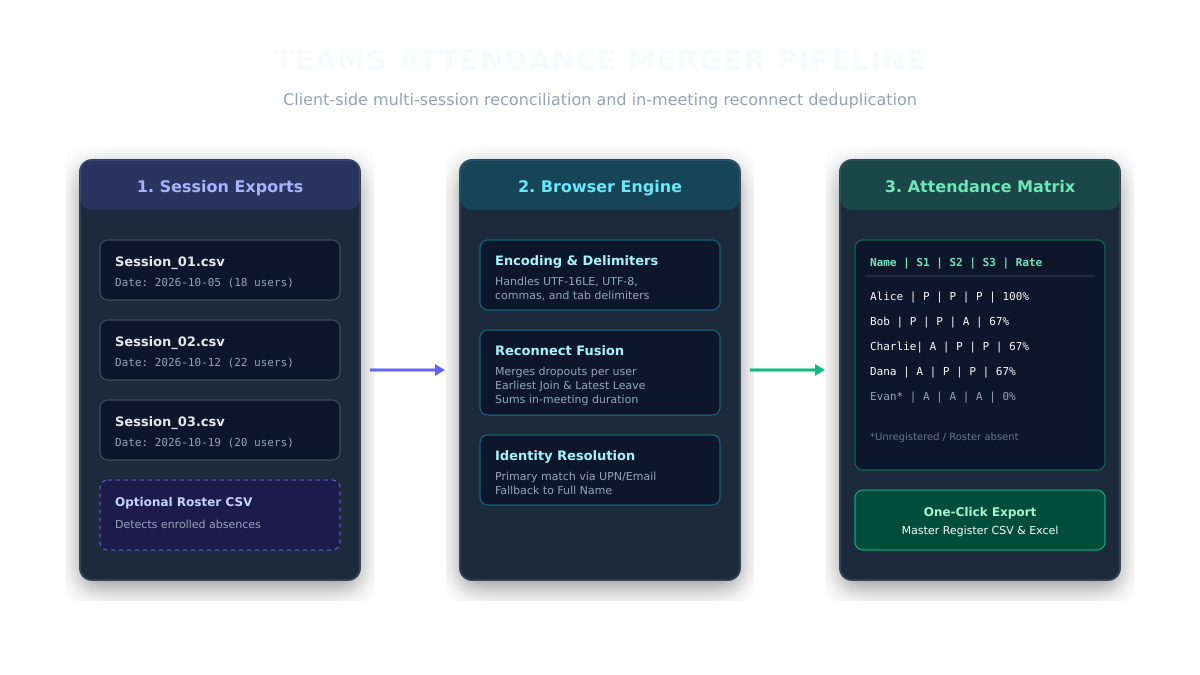
Power Query documents combining files using a sample transformation. Teams attendance exports can contain metadata and repeated join/leave intervals, so a simple append may need additional logic. PageUtil focuses on the attendance structure and can compare recorded participants with a supplied roster.
| Requirement | PageUtil | Excel Power Query |
|---|---|---|
| Input | Teams attendance exports and optional roster | Files combined through a sample query |
| Transformation | Meeting and participant-focused review | Custom query steps and aggregation |
| Validation | Check intervals and identities | Check intervals and identities |
Is PageUtil free, and what else do you need?
PageUtil Microsoft Teams Attendance Report Merger is free to use without creating a PageUtil account. This covers the tool’s supported workflow and outputs; its technical limits still apply.
Access to Teams attendance exports and the required Excel Power Query environment are separate considerations. Compare recurring query maintenance with a meeting-specific local review of supplied reports.
Compare the complete task, including preparation, review and destination access. Consult the linked provider documentation for current terms; no unverified competitor price is assumed here.
About PageUtil and its free tools
A worked example to test the choice
A participant joins at 09:00, leaves at 09:20 and returns from 09:30 to 10:00. The two intervals total 50 minutes, with a ten-minute gap. Review repeated intervals and session identity before summing reports from several meetings.
First interval:   09:00–09:20 = 20 minutes
Gap:              09:20–09:30 = 10 minutes
Second interval:  09:30–10:00 = 30 minutes
Attendance total:             50 minutes
How do you run the PageUtil workflow?
Open Microsoft Teams Attendance Report Merger.
Download the original report for each meeting occurrence and keep its date. Load the reports into PageUtil and provide a roster if you need expected-participant comparison. Review identity matches, session boundaries and duration evidence. In Power Query, inspect the sample-file transformation and handle metadata and interval rows explicitly before aggregation.
For the detailed procedure and interpretation, read How to Merge Recurring Microsoft Teams Attendance Reports.
What are the practical limits?
A missing report cannot be reconstructed from an empty local result. Similar display names can describe different people, and attendance duration does not establish participation or learning. An absent roster match may be an identity problem rather than a true absence.
What should you verify before using the result?
Compare a few participants’ merged durations with the original sessions, including rejoin cases. Reconcile session counts and unresolved identity matches before using the result for an operational report.
Sources and comparison scope
Prepared on 18 November 2026 using the current PageUtil workflow and the linked official documentation, checked on 17–18 November 2026. The example is illustrative. Competitor descriptions are based on published documentation; this article does not report a comparative performance benchmark.
Continue troubleshooting
- How to Merge Recurring Microsoft Teams Attendance Reports
- Easy Data Transform Alternative for CSV Cleanup
- PageUtil vs AdminSheet Pro for Google Workspace User Updates
- PageUtil vs Excel Locale Settings for Formula Separators
- PageUtil vs Power Platform CLI for Deployment Settings Checks
- PageUtil vs Moodle Grade Import Preview
- PageUtil vs Asana CSV Import for Task Hierarchy Checks
- PageUtil vs Azure Test Plans CSV Import Checks
- PageUtil vs Power BI Desktop for Theme JSON Validation
- PageUtil vs Intune for Windows Autopilot CSV Checks
- PageUtil vs Jira CSV Import for Parent and Hierarchy Checks
- PageUtil vs Teams Shifts for Excel Schedule Import Checks
- PageUtil vs Calendar Apps for ICS Timezone Debugging
- PageUtil vs Salesforce Data Loader for CSV Import Preflight
Related tools
Frequently asked questions
Can PageUtil retrieve a missing Teams report?
It works with supplied files. Obtain the report through an eligible organizer account and check the meeting’s reporting settings.
Should I sum every repeated attendee row?
Inspect join/leave intervals and duplicates first. Repeated rows can reflect rejoining or repeated evidence.
Does attendance duration prove engagement?
No. It records presence evidence and needs separate context for participation or learning conclusions.
When is Power Query the better fit?
It suits a repeatable custom reporting pipeline when you can maintain and verify the transformation for the source report structure.
Is the PageUtil tool free to use?
Yes. PageUtil Microsoft Teams Attendance Report Merger is free to use without a PageUtil account. Access to Teams attendance exports and the required Excel Power Query environment are separate considerations. Compare recurring query maintenance with a meeting-specific local review of supplied reports.