When should you choose PageUtil or calendar applications?
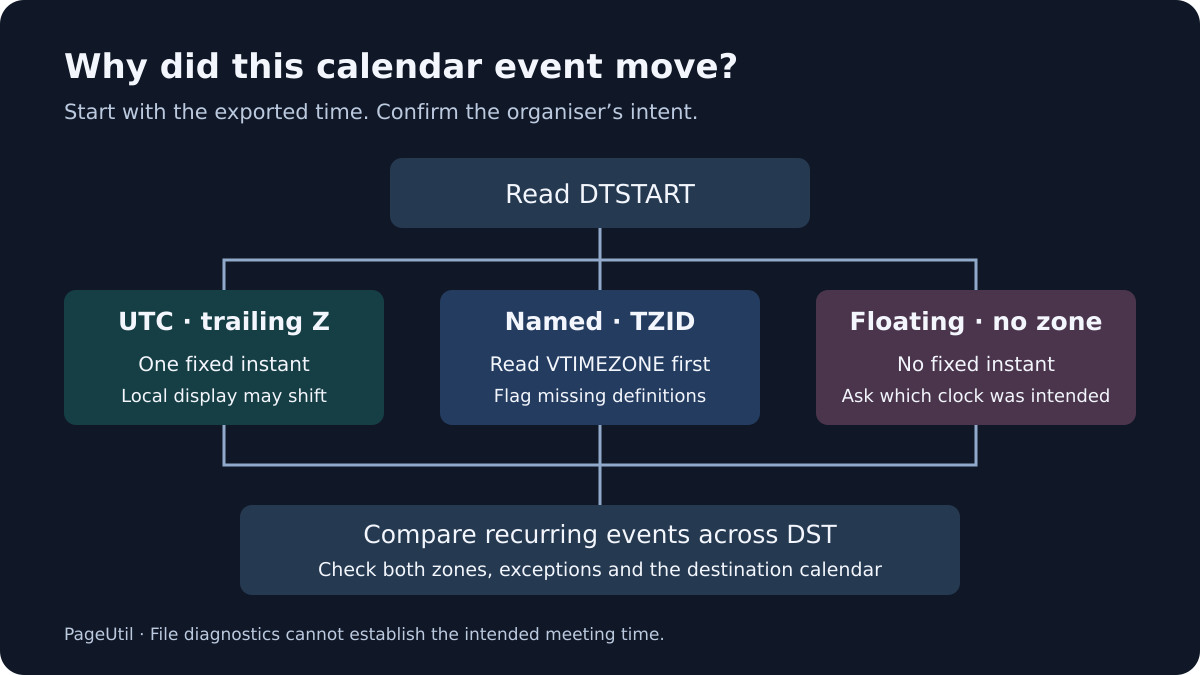
The iCalendar specification defines several date-time representations. A UTC value ending in Z identifies an instant, a TZID value uses a timezone context, and a floating time has no fixed zone. Changing a display timezone cannot repair an incorrectly authored event.
| Requirement | PageUtil | calendar applications |
|---|---|---|
| Source interpretation | Inspect UTC, TZID and floating values | Interpret the imported event |
| Recurrence review | Bounded preview and exception evidence | Actual calendar display and updates |
| Correction | Preserve intended clock semantics | Verify recipient behavior |
Is PageUtil free, and what else do you need?
PageUtil ICS Timezone Debugger is free to use without creating a PageUtil account. This covers the tool’s supported workflow and outputs; its technical limits still apply.
Access to the receiving calendar app is separate from inspecting an ICS file. Include testing the actual recipient view and recurrence exceptions when comparing troubleshooting workflows.
Compare the complete task, including preparation, review and destination access. Consult the linked provider documentation for current terms; no unverified competitor price is assumed here.
About PageUtil and its free tools
A worked example to test the choice
A weekly 09:00 New York meeting can display at a different London hour during the weeks when the regions change daylight-saving time on different dates. That shift can be correct for a meeting intended to stay at 09:00 in New York. Confirm the organizer’s clock intent before rewriting the event.
How do you run the PageUtil workflow?
Open ICS Timezone Debugger.
Load the original UTF-8 ICS and select organizer and destination display zones. Preview a bounded range around the reported discrepancy. Inspect DTSTART, timezone definitions and recurrence exceptions. Compare a before-and-after daylight-saving occurrence, then test the file in the intended calendar app.
For the detailed procedure and interpretation, read How to Debug ICS Timezone and Recurring Event Errors.
What are the practical limits?
A floating time needs an explicitly confirmed interpretation. A missing VTIMEZONE may trigger a browser-rule fallback warning, and an unknown custom zone can remain unresolved. Preview caps mean the entire recurrence was not inspected.
What should you verify before using the result?
Confirm event dates, displayed times and moved or cancelled occurrences in the recipient app. Preserve UID and recurrence identity when reviewing corrections so a revised file does not unintentionally create duplicate events.
Sources and comparison scope
Prepared on 18 November 2026 using the current PageUtil workflow and the linked official documentation, checked on 17–18 November 2026. The example is illustrative. Competitor descriptions are based on published documentation; this article does not report a comparative performance benchmark.
Continue troubleshooting
- How to Debug ICS Timezone and Recurring Event Errors
- Easy Data Transform Alternative for CSV Cleanup
- PageUtil vs AdminSheet Pro for Google Workspace User Updates
- PageUtil vs Excel Locale Settings for Formula Separators
- PageUtil vs Excel for Teams Attendance Report Merging
- PageUtil vs Power Platform CLI for Deployment Settings Checks
- PageUtil vs Moodle Grade Import Preview
- PageUtil vs Asana CSV Import for Task Hierarchy Checks
- PageUtil vs Azure Test Plans CSV Import Checks
- PageUtil vs Power BI Desktop for Theme JSON Validation
- PageUtil vs Intune for Windows Autopilot CSV Checks
- PageUtil vs Jira CSV Import for Parent and Hierarchy Checks
- PageUtil vs Teams Shifts for Excel Schedule Import Checks
- PageUtil vs Salesforce Data Loader for CSV Import Preflight
Related tools
Frequently asked questions
Does changing my calendar display timezone fix an incorrect ICS?
It changes the display context. Inspect the source event’s intended instant or local clock semantics before editing it.
What is a floating calendar time?
It has no fixed timezone in its date-time value. Confirm the organizer’s intent before assigning a zone.
Why does a weekly meeting shift for another country?
Regions can change daylight-saving time on different dates. A fixed local meeting time can therefore appear at a different remote hour temporarily.
Does a recurrence preview inspect every future occurrence?
The preview is bounded. Review its range and any cap or timeout before making claims about the complete series.
Is the PageUtil tool free to use?
Yes. PageUtil ICS Timezone Debugger is free to use without a PageUtil account. Access to the receiving calendar app is separate from inspecting an ICS file. Include testing the actual recipient view and recurrence exceptions when comparing troubleshooting workflows.