When should you choose PageUtil or AdminSheet Pro?
AdminSheet Pro describes bulk Google Workspace management from a spreadsheet-oriented workflow. A local preflight is useful when an HR export needs review before reaching the directory. Clarify whether the job creates users, updates selected fields or changes account state, because those operations have different consequences.
| Requirement | PageUtil | AdminSheet Pro |
|---|---|---|
| Review context | Supplied proposal and baseline export | Connected Workspace management |
| Execution | Reviewed CSV for separate upload | Live operations under granted permissions |
| Verification | Compare intended and accepted changes | Inspect actual directory results |
Is PageUtil free, and what else do you need?
PageUtil Google Workspace Bulk User CSV Validator is free to use without creating a PageUtil account. This covers the tool’s supported workflow and outputs; its technical limits still apply.
For AdminSheet Pro, evaluate the current licence, account permissions and update workflow. Local CSV review still requires authorized Google Workspace administration for the actual tenant changes.
Compare the complete task, including preparation, review and destination access. Consult the linked provider documentation for current terms; no unverified competitor price is assumed here.
About PageUtil and its free tools
A worked example to test the choice
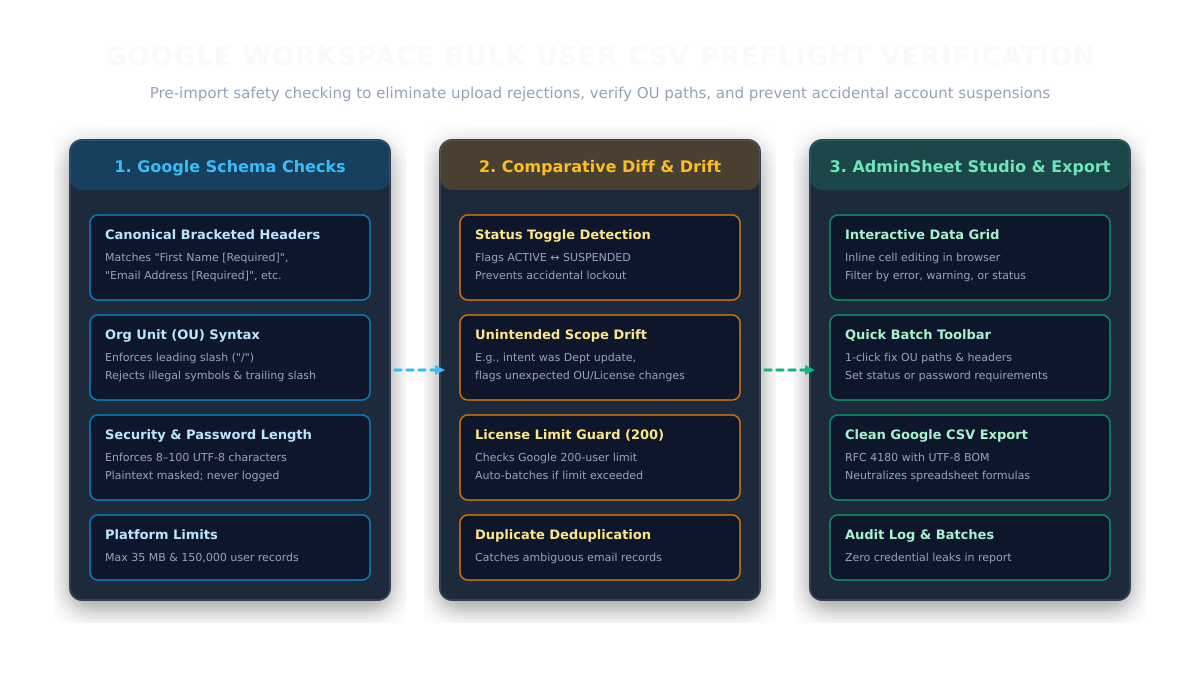
An HR export intends to update Department and Job Title but also contains a changed organizational-unit path and a suspended status. Compare the proposed file with the current tenant export and review changes outside the approved field scope before importing.
How do you run the PageUtil workflow?
Open Google Workspace Bulk User CSV Validator.
Choose create or update mode, load the proposed CSV and provide a fresh baseline for update comparison. Review header mapping, organizational-unit paths and consequential changes. Keep sensitive account fields protected in the review. Export the approved candidate in batches suitable for the actual Admin Console workflow.
For the detailed procedure and interpretation, read How to Fix Google Workspace Bulk User CSV Upload Errors.
What are the practical limits?
A local file cannot establish available licenses, live account state or the acting administrator’s permissions. Baseline age matters because another administrator may have changed the same account after export. Verify consequential changes again at the live operation.
What should you verify before using the result?
Inspect processing results and a sample of updated directory records. Reconcile successful and failed rows before retrying, and preserve the intended update scope with the source and baseline.
Sources and comparison scope
Prepared on 18 November 2026 using the current PageUtil workflow and the linked official documentation, checked on 17–18 November 2026. The example is illustrative. Competitor descriptions are based on published documentation; this article does not report a comparative performance benchmark.
Continue troubleshooting
- How to Fix Google Workspace Bulk User CSV Upload Errors
- Easy Data Transform Alternative for CSV Cleanup
- PageUtil vs Excel Locale Settings for Formula Separators
- PageUtil vs Excel for Teams Attendance Report Merging
- PageUtil vs Power Platform CLI for Deployment Settings Checks
- PageUtil vs Moodle Grade Import Preview
- PageUtil vs Asana CSV Import for Task Hierarchy Checks
- PageUtil vs Azure Test Plans CSV Import Checks
- PageUtil vs Power BI Desktop for Theme JSON Validation
- PageUtil vs Intune for Windows Autopilot CSV Checks
- PageUtil vs Jira CSV Import for Parent and Hierarchy Checks
- PageUtil vs Teams Shifts for Excel Schedule Import Checks
- PageUtil vs Calendar Apps for ICS Timezone Debugging
- PageUtil vs Salesforce Data Loader for CSV Import Preflight
Related tools
Frequently asked questions
Can a CSV checker confirm available licenses?
It can inspect supplied values, but live entitlement and allocation information comes from the Workspace tenant.
Why should I supply a baseline export?
It makes intended and unexpected changes visible. Use a recent export and consider concurrent administrator updates.
Does a valid organizational-unit path prove the OU exists?
Syntax is only part of the check. Confirm the target organizational unit in the live directory.
Should I retry the whole file after partial success?
Review the result first. Reconcile successful and failed rows so the retry matches the remaining intended changes.
Is the PageUtil tool free to use?
Yes. PageUtil Google Workspace Bulk User CSV Validator is free to use without a PageUtil account. For AdminSheet Pro, evaluate the current licence, account permissions and update workflow. Local CSV review still requires authorized Google Workspace administration for the actual tenant changes.