What to run
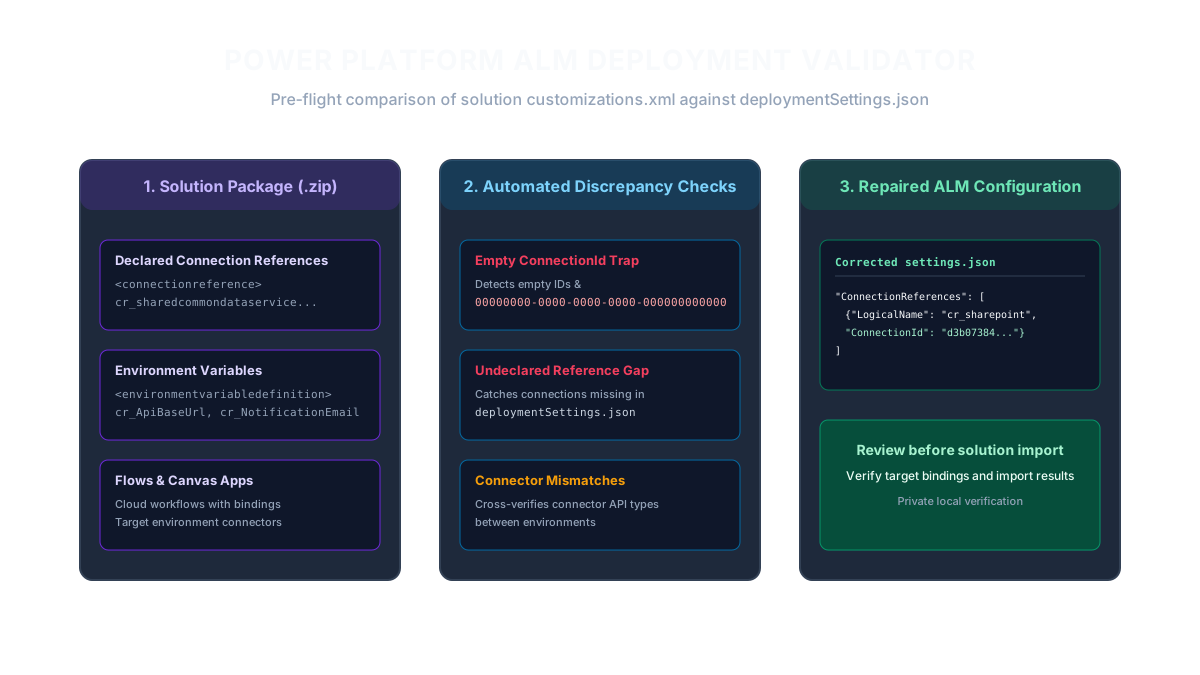
Open Power Platform Deployment Settings Checker and upload your exported Power Platform solution .zip package.
Paste your target deploymentSettings.json file (generated via `pac solution create-settings`) into the configuration text area.
ZIP inspection and XML parsing execute completely inside your browser using client-side JavaScript. Proprietary solution definitions, connection references, and cloud flows are never sent to external servers.
Click Validate Deployment Settings to perform deep cross-referencing between your solution schema and target settings.
// Standard deploymentSettings.json structure
{
  "EnvironmentVariables": [
    {
      "SchemaName": "cr_NotificationEmail",
      "Value": "[email protected]"
    }
  ],
  "ConnectionReferences": [
    {
      "LogicalName": "cr_sharedcommondataserviceforapps_a1b2c",
      "ConnectionId": "8f5642a4-b032-4d2b-980e-3fa12759f201",
      "ConnectorId": "/providers/Microsoft.PowerApps/apis/shared_commondataserviceforapps"
    }
  ]
}
How to read the result
Review the status banner and stat cards for Connection References, Environment Variables, Errors, and Warnings.
Check for missing ConnectionReferences. Check required connection bindings against the solution and target environment. Missing or unusable bindings can cause deployment failures; not every import or already-bound reference has the same settings requirement.
Identify empty or placeholder ConnectionId values. Replace empty or placeholder values with the actual target connection identifier in the format required by the deployment tooling. Do not invent a GUID or assume every connector uses the same identifier shape.
Check for connector ID mismatches where the solution requests a specific API connector variant that differs from the target environment definition.
Download the corrected settings.json template pre-populated with every missing reference and variable name.
| Deployment Failure | Root Cause in Configuration | Actionable Fix |
|---|---|---|
| Connection reference not found in settings file | New connector added to solution without updating deploymentSettings.json | Add missing ConnectionReference block with target environment ConnectionId |
| ConnectionId is empty or placeholder | pac solution create-settings generates empty values by default | Paste the real connection GUID from Power Apps Connections Details page |
| ConnectorId mismatch | Target environment uses different connector version or region | Align ConnectorId with declared API provider in solution customizations.xml |
| Environment variable unassigned | Value omitted in JSON and no default value set in solution | Specify target environment value or ensure default value is configured |
What to open next
If you also manage Power BI analytics themes, validate JSON palettes with Power BI Theme JSON Validator.
If you import Azure DevOps test cases and steps, audit work items with Azure DevOps Test Case CSV Validator.
If you need to inspect or beautify deployment JSON files, format them with JSON Formatter.
In Azure DevOps or GitHub Actions, commit the corrected deploymentSettings.json to your repository and trigger your ALM release pipeline.
Stop when
Stop when Errors reaches zero, the required connection references have reviewed target connection identifiers, and all required environment variables are populated.
Verify that the deploying service principal or DevOps identity has permissions to access the specified connections in the target Power Platform environment.
References
Use the linked specifications and product documentation to check behavior in your own environment.
Continue troubleshooting
- How to Fix Power BI Theme JSON Import Errors
- How to Fix Azure DevOps Test Case CSV and Test Step Import Errors
- How to Detect and Recover Lost Shopify Theme Customisations After an Update
- How to Find and Fix JSON Syntax Errors
- How to Compare Two JSON Files with Semantic Diff
- How to Generate TypeScript Interfaces from JSON
- How to Convert Nested JSON to Tabular CSV
- How to Convert Between JSON and YAML
- JSON syntax vs schema validation: format and diagnose JSON
- Why large JSON numbers change in JavaScript
- JWT exp, nbf and iat explained with timestamp examples
- Base64 vs Base64URL: why JWT decoding fails
Related tools
Frequently asked questions
Why does pac solution import fail with connection reference errors?
This failure occurs when a solution component expects a connection reference that is either omitted from deploymentSettings.json or has an empty ConnectionId parameter.
Where do I find the ConnectionId for the target environment?
In Power Apps, navigate to Connections in your target environment, click the ellipsis next to the connection, select Details, and confirm the target connection identifier through the supported connection details or administration tooling.
Does this tool upload my solution package or secrets to a server?
No. All ZIP unpacking, XML parsing, and JSON comparisons occur entirely in your browser using local JavaScript. Your solution code and environment variables remain private on your computer.