What to run
Open ICS Timezone Debugger and choose a UTF-8 ICS file or paste the original text. Processing stays in the browser. Select the organiser’s display timezone and your destination timezone using region names such as America/New_York and Europe/London.
Set a preview range around the reported error. Load the DST example for a reproducible weekly 09:00 New York meeting starting on 25 October 2026. London displays the first meeting at 13:00 and the next meeting at 14:00 because the regions change clocks on different dates. The sample intentionally lacks VTIMEZONE so the report also demonstrates the browser-rule fallback warning.
How to read the result
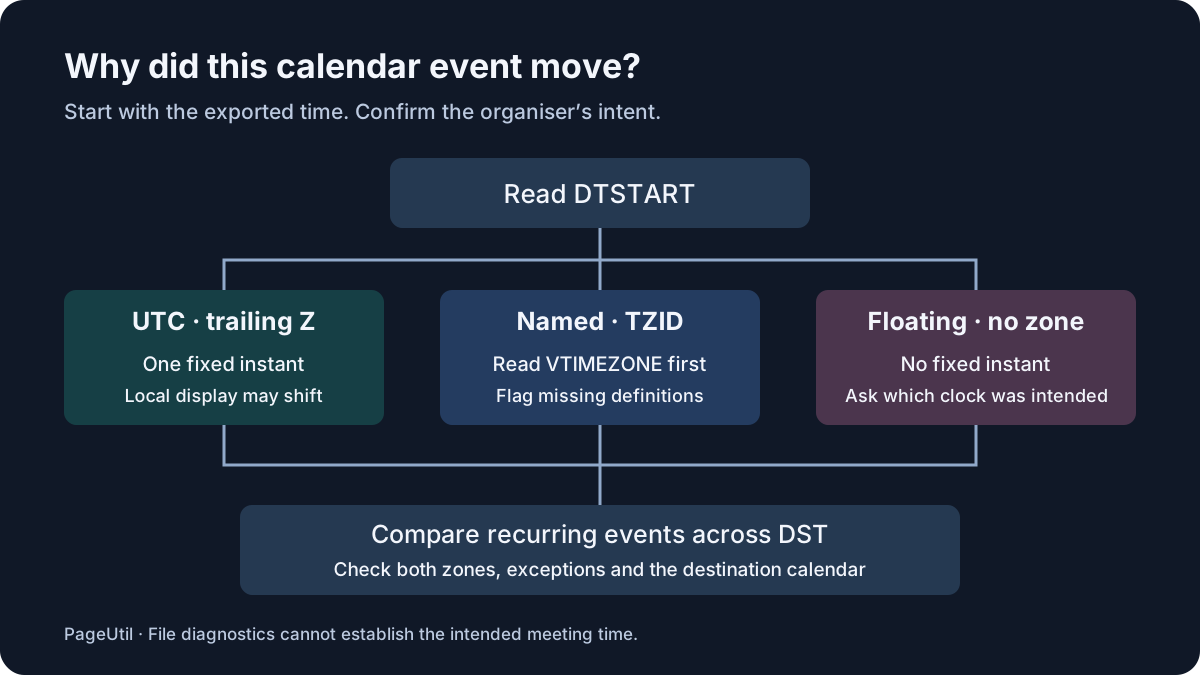
A DTSTART ending in Z is UTC and identifies a fixed instant. A date-time with TZID refers to a named timezone. With neither, the value is floating and has no fixed instant. Floating times are valid; enter an assumed timezone only after confirming which clock the organiser intended. All-day DATE values remain dates and are not converted.
Read errors before compatibility warnings. Missing VTIMEZONE definitions are reported even when the browser recognises the IANA name. A custom TZID can be valid when its embedded definition supplies the transitions. An unknown named zone without that definition remains unresolved rather than silently becoming UTC.
Inspect recurrence on both sides of daylight saving. Fixed UTC recurrence can move on a local clock. EXDATE removes an occurrence, RDATE adds one, and a matching UID plus RECURRENCE-ID can move or cancel one occurrence. The preview is bounded; a cap or timeout means the whole recurrence was not inspected. Embedded definitions are preferred and differences from browser rules are reported when the identifier is recognised.
What to open next
Use Time Zone Converter to check a known individual appointment. For an Outlook-only zone name, obtain a complete timezone definition from the publisher rather than replacing the name with a guessed region. A displayed offset alone cannot establish the intended timezone or its future daylight-saving rules.
Correct the exporting application or feed at its source. Download the JSON report to retain diagnostic evidence; it contains calendar titles and times, so review it before sharing. This tool does not rewrite the calendar or emulate Google Calendar, Outlook or Apple Calendar.
Stop when
Confirm the intended local date, local time and UTC instant with the organiser for representative occurrences before and after the relevant transition. Test the corrected export in a temporary destination calendar and verify moved and cancelled exceptions.
For a subscription URL, a repaired local copy does not repair future feed updates. Verify the publisher has fixed the feed and allow the destination application to refresh. For a manual re-import, inspect existing events first to avoid creating duplicate appointments.
References
Continue troubleshooting
Related tools
Frequently asked questions
Does a valid file guarantee the correct meeting time?
No. A valid file can describe the wrong intended instant, and calendar applications can apply different compatibility behavior.
Should every recurring event be converted to UTC?
No. Fixed UTC recurrence can move relative to local business hours when daylight saving changes the local offset.
Can I repair a subscribed feed with a downloaded file?
A local copy does not change the subscribed feed. The publisher must correct future updates at the source.