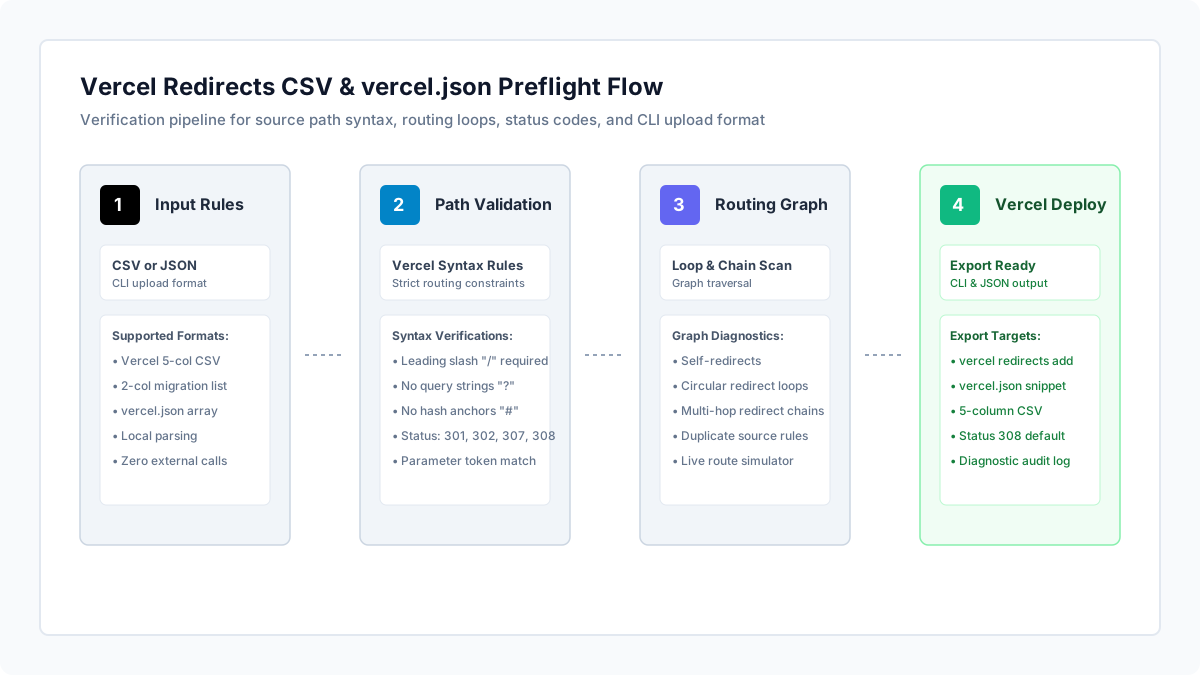
What to run
Open Vercel Redirects CSV Validator and upload your redirects CSV or vercel.json file, or paste your mapping rows directly.
Validation runs entirely within your browser using client-side JavaScript. Unreleased URLs, staging domain paths, and proprietary migration strategies are never transmitted to external servers.
The validator accepts official Vercel 5-column CSV files (source, destination, status, caseSensitive, preserveQueryParams), raw vercel.json redirect objects, or simple two-column migration lists (old URL, new URL).
// Official Vercel CLI CSV structure
source,destination,status,caseSensitive,preserveQueryParams
/old-docs,https://docs.example.com,308,false,true
/blog/:slug,/articles/:slug,308,false,true
/products/(.*),/shop/$1,301,false,true
How to read the result
Inspect the status banner and stat cards for Total Rules, Circular Loops, Redirect Chains, and Upload Blockers.
Verify source path formatting. Vercel strictly requires all source paths to begin with a leading slash ("/"). Omitting the leading slash causes Vercel CLI to reject the upload.
Beware the query parameter trap. In Vercel, the source path only matches request pathnames. If your spreadsheet contains source paths like "/search?q=shoes", Vercel will never match them. Query string matching must be configured using the "has" property in vercel.json.
Check status codes. Vercel supports HTTP 301, 302, 307, and 308. Using 200, 303, or 500 will halt the CLI import.
Use the Test Route Simulator box. Type a sample path like "/blog/welcome-post" to test how your wildcards and named parameters resolve in real time.
| Vercel Error / Trap | Root Cause in Configuration | Actionable Fix |
|---|---|---|
| Invalid source: must start with "/" | Source path missing leading slash (e.g. "blog/post" instead of "/blog/post") | Add a leading slash "/" to all source patterns |
| Redirect never triggers on query URLs | Query string embedded in source path (e.g. "/shop?category=shoes") | Remove query string from source path and use vercel.json "has" condition instead |
| Unsupported status code | Status code other than 301, 302, 307, or 308 specified in CSV | Change status code to 308 (permanent) or 307 (temporary) |
| Browser ERR_TOO_MANY_REDIRECTS | Self-redirect or circular loop (/a -> /b -> /a) | Review Circular Loops card and break the loop by pointing /a to final destination |
| SEO penalty from multiple hops | Redirect chain (/old -> /intermediate -> /current) | Update destination to point directly to the final URL in a single hop |
What to open next
If you also manage edge redirect rules on Cloudflare, validate your bulk lists with Cloudflare Bulk Redirect CSV Validator.
If you need to test Apache rewrite rules or generate .htaccess redirects, use htaccess Redirect Generator.
To test live HTTP status codes on deployed endpoints, inspect headers with Redirect Checker.
In your terminal: run "vercel redirects add --file redirects.csv" to upload your validated rules to Vercel.
Stop when
Stop when Upload Blockers and Circular Loops reach zero, and your test routes simulate with expected status codes.
Remember that Vercel projects have project-level redirect limits depending on plan tiers (hobby vs pro); verify your rule count fits your tier.
References
Use the linked specifications and product documentation to check behavior in your own environment.
Continue troubleshooting
Related tools
Frequently asked questions
Why does Vercel recommend HTTP 308 instead of HTTP 301 for permanent redirects?
HTTP 308 is the modern HTTP standard for permanent redirects that instructs clients to preserve the original HTTP request method (such as POST), preventing unintentional method rewriting to GET.
How do wildcards and named parameters work in Vercel redirects?
Vercel supports named parameters like /blog/:slug which can be substituted into the destination as /articles/:slug. For multi-segment wildcards, use /docs/(.*) mapped to /documentation/$1.
Can I upload redirects directly from a CSV file using Vercel CLI?
Yes. The command "vercel redirects add --file my-redirects.csv" accepts a 5-column CSV file matching the schema source,destination,status,caseSensitive,preserveQueryParams.