Export the baseline and comparison snapshots
Open Google Search Console, navigate to Indexing > Pages, and open the specific reason report causing concern (such as "Crawled - currently not indexed" or "Discovered - currently not indexed"). Click Export in the top right corner and choose Download CSV. Repeat this export across your key unindexed categories and store the files with clear date stamps.
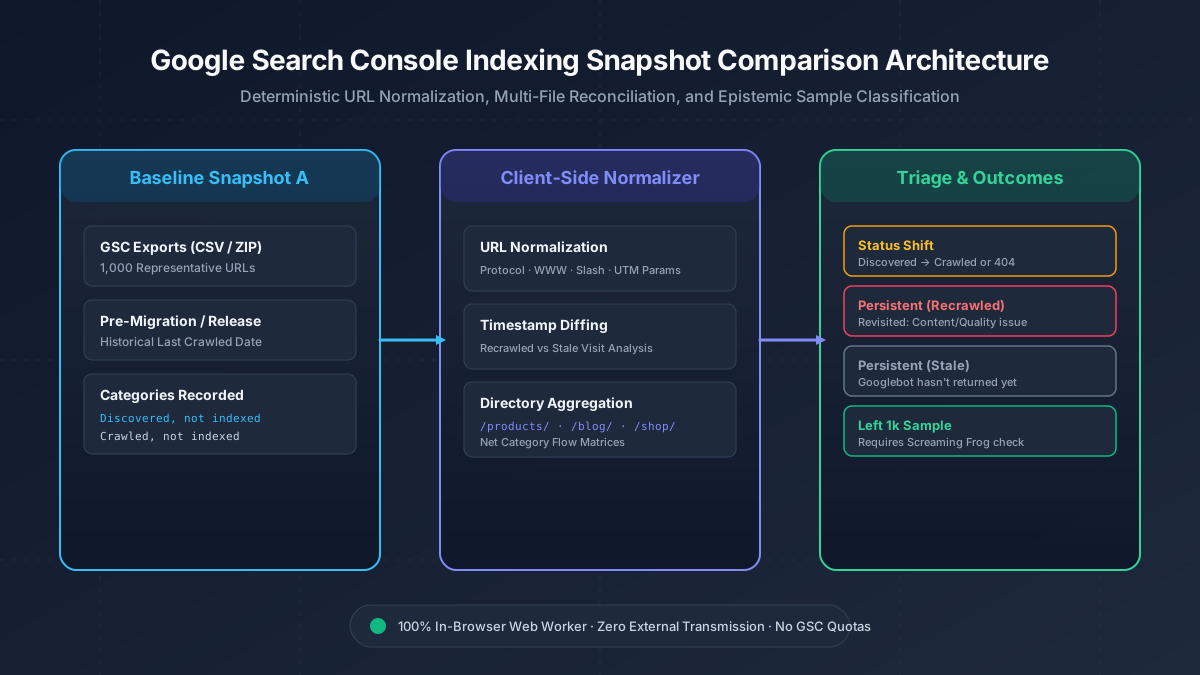
When diagnosing a release or CMS migration, export both an earlier baseline (prior to the change) and a recent post-deployment snapshot. You can upload the raw CSV files directly into Google Search Console Indexing Comparison or paste URL columns directly. The tool accepts multi-file batches and decompresses native GSC ZIP archives entirely in your browser.
Interpret status shifts and recrawl timestamps
The comparator classifies every observed URL into deterministic transition states. A status shift occurs when a page moves from "Discovered" to "Crawled" or escalates into "Soft 404" or "Server error (5xx)". A shift from Discovered to Crawled confirms that Googlebot allocated crawl budget to fetch and render the page, but encountered quality, duplicate, or thin content signals preventing indexation.
Inspect the Last Crawled timestamp delta. If a URL remains under "Crawled - currently not indexed" but its timestamp updated after your deployment, Googlebot visited the updated page and confirmed its exclusion. If the timestamp is unchanged from the baseline, Googlebot has not revisited yet, indicating that your fixes simply await crawl queue re-evaluation.
Handle the 1,000-row Search Console sample limit
Search Console user interface table exports provide a representative sample capped at 1,000 example URLs per report. If a URL appears in your January baseline export but is absent from your February export, never assume that the page has become indexed without live verification.
The comparator labels disappearing URLs as "Left 1k Sample". Use the built-in Screaming Frog export action to copy candidate URLs and execute a live status code and canonical tag crawl, or run targeted inspections using the Search Console URL Inspection tool.
Cluster by directory and triage remediations
Review the Directory Breakdown table to identify which site sections show the highest concentration of shifts and persistent exclusions. For instance, if /products/ accounts for the majority of recrawled exclusions, audit faceted URL parameters, schema markup, and product availability tags.
If a legacy folder shows persistent 404 or soft 404 errors, cross-reference the inventory using Sitemap Comparison to ensure retired URLs are mapped to clean 301 destinations, and review rewrite patterns in Google Regex Tester.
References
Related tools
Frequently asked questions
Why did my URLs move from Discovered to Crawled not indexed?
This shift indicates Googlebot crawled and rendered the page, but chose not to index it due to perceived duplicate content, thin value, or weak internal linking.
Does disappearing from the unindexed export mean a URL is indexed?
No. GSC exports are limited to 1,000 sample URLs. URLs can drop from the export simply because newer URLs displaced them in the sample.
How can I verify if an excluded URL was re-evaluated?
Check the Last Crawled column in the export. If the timestamp is more recent than your deployment date, Googlebot has re-crawled and re-evaluated the page.