Check the exact original URL
Open Redirect Checker, paste the address visitors actually use, and select Trace redirects. Keep HTTP versus HTTPS, www, the path, trailing slash, and query string. A bare domain uses HTTPS, so include http:// explicitly when checking an HTTP-to-HTTPS rule.
The result shows completion, the number of redirects, final HTTP status, and final HTTP URL. Expand the response list to inspect timings, raw Location headers, absolute resolved targets, and response headers. Copy the report or export it before changing configuration. Ctrl+Enter or Command+Enter runs the check.
A completed trace means the checker reached a non-redirect response. It does not mean that the destination is correct: a 404, a login page, or an unrelated 200 page can still be the endpoint. An incomplete trace has no confirmed final destination. Read its stop reason and attempted URL.
Read a worked redirect-chain example
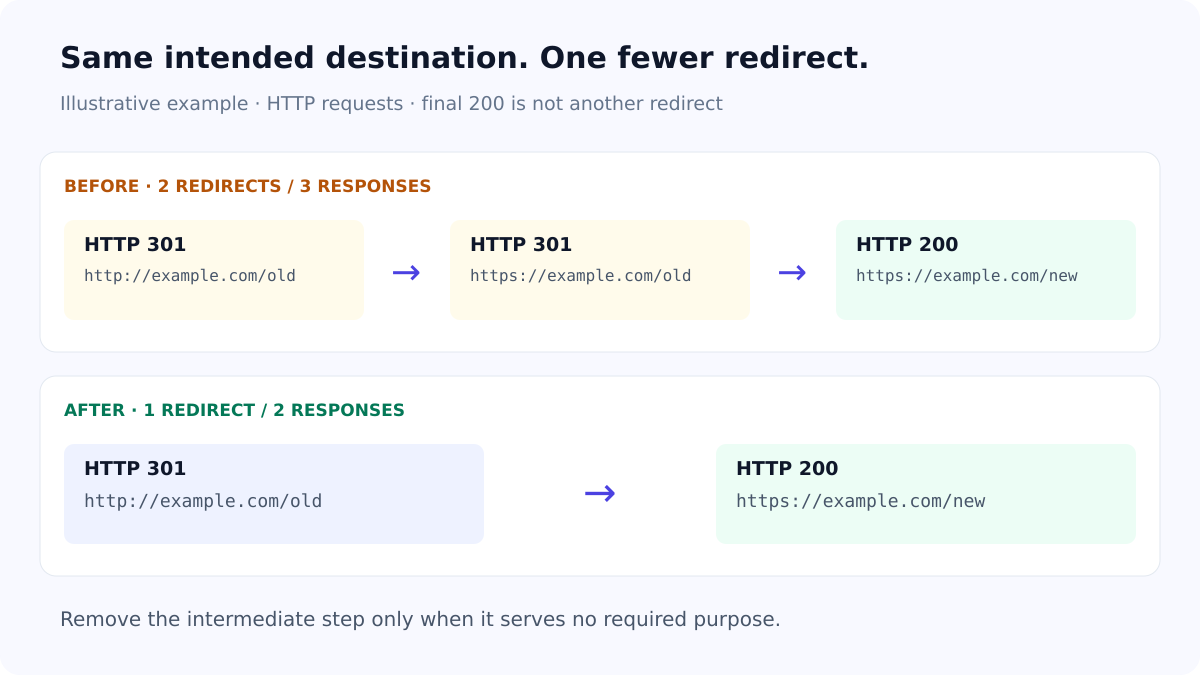
Suppose an old link uses HTTP, the website first upgrades it to HTTPS, and the application then sends the old path to a replacement page. The three responses below contain two redirects. The final 200 is a successful HTTP response, not a third redirect.
If the intermediate URL is unnecessary, change the rule for the original URL so it points directly to https://example.com/new. Update internal links to use that final URL too. Keep a separate redirect for the HTTPS old URL so existing links to it still work.
| Response | URL | Status | Location |
|---|---|---|---|
| 1 | http://example.com/old | 301 | https://example.com/old |
| 2 | https://example.com/old | 301 | /new |
| 3 | https://example.com/new | 200 | None |
The relative Location /new resolves against the URL that returned it. The checker shows the full resolved target so you can inspect the actual next request.
Choose the right redirect status
Use a permanent redirect when the old page has moved for good, and a temporary redirect when the original URL is expected to return. A temporary redirect is not automatically an SEO error. Review the purpose of the move before replacing its status code.
301 and 308 signal a permanent move. 302 and 307 signal a temporary move. 303 means see other, often after a form submission. The 307 and 308 codes preserve the HTTP method; 301 and 302 can change POST to GET. This checker sends GET and does not test form submissions.
| Status | Meaning | Action |
|---|---|---|
| 301 / 308 | Permanent move | Confirm the replacement is intended and lasting. |
| 302 / 307 | Temporary move | Confirm the old URL should return. |
| 303 | See other | Check the application workflow. |
| 200 | Successful response | Check the actual destination content. |
| 404 / 410 | Missing / gone | Fix an unintended destination or missing page. |
| 5xx | Server error | Investigate hosting, upstream, or application errors. |
Google treats permanent and temporary redirects differently when selecting a canonical URL. See Google’s redirect documentation. A redirect is not a guarantee that the target will rank or be indexed.
Diagnose the finding before changing rules
Keep redirects direct where practical. Each extra request can add latency and work for crawlers. Multiple steps may be required for authentication, payment, tracking, or locale selection; do not remove a step solely because the chain is long.
An exact repeated URL is a loop. A ten-redirect stop can also be a long chain of different URLs. Review the URLs and stop reason instead of treating every incomplete check as a loop.
| Finding | What to investigate |
|---|---|
| Unnecessary intermediate URL | Point the source directly to the intended replacement and update internal links. |
| Wrong destination | Check path matching, query handling, locale rules, and stale redirect maps. |
| Repeated URL / loop | Compare HTTPS, www, trailing-slash, CDN, and application rules for conflicts. |
| HTTPS to HTTP | Keep the redirect target on HTTPS. |
| Missing or invalid Location | Correct the destination header on the redirect response. |
| Final 403 / 429 | Compare with your browser; bot protection or rate limiting may affect this probe. |
| Timeout / connection failure | Inspect the attempted URL, DNS, TLS, and hosting; retain the partial trace. |
Fix the rule that owns the extra redirect
Find which layer generated the response: your CDN, hosting control panel, web server, CMS, or application. Inspect response headers and correlate the request with logs. Headers are clues, not proof of which rule ran.
Edit the existing rule and check its order against general HTTPS or hostname rules. Adding another redirect without understanding the old rules can create a loop. On Apache, use htaccess Redirect Generator to draft a rule, then review it against your actual configuration. Other platforms need their own configuration syntax.
For a permanent page move, map the old page to its relevant replacement. Do not send every deleted page to an unrelated homepage merely to avoid a 404. Preserve meaningful query parameters, and decide deliberately whether tracking parameters should remain.
Google’s site-move guidance recommends redirecting directly to the final destination and keeping chains short.
Compare HTTP, HTTPS, www, and non-www
Enable Compare HTTP/HTTPS and www/non-www. The checker tests all four domain variants, preserving the entered path and query string. The comparison shows whether they reach the same HTTP destination. Four variants consume four checks, so a run can compare up to five distinct domains or paths.
Convergence is useful evidence, but it is not a full canonicalization audit. All variants could converge on the wrong page or a shared error page. Check the final status and content. A canonical tag is an indexing hint in the page, not a redirect; compare it with the intended final URL.
Validate a migration with expected destinations
Paste up to 20 unique URLs, or import a CSV with source,expected columns. The optional header row is source,expected. For example, use https://example.com/old,https://example.com/new to check that the old page lands on its intended replacement.
CSV files are read on your device. Only source URLs are requested, unless you separately submit their expected destinations. Editing the source list clears imported expectations. Results match normalized URLs exactly, preserving path case, query order, and trailing slashes; fragments are ignored because they are not sent in HTTP requests.
Filter destination mismatches or results needing review, then download CSV or JSON for an audit trail. Checks run sequentially. If a shared network-tool limit interrupts a batch, completed results remain available; wait before checking the remaining URLs. An incomplete trace is not scored as a destination mismatch because its final URL is unknown.
Verify the change after deployment
Re-check the exact original URL and the relevant domain variants. Confirm the intended destination, expected HTTP status, no loop, and no HTTPS downgrade. Check that any intermediate steps left in the chain serve a purpose.
Open the final page manually to verify content and important actions. Inspect canonical and robots hints in the response details, and use HTTP Headers when you need a separate header check. Use HTTP Status Codes to interpret an unfamiliar response.
Update internal links and migration maps, then save a new report. A final 200 does not establish indexability: robots.txt, noindex, canonicals, rendering, and content relevance still need review. If a hostname does not resolve, investigate its public records with DNS Lookup.
Why the checker may differ from your browser
The probe makes server-side GET requests from Cloudflare without your saved cookies, login session, cached redirects, or browser extensions. HSTS can upgrade HTTP inside your browser before a server redirect is observed. Geography, CDN rules, and bot protection can also change the response.
Changing the user-agent preset changes a request header. Googlebot-style requests are not verified Googlebot and do not reproduce Google's network, rendering, or indexing pipeline. A difference is evidence to investigate, not proof of cloaking or a crawl problem.
The checker follows only HTTP 301, 302, 303, 307, and 308 responses with Location. It samples at most 64 KiB of final HTML for meta refresh, canonical and robots tags, and possible inline JavaScript navigation. It reports Refresh headers but does not follow them. It never executes JavaScript. A partial sample or external script can contain behavior it misses, so the final HTTP URL may differ from the final browser URL.
Continue troubleshooting
Related tools
Frequently asked questions
How many redirects should I keep?
Aim to reach the intended destination directly when you can. Remove unnecessary steps, but preserve redirects required by authentication, payment, or other application behavior. Chain length alone is not a verdict.
Is a 302 redirect automatically bad for SEO?
No. A 302 is appropriate for a temporary move. Use a permanent redirect such as 301 or 308 when the move is lasting, and review the destination and canonicalization intent.
Is a canonical tag a redirect?
No. A canonical tag is an indexing hint and does not navigate the browser to another URL. The checker reports it separately from HTTP redirect destinations.
Why does the browser work when the checker returns 403?
Bot protection, login cookies, geography, or user-agent rules may accept your browser and refuse the server probe. Compare the request context and server logs before concluding that visitors or Google cannot reach the page.