When should you choose PageUtil or Google Business Profile bulk updates?
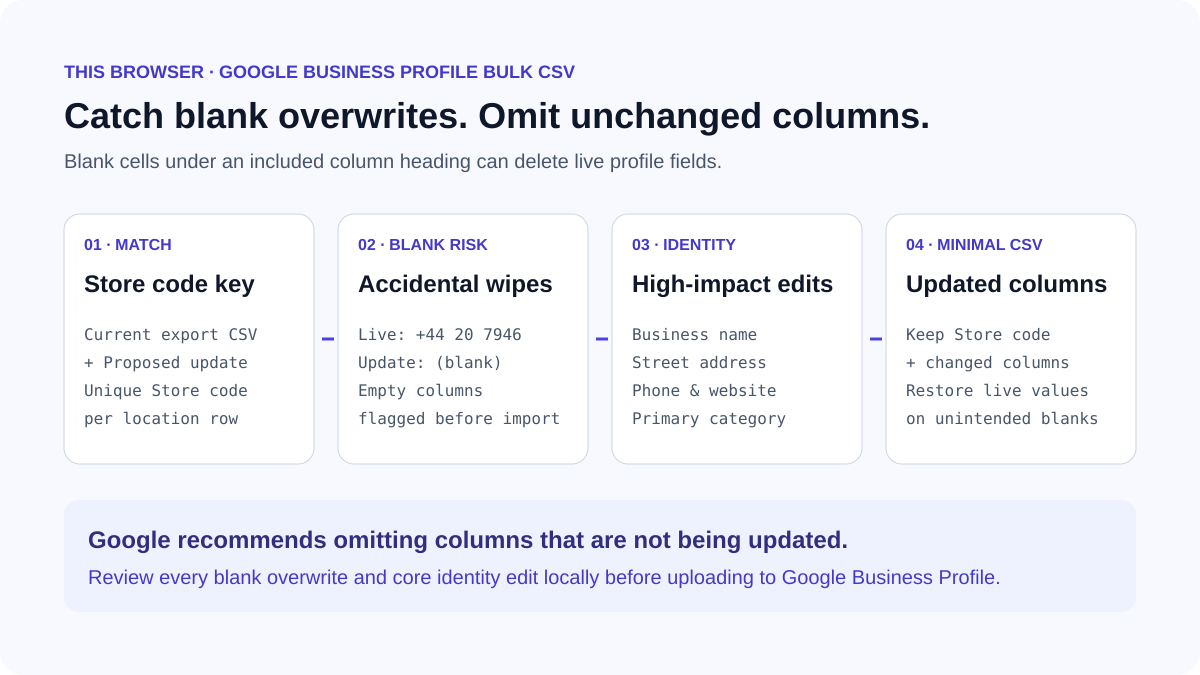
Google’s bulk spreadsheet guidance defines the destination columns and store identity. A file that updates opening hours can also contain stale addresses or blank phone values. Review the intended field scope and retain a current baseline so unrelated edits become visible.
| Requirement | PageUtil | Google Business Profile bulk updates |
|---|---|---|
| Change review | Baseline versus proposed CSV | Bulk spreadsheet workflow |
| Identity | Inspect store-code matching | Resolve actual managed locations |
| Acceptance | Prepare approved fields | Process and publish eligible changes |
Is PageUtil free, and what else do you need?
PageUtil Google Business Profile Bulk Update Checker is free to use without creating a PageUtil account. This covers the tool’s supported workflow and outputs; its technical limits still apply.
Business Profile access and permission to manage the affected locations remain necessary. Include the effort of comparing a current baseline and checking the accepted changes after upload.
Compare the complete task, including preparation, review and destination access. Consult the linked provider documentation for current terms; no unverified competitor price is assumed here.
About PageUtil and its free tools
A worked example to test the choice
A sheet changes holiday hours for one store but leaves the phone cell blank for another store under an included phone column. Inspect how that blank would be handled before uploading. Omitting an unchanged column and submitting an explicit blank can have different effects.
How do you run the PageUtil workflow?
Open Google Business Profile Bulk Update Checker.
Export current locations, load the baseline and proposal into the checker and confirm the store-code mapping. Resolve missing or duplicate identifiers, then review new locations, blank replacements and high-impact edits. Inspect the approved candidate’s included columns before uploading through Business Profile.
For the detailed procedure and interpretation, read How to Check a Google Business Profile Bulk Update CSV.
What are the practical limits?
A local baseline can become stale while someone edits the live profile. Matching a store code cannot establish ownership, verification state or Google’s final acceptance. Inspect the current platform preview and processing result.
What should you verify before using the result?
Review the actual affected profiles and reconcile accepted changes with the proposal. Keep the baseline and intended field scope for any correction or rollback preparation.
Sources and comparison scope
Prepared on 18 November 2026 using the current PageUtil workflow and the linked official documentation, checked on 17–18 November 2026. The example is illustrative. Competitor descriptions are based on published documentation; this article does not report a comparative performance benchmark.
Continue troubleshooting
- How to Check a Google Business Profile Bulk Update CSV
- Optmyzr Alternative for Negative Keyword Conflict Checks
- PageUtil vs Supermetrics for GA4 Cost Data Preparation
- PageUtil vs Google Ads Editor CSV Import Review
- PageUtil vs Microsoft Advertising Editor for Bulk CSV Checks
- PageUtil vs LinkedIn Offline Conversion CSV Import
- PageUtil vs Canva Bulk Create for CSV Preparation
- PageUtil vs Pinterest Bulk Upload CSV Checks
- PageUtil vs Google My Maps for CSV Location Preparation
Related tools
Frequently asked questions
Why does an empty cell deserve review?
Under an included column, a blank can have a clearing effect. Check the destination rules and the candidate’s exact columns.
Can a mistyped store code create a new-location candidate?
Yes. Compare identifiers with the fresh baseline and confirm whether the location is intentionally new.
Does the checker prove I manage the location?
No. Ownership, verification and permissions come from the live Business Profile account.
What should I inspect after upload?
Check the processing result and the affected live fields, particularly addresses, phone numbers, websites and hours.
Is the PageUtil tool free to use?
Yes. PageUtil Google Business Profile Bulk Update Checker is free to use without a PageUtil account. Business Profile access and permission to manage the affected locations remain necessary. Include the effort of comparing a current baseline and checking the accepted changes after upload.