When should you choose PageUtil or LinkedIn Campaign Manager?
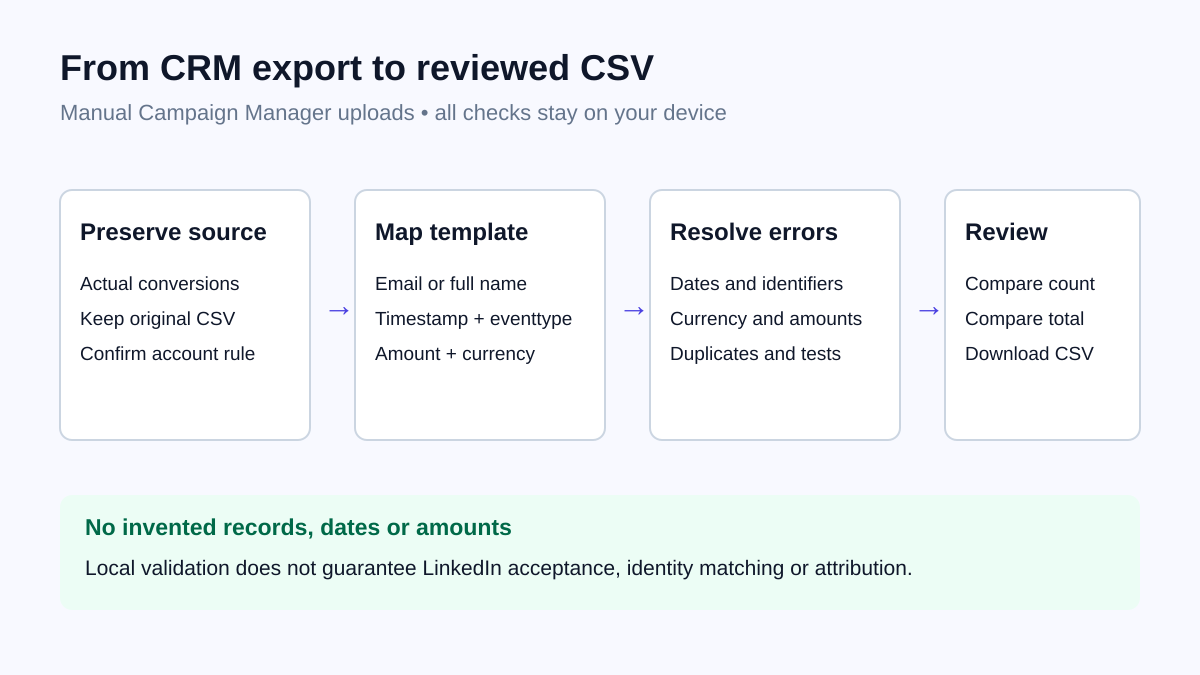
LinkedIn documents a manual CSV upload workflow distinct from API ingestion. A CRM export can contain several dates and identifiers, so identify the completed conversion event before mapping. Keep the original timezone and currency evidence rather than choosing values simply to satisfy a file check.
| Requirement | PageUtil | LinkedIn Campaign Manager |
|---|---|---|
| Source review | Manual CSV identifiers and timestamps | Current upload template and rule |
| Processing | Prepare candidate rows locally | Member matching and platform processing |
| Outcome | Retain source and exclusion evidence | Inspect actual import and reporting results |
Is PageUtil free, and what else do you need?
PageUtil LinkedIn Offline Conversion CSV Validator is free to use without creating a PageUtil account. This covers the tool’s supported workflow and outputs; its technical limits still apply.
LinkedIn account access, conversion configuration and applicable advertising costs remain separate. CSV preparation cannot supply missing consent, event identity or matching evidence.
Compare the complete task, including preparation, review and destination access. Consult the linked provider documentation for current terms; no unverified competitor price is assumed here.
About PageUtil and its free tools
A worked example to test the choice
A conversion time is recorded as 03/04/2026 09:30 with no timezone. Establish the CRM’s date order and timezone before conversion. If the local clock time falls in a daylight-saving gap or repetition, obtain an explicit offset or authoritative event timestamp.
How do you run the PageUtil workflow?
Open LinkedIn Offline Conversion CSV Validator.
Download the current Campaign Manager template, confirm the conversion rule and map the CRM fields. Choose the documented source date convention and timezone. Review blocked and duplicate rows, identifiers, event type, amount and account currency. Export the reviewed candidate and inspect the actual upload result.
For the detailed procedure and interpretation, read How to Fix LinkedIn Offline Conversion CSV Upload Errors.
What are the practical limits?
A structurally valid identifier cannot establish a match to a LinkedIn member or permission to upload that data. The checker’s manual CSV contract differs from a Conversions API payload. Never substitute a newer date to make an old event fit an upload window.
What should you verify before using the result?
Reconcile source and candidate counts and inspect Campaign Manager’s processing feedback. Keep the exact event data, exclusions and rule configuration used for the upload so later attribution questions have a traceable basis.
Sources and comparison scope
Prepared on 18 November 2026 using the current PageUtil workflow and the linked official documentation, checked on 17–18 November 2026. The example is illustrative. Competitor descriptions are based on published documentation; this article does not report a comparative performance benchmark.
Continue troubleshooting
- How to Fix LinkedIn Offline Conversion CSV Upload Errors
- Optmyzr Alternative for Negative Keyword Conflict Checks
- PageUtil vs Supermetrics for GA4 Cost Data Preparation
- PageUtil vs Google Business Profile Bulk Update Review
- PageUtil vs Google Ads Editor CSV Import Review
- PageUtil vs Microsoft Advertising Editor for Bulk CSV Checks
- PageUtil vs Canva Bulk Create for CSV Preparation
- PageUtil vs Pinterest Bulk Upload CSV Checks
- PageUtil vs Google My Maps for CSV Location Preparation
Related tools
Frequently asked questions
Can I use a Conversions API payload as the manual CSV?
Follow the manual template. API identifiers and payload shapes have a separate contract.
Can I replace a missing conversion date with today?
No. Recover the actual event timestamp from the authoritative source or exclude the unresolved record deliberately.
Does a valid email guarantee LinkedIn will match the event?
No. Platform matching and attribution require additional account-side processing.
Why does timezone matter?
The same clock text can represent different instants. Preserve the source convention and resolve daylight-saving ambiguity before export.
Is the PageUtil tool free to use?
Yes. PageUtil LinkedIn Offline Conversion CSV Validator is free to use without a PageUtil account. LinkedIn account access, conversion configuration and applicable advertising costs remain separate. CSV preparation cannot supply missing consent, event identity or matching evidence.