When should you choose PageUtil or Google Ads Editor?
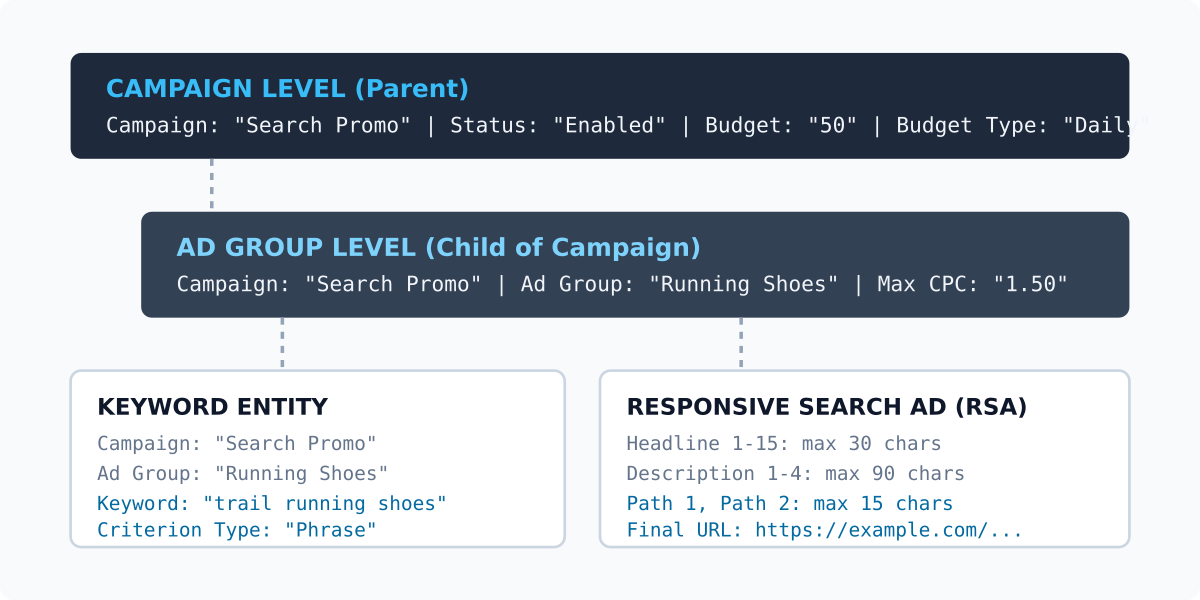
Google documents the CSV structure used by Ads Editor. Spreadsheet headings copied from a web interface or generated by an AI system can differ from the import labels. A row also needs enough information to identify the intended entity and its parent campaign or ad group.
| Requirement | PageUtil | Google Ads Editor |
|---|---|---|
| File preparation | Headers, entities and supported constraints | CSV import format |
| Account review | Supplied evidence only | Current account and proposed changes |
| Execution | Export a reviewed candidate | Post approved account changes |
Is PageUtil free, and what else do you need?
PageUtil Google Ads Editor CSV Validator is free to use without creating a PageUtil account. This covers the tool’s supported workflow and outputs; its technical limits still apply.
Google Ads Editor access, account permissions and advertising spend are separate from CSV preparation. Review campaign and ad-group context before importing a candidate into the account.
Compare the complete task, including preparation, review and destination access. Consult the linked provider documentation for current terms; no unverified competitor price is assumed here.
About PageUtil and its free tools
A worked example to test the choice
A row contains headline text but omits the campaign and ad-group context needed for the intended ad. Renaming columns alone cannot supply that missing relationship. Review the row type and parent fields, then check the complete candidate in Ads Editor.
How do you run the PageUtil workflow?
Open Google Ads Editor CSV Validator.
Load the CSV or TSV locally and inspect suggested header mappings. Resolve ambiguous row types and missing parent fields. Review ad-copy constraints and destination URLs using the intended entity type. Export the reviewed candidate, import into Ads Editor and inspect the changes before posting.
For the detailed procedure and interpretation, read How to Fix Google Ads Editor CSV Import Errors.
What are the practical limits?
A file-level check cannot establish policy approval, billing eligibility or whether a referenced entity changed after the export. An accepted import can still require account-side corrections before posting.
What should you verify before using the result?
Review the posted result and inspect a sample of changed ads or keywords in the account. Keep the source, approved mapping and Editor messages so partial failures can be retried deliberately.
Sources and comparison scope
Prepared on 18 November 2026 using the current PageUtil workflow and the linked official documentation, checked on 17–18 November 2026. The example is illustrative. Competitor descriptions are based on published documentation; this article does not report a comparative performance benchmark.
Continue troubleshooting
- How to Fix Google Ads Editor CSV Import Errors
- Optmyzr Alternative for Negative Keyword Conflict Checks
- PageUtil vs Supermetrics for GA4 Cost Data Preparation
- PageUtil vs Google Business Profile Bulk Update Review
- PageUtil vs Microsoft Advertising Editor for Bulk CSV Checks
- PageUtil vs LinkedIn Offline Conversion CSV Import
- PageUtil vs Canva Bulk Create for CSV Preparation
- PageUtil vs Pinterest Bulk Upload CSV Checks
- PageUtil vs Google My Maps for CSV Location Preparation
Related tools
Frequently asked questions
Are web interface labels always valid CSV headings?
No. Use Ads Editor’s documented import labels and review proposed mappings.
Does a CSV pass mean my ads are approved?
No. Account and advertising-policy checks remain part of Google Ads processing.
Can an AI-generated spreadsheet omit entity context?
Yes. Check campaign, ad-group and defining entity fields instead of relying on plausible column names.
Should I post immediately after import?
Inspect the actual imported changes and account-side findings before posting the intended edits.
Is the PageUtil tool free to use?
Yes. PageUtil Google Ads Editor CSV Validator is free to use without a PageUtil account. Google Ads Editor access, account permissions and advertising spend are separate from CSV preparation. Review campaign and ad-group context before importing a candidate into the account.