When should you choose PageUtil or Optmyzr?
Optmyzr documents conflict checks across ad-group, campaign, shared-list and account-level negatives. For a local review, completeness of the export determines which conflicts can be found. Gather every applicable negative scope and preserve match types. A campaign-only export can miss a blocking shared or account-level rule.
| Requirement | PageUtil | Optmyzr |
|---|---|---|
| Data access | Supplied keyword data | Connected account conflict workflow |
| Scope review | Confirm every applicable exported negative list | Documented multiple negative scopes |
| Action | Review and apply approved changes separately | Account-management workflow |
Is PageUtil free, and what else do you need?
PageUtil Negative Keyword Conflict Checker is free to use without creating a PageUtil account. This covers the tool’s supported workflow and outputs; its technical limits still apply.
For Optmyzr, assess the applicable plan and connected-account workflow. Compare that with the effort of exporting current keyword evidence and reviewing a local conflict report.
Compare the complete task, including preparation, review and destination access. Consult the linked provider documentation for current terms; no unverified competitor price is assumed here.
About PageUtil and its free tools
A worked example to test the choice
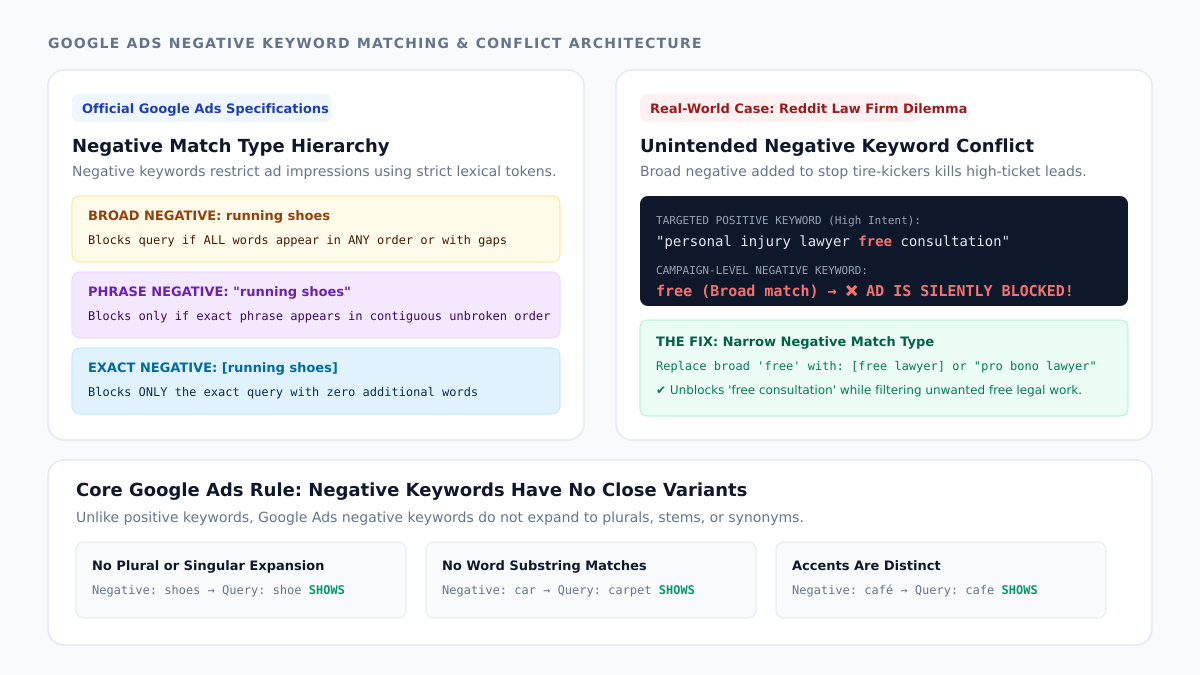
A positive keyword is free legal consultation and a broad negative is free. The negative can block queries containing that term, including valuable consultation searches. Review why the negative was added before removing it. A narrower reviewed exclusion might preserve the original waste-reduction goal without blocking the desired query.
How do you run the PageUtil workflow?
Open Negative Keyword Conflict Checker.
Provide the positive and negative keyword data to the checker and confirm their scope and match types. Review the conflicting negative, the affected positive and the explanation together. Compare the proposed change with search-term evidence and the account’s current shared lists. Apply approved edits in Google Ads or your connected account-management tool.
For the detailed procedure and interpretation, read How to find and resolve Google Ads negative keyword conflicts.
What are the practical limits?
Google’s negative keyword matching has specific rules and does not expand to close variants in the same way as positive keyword matching. A conflict check cannot predict every auction or prove lost revenue. Historical spend, impressions and conversions need to come from the actual account and an appropriate date range.
What should you verify before using the result?
Retain the original negative list and the reason for each approved edit. Check the campaign after posting changes, then monitor relevant search terms. A clean local report covers the submitted inventory, so repeat the review when shared or account-level lists change.
Sources and comparison scope
Prepared on 18 November 2026 using the current PageUtil workflow and the linked official documentation, checked on 17–18 November 2026. The example is illustrative. Competitor descriptions are based on published documentation; this article does not report a comparative performance benchmark.
Continue troubleshooting
- How to find and resolve Google Ads negative keyword conflicts
- PageUtil vs Supermetrics for GA4 Cost Data Preparation
- PageUtil vs Google Business Profile Bulk Update Review
- PageUtil vs Google Ads Editor CSV Import Review
- PageUtil vs Microsoft Advertising Editor for Bulk CSV Checks
- PageUtil vs LinkedIn Offline Conversion CSV Import
- PageUtil vs Canva Bulk Create for CSV Preparation
- PageUtil vs Pinterest Bulk Upload CSV Checks
- PageUtil vs Google My Maps for CSV Location Preparation
Related tools
Frequently asked questions
Do negative keywords match close variants?
Google documents distinct negative matching rules. Include spelling variants explicitly when required and verify the match type of each rule.
Does every conflict need removal?
No. A conflict may enforce an intentional exclusion. Review the desired query and campaign objective before changing it.
Can a conflict report calculate lost revenue?
It cannot establish that from matching alone. Use actual account metrics and avoid treating potential blocking as observed lost conversions.
Why did the local checker miss a live conflict?
Check whether shared and account-level negatives, the correct campaign scope and current match types were included in the submitted data.
Is the PageUtil tool free to use?
Yes. PageUtil Negative Keyword Conflict Checker is free to use without a PageUtil account. For Optmyzr, assess the applicable plan and connected-account workflow. Compare that with the effort of exporting current keyword evidence and reviewing a local conflict report.