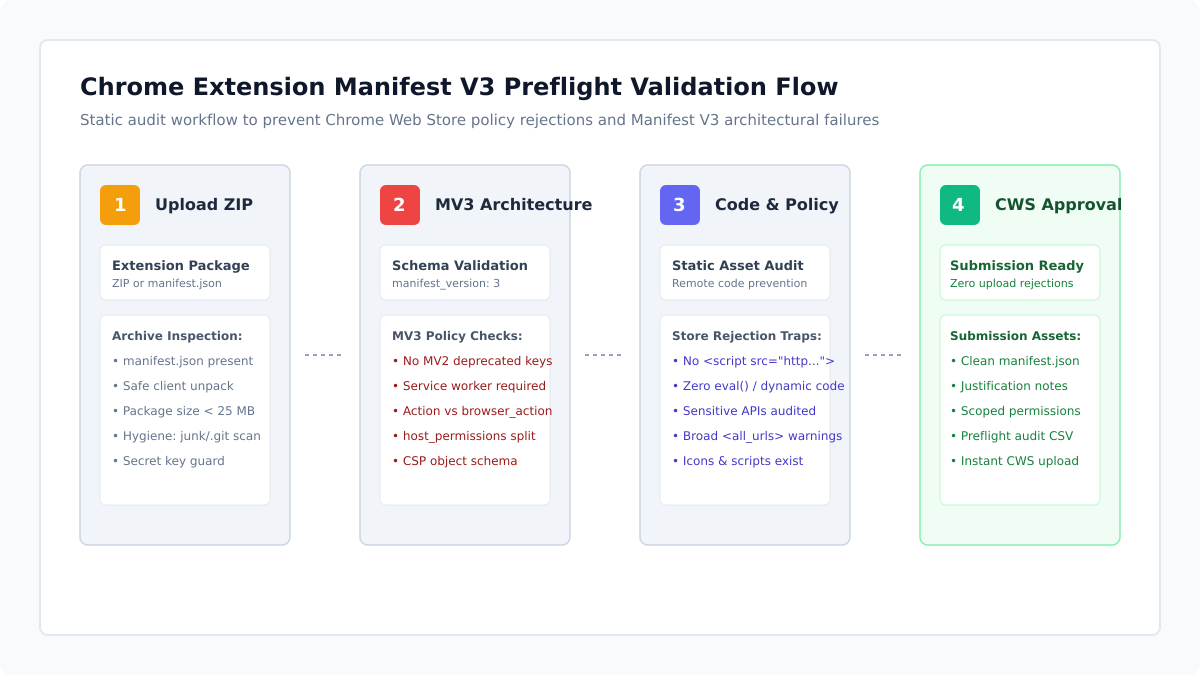
When should you choose PageUtil or Chrome extension loader?
Chrome documents the manifest structure and the meaning of permissions, host permissions and background configuration. A package can contain valid JSON while referring to a missing service-worker file. Reviewing the complete package gives more evidence than examining the manifest text alone.
| Requirement | PageUtil | Chrome extension loader |
|---|---|---|
| Static preparation | Manifest and supplied-package findings | Documented manifest contract |
| Runtime | Prepare a reviewed build | Load and exercise the extension |
| Distribution | Retain diagnostic evidence | Store submission and review |
Is PageUtil free, and what else do you need?
PageUtil Chrome Extension Manifest V3 Validator is free to use without creating a PageUtil account. This covers the tool’s supported workflow and outputs; its technical limits still apply.
Chrome testing and any applicable Chrome Web Store publishing requirements remain separate. A local manifest check does not provide store review, runtime testing or approval.
Compare the complete task, including preparation, review and destination access. Consult the linked provider documentation for current terms; no unverified competitor price is assumed here.
About PageUtil and its free tools
A worked example to test the choice
The manifest declares background.service_worker as worker.js, but the archive contains background.js. Correct the intended reference or packaging process, then load the unpacked extension in Chrome. Check the service worker’s errors and exercise the action that depends on it.
How do you run the PageUtil workflow?
Open Chrome Extension Manifest V3 Validator.
Inspect the manifest or package in PageUtil and review referenced assets, permission placement and supported code-pattern findings. Correct source files and rebuild the extension. Load the intended build in a test Chrome profile, inspect runtime errors and test the extension’s actual user actions.
For the detailed procedure and interpretation, read How to Fix Chrome Extension Manifest V3 and Store Rejection Errors.
What are the practical limits?
Static findings are signals to investigate. They cannot certify safety, prove the absence of remote behavior or guarantee store approval. Permissions should be justified by actual features, and application code needs its own review.
What should you verify before using the result?
Verify the packaged files match the tested build and review the current store submission requirements. Keep manifest findings, runtime checks and policy evidence distinct so each conclusion has a clear basis.
Sources and comparison scope
Prepared on 18 November 2026 using the current PageUtil workflow and the linked official documentation, checked on 17–18 November 2026. The example is illustrative. Competitor descriptions are based on published documentation; this article does not report a comparative performance benchmark.
Continue troubleshooting
- How to Fix Chrome Extension Manifest V3 and Store Rejection Errors
- regex101 Alternative for Testing Regular Expressions
- PageUtil vs regex101 for Google Search Console and GA4 Regex
- Curious Concept Alternative for Formatting JSON
- PageUtil vs CyberChef for Formatting XML
- JWT.io Alternative for Decoding Token Claims
- Diffchecker Alternative for Comparing Text Lines
- Crontab Guru Alternative for Cron Schedule Checks
- PageUtil vs Chrome DevTools for HAR Sanitization
- PageUtil vs Dependabot for Dependency Group Rule Testing
Related tools
Frequently asked questions
Does a valid manifest prove an extension is safe?
No. Review code, permissions, data handling and actual behavior in addition to manifest structure.
Can the checker guarantee Chrome Web Store approval?
No. Store policy and review involve more than the supplied manifest and static package findings.
Why test the full package?
Declared icons, pages and worker scripts can be missing or misnamed even when the manifest parses correctly.
What should I do after fixing a static error?
Rebuild, load the intended extension in Chrome and exercise the affected feature while inspecting runtime errors.
Is the PageUtil tool free to use?
Yes. PageUtil Chrome Extension Manifest V3 Validator is free to use without a PageUtil account. Chrome testing and any applicable Chrome Web Store publishing requirements remain separate. A local manifest check does not provide store review, runtime testing or approval.