When should you choose PageUtil or Diffchecker?
A line comparison preserves order and whitespace as evidence. This is useful for configuration changes where moving a line can alter behavior. For an unordered list, decide whether order should matter before comparing; sorting changes the comparison question and can hide meaningful sequencing.
| Requirement | PageUtil | Diffchecker |
|---|---|---|
| Input | Two pasted texts | Two texts or supported text-file input |
| Interpretation | Added, removed and unchanged lines | Text comparison workflow |
| Follow-up | Run the actual consumer | Run the actual consumer |
Is PageUtil free, and what else do you need?
PageUtil Text Diff is free to use without creating a PageUtil account. This covers the tool’s supported workflow and outputs; its technical limits still apply.
For Diffchecker, check whether the needed text mode and export are included in the current offering. Assess other file types separately rather than assuming a text comparison includes every document workflow.
Compare the complete task, including preparation, review and destination access. Consult the linked provider documentation for current terms; no unverified competitor price is assumed here.
About PageUtil and its free tools
A worked example to test the choice
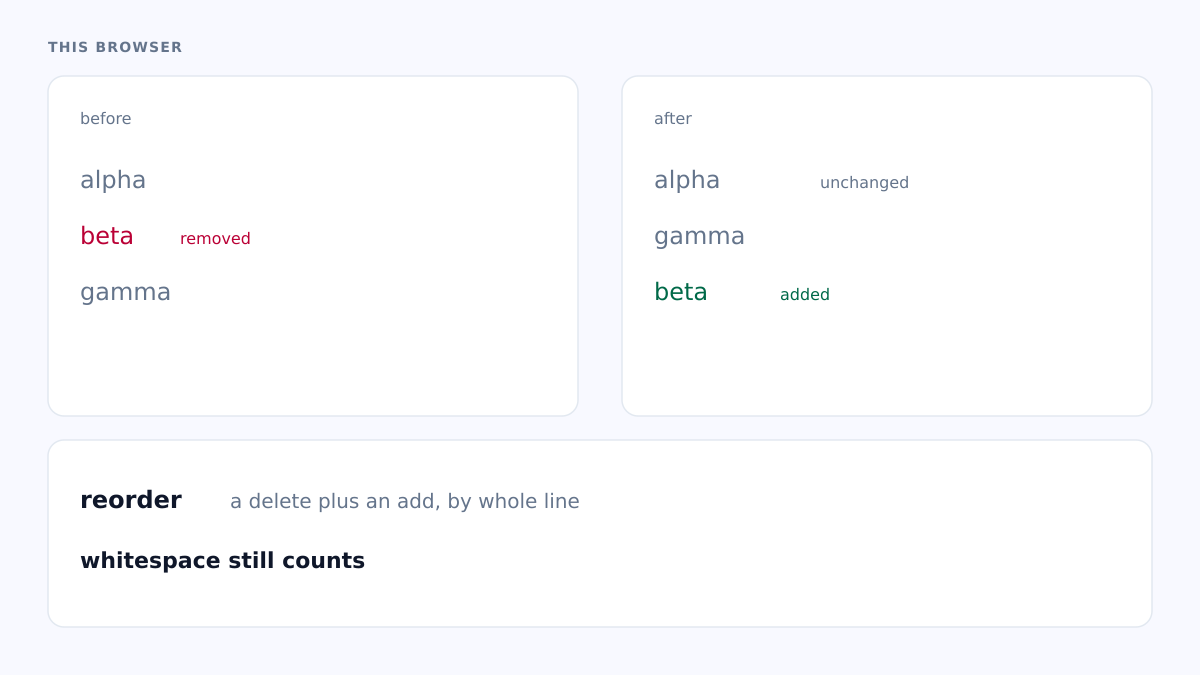
The original list contains alpha followed by beta. The revised list contains beta followed by alpha. A line diff can represent the move as a deletion and addition. The set of values is unchanged, but their sequence differs. Review the actual consumer before dismissing the difference.
Original order:       Revised order:
alpha                 beta
beta                  alpha

Same values; different sequence.
How do you run the PageUtil workflow?
Open Text Diff.
Paste the original on the left and the revision on the right. Inspect added and removed lines around the changed block, including blank lines and trailing spaces. If your contract explicitly ignores order, sort copies of both inputs and compare those separately. Keep the unsorted originals for reference.
For the detailed procedure and interpretation, read How to compare two texts line by line.
What are the practical limits?
Line-level output does not establish semantic equivalence for JSON, XML or source code. Reformatting can produce many changed lines while leaving ordinary parsed values equivalent. Conversely, a one-character edit can materially change a rule or amount.
What should you verify before using the result?
Validate the revised configuration or document through its normal consumer. Retain the inputs and the relevant diff evidence, since the tool does not provide a durable shared project history.
Sources and comparison scope
Prepared on 18 November 2026 using the current PageUtil workflow and the linked official documentation, checked on 17–18 November 2026. The example is illustrative. Competitor descriptions are based on published documentation; this article does not report a comparative performance benchmark.
Continue troubleshooting
- How to compare two texts line by line
- regex101 Alternative for Testing Regular Expressions
- PageUtil vs regex101 for Google Search Console and GA4 Regex
- Curious Concept Alternative for Formatting JSON
- PageUtil vs CyberChef for Formatting XML
- JWT.io Alternative for Decoding Token Claims
- Crontab Guru Alternative for Cron Schedule Checks
- PageUtil vs Chrome DevTools for HAR Sanitization
- PageUtil vs Dependabot for Dependency Group Rule Testing
- PageUtil vs Chrome for Manifest V3 Validation
Related tools
Frequently asked questions
Why does a moved line appear deleted and added?
A line diff compares positions in sequences. Moving the same text can produce a deletion at one position and an addition at another.
Should I sort both sides first?
Only when order is irrelevant to your task. Keep an original-order comparison when sequence can affect meaning.
Do whitespace changes count?
Yes. Blank lines and whitespace can produce line differences, and the consuming format determines whether they matter.
Can a text diff prove two JSON documents mean the same thing?
Raw text comparison shows representation changes. A parsed comparison needs its own rules for numbers, object members and array ordering.
Is the PageUtil tool free to use?
Yes. PageUtil Text Diff is free to use without a PageUtil account. For Diffchecker, check whether the needed text mode and export are included in the current offering. Assess other file types separately rather than assuming a text comparison includes every document workflow.