What to run
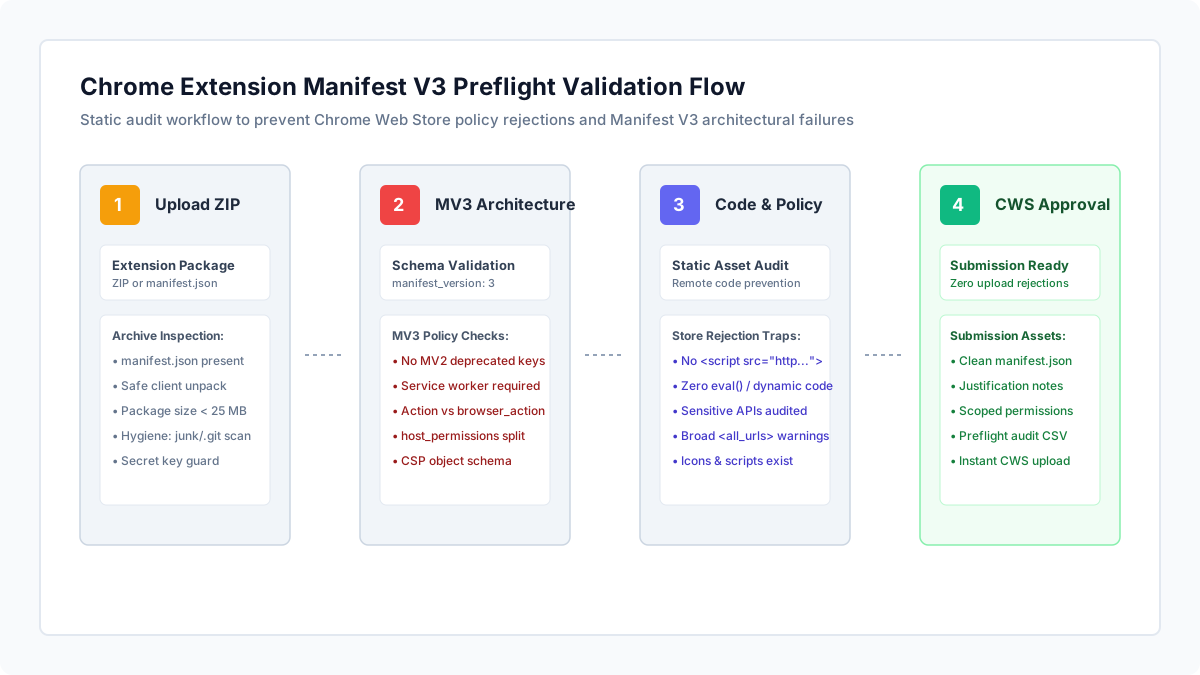
Open Chrome Extension Manifest V3 Validator and upload your extension .zip package, or paste your manifest.json content directly.
Decompression and policy inspection execute 100% locally in your browser using Web Workers. Proprietary extension source code, client assets, and development configuration files are never sent to external servers.
The scanner analyzes your manifest against official Chrome Web Store Manifest V3 requirements, cross-references all declared icons, HTML popups, and service worker files, and inspects bundled scripts for banned remote code patterns.
// Standard Chrome Extension Manifest V3 structure
{
  "manifest_version": 3,
  "name": "Quick Tab Manager",
  "version": "1.0.0",
  "description": "Organize, group, and search active browser tabs locally.",
  "icons": {
    "16": "icons/icon16.png",
    "48": "icons/icon48.png",
    "128": "icons/icon128.png"
  },
  "action": {
    "default_popup": "popup.html"
  },
  "background": {
    "service_worker": "background.js"
  },
  "permissions": ["storage"],
  "host_permissions": ["https://*.example.com/*"]
}
How to read the result
Inspect the status banner and stat cards for Manifest Version, Sensitive Permissions, Host Match Patterns, and Store Blockers.
Eliminate Manifest V2 legacy traps. The Chrome Web Store immediately rejects extensions declaring manifest_version: 2, background.scripts arrays, or legacy browser_action / page_action objects. In Manifest V3, background logic must use background.service_worker, and UI entry points must declare action.
Separate permissions from host permissions. In Manifest V3, domain match patterns like "https://*/*" or "<all_urls>" are strictly banned inside the permissions array; they must be declared under host_permissions.
Check for remote hosted code violations. Manifest V3 strictly prohibits loading executable JavaScript from external CDN URLs or running dynamic eval() calls. Any <script src="https://..."> in your popup or options HTML will cause immediate store rejection.
Review sensitive permission justifications. If your extension requests tabs, cookies, or scripting, prepare clear, concise single-purpose justification statements for your Chrome Web Store submission dashboard.
| CWS Rejection Notice | Root Cause in Extension Package | Actionable Fix |
|---|---|---|
| Manifest version 2 is no longer supported | manifest_version set to 2 or declaring background.scripts | Set manifest_version to 3 and replace background scripts with a service worker |
| Invalid value for permissions[...] | Host match pattern (e.g. "https://*/*") placed in permissions array | Move host match patterns into the dedicated host_permissions array |
| Violation of Remote Hosted Code policy | HTML file includes <script src="https://..."> or JS calls eval() | Download external scripts and bundle them locally in the ZIP package; remove eval() |
| Action / Popup file not found | Declared default_popup or icon path is missing from the ZIP archive | Ensure all file paths declared in manifest.json exist inside the uploaded ZIP |
| Unjustified broad host permissions | Requested "<all_urls>" when only specific domains are needed | Scope host_permissions to specific target domains to speed up manual review |
| Unnecessary sensitive permissions | Declared "tabs" or "webRequest" without functional necessity | Remove unused permissions; use activeTab API instead of full tabs permission if appropriate |
What to open next
If you need to validate or format manifest.json syntax, inspect it with JSON Formatter.
If your extension interacts with JWT tokens or OAuth authentication endpoints, inspect claims with JWT Decoder.
If you publish related documentation on Cloudflare Pages, test header rules with Cloudflare Pages _headers Validator.
In the Chrome Web Store Developer Dashboard: Click "New Item", upload your validated ZIP package, enter your single-purpose justifications, and submit for review.
Stop when
Stop when Store Blockers reaches zero, all declared assets exist in the ZIP, and all sensitive permissions have documented justifications.
Remember that while preflight checks catch syntax and static policy rejections, human reviewers will still assess your extension description, privacy policy link, and single-purpose adherence.
References
Use the linked specifications and product documentation to check behavior in your own environment.
Continue troubleshooting
Related tools
Frequently asked questions
Can I still publish Manifest V2 extensions to the Chrome Web Store?
No. Google has phased out Manifest V2. New submissions and updates using Manifest V2 are automatically rejected by the Chrome Web Store.
Why does Manifest V3 ban remote hosted code like CDN scripts?
Manifest V3 requires all executable code to be bundled locally within the extension ZIP so that Google can review and verify the exact code running on user machines, preventing malicious dynamic updates.
When should I use activeTab instead of the tabs permission?
If your extension only needs access to the current tab when the user clicks the extension action icon, use activeTab. It provides temporary tab access without triggering broad permission warnings during installation.