What to run
Open Text Diff and paste the original text on the left and the new text on the right. The tool stays in the browser; nothing is uploaded.
If order does not matter, sort both sides first with Sort Lines, then run the diff again so pure reordering does not appear as changes.
How to read the result
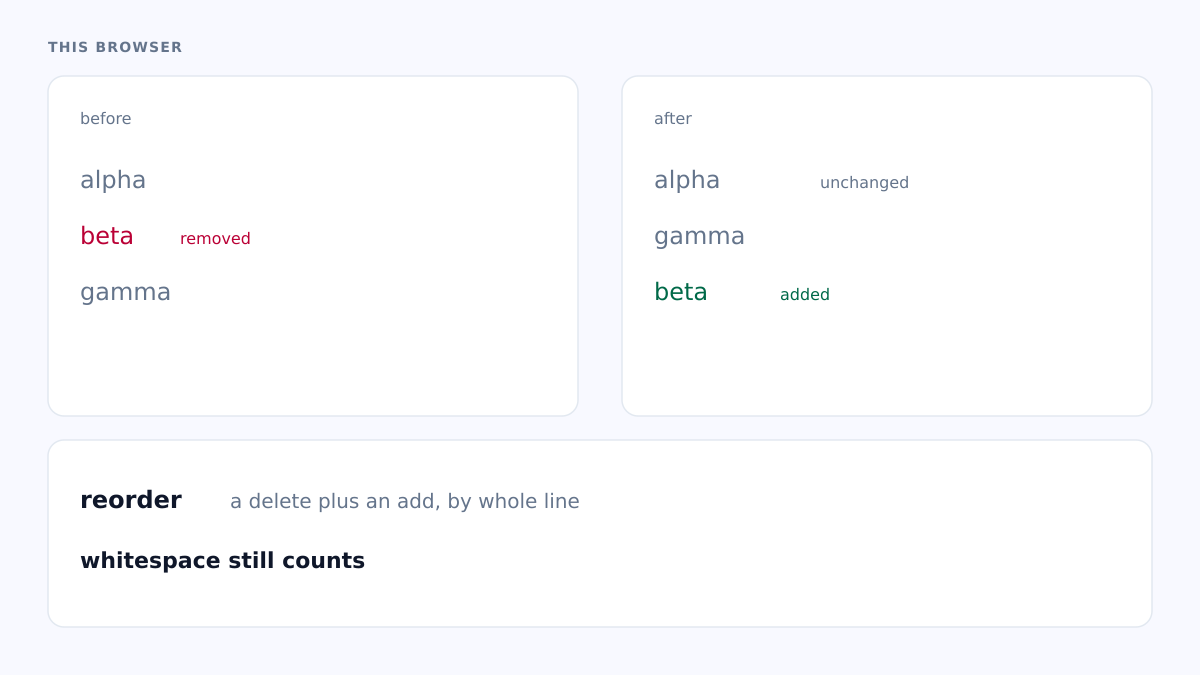
Added, removed, and unchanged marks are by whole line, not by word or character, unless the page says otherwise.
A reorder of the same lines appears as a delete of the old position plus an add of the new position.
Whitespace-only changes still count as a change. Trailing spaces or blank lines are visible differences.
What to open next
If the lists should ignore order, sort both sides with Sort Lines before you diff.
To clean duplicates first, run Remove Duplicate Lines on each side, then diff the cleaned versions.
For a permanent record, copy the marked result. The page does not save the texts.
References
Use the linked specifications and product documentation to check behavior in your own environment.
Continue troubleshooting
Related tools
Frequently asked questions
Is a text diff by line or by word?
Added, removed, and unchanged marks are by whole line, not by word or character, unless the page says otherwise.
How does reordering lines show up in a diff?
A reorder looks like a delete of the old line plus an add of the same line in its new place.
Do whitespace-only line changes count?
Yes. Whitespace-only changes still count as a difference because the comparison is by line.