When should you choose PageUtil or Stripe reports?
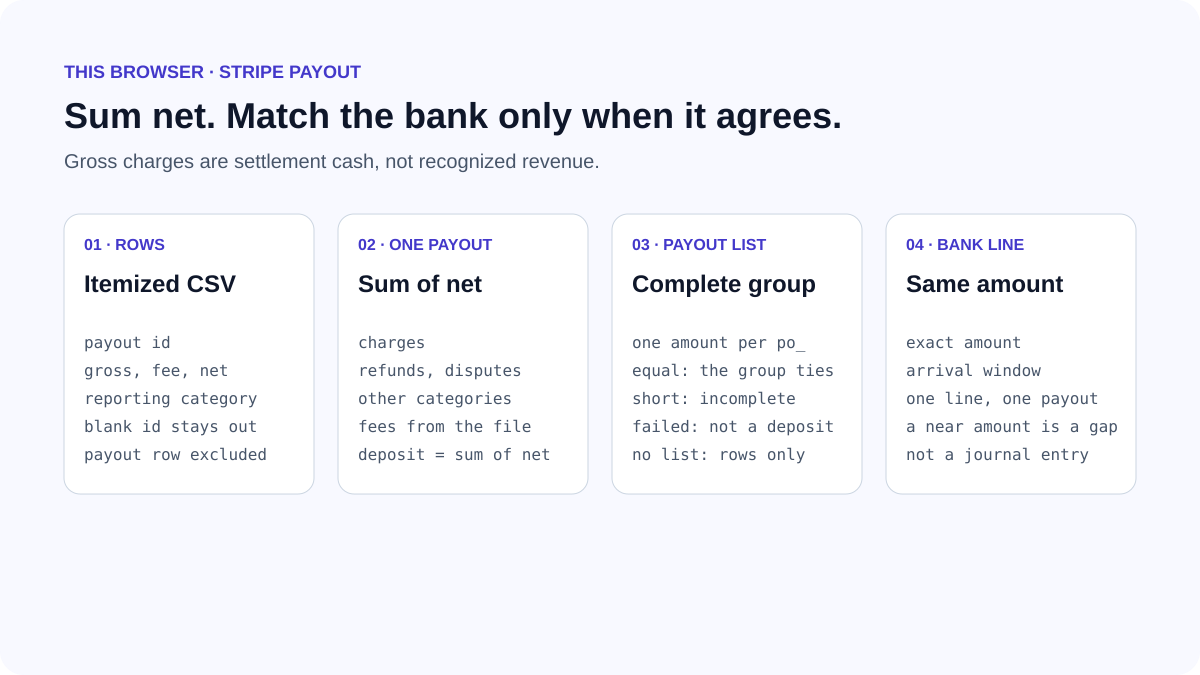
Stripe documents a report that connects a payout with the batch of transactions it settles. PageUtil is useful when reviewing those exported records alongside a bank amount. Timing, fees, refunds and adjustments can explain why a payout differs from an ordinary sales total.
| Requirement | PageUtil | Stripe reports |
|---|---|---|
| Source evidence | Supplied exports and bank amount | Live payout and reconciliation reports |
| Investigation | Local transaction-level comparison | Account-side settlement information |
| Completion | Explain residual differences | Confirm current payout status |
Is PageUtil free, and what else do you need?
PageUtil Stripe Payout Reconciliation is free to use without creating a PageUtil account. This covers the tool’s supported workflow and outputs; its technical limits still apply.
Stripe account access and any applicable service charges remain separate. Compare the reports available for the actual payout with the work of assembling supplied files and reconciling the bank entry.
Compare the complete task, including preparation, review and destination access. Consult the linked provider documentation for current terms; no unverified competitor price is assumed here.
About PageUtil and its free tools
A worked example to test the choice
A simplified settlement has gross receipts of 1,000.00, refunds of 100.00 and fees of 30.00 in the same currency. Net movement is 870.00. Check the actual payout’s included balance transactions before expecting that amount in the bank, because settlement timing or other adjustments can change the batch.
Illustrative settlement, one currency:
Gross receipts     1000.00
Refunds            -100.00
Fees                -30.00
Net movement        870.00
How do you run the PageUtil workflow?
Open Stripe Payout Reconciliation.
Export the relevant payout and transaction evidence from Stripe and preserve the report scope. Load the supported files into the reconciliation tool, select the intended payout and currency, and inspect included and unmatched rows. Compare the computed net amount with both the Stripe payout and bank evidence.
For the detailed procedure and interpretation, read How to Explain a Stripe Payout That Does Not Match the Bank.
What are the practical limits?
Transactions from different currencies cannot be combined as if their units were identical. A matching amount alone does not identify a payout, and a local export can be stale while a payout changes status. Use the live Stripe record for current settlement state.
What should you verify before using the result?
Retain the payout ID, report period, included rows and bank reference. Investigate every residual difference instead of adding a balancing adjustment solely to make the totals agree.
Sources and comparison scope
Prepared on 18 November 2026 using the current PageUtil workflow and the linked official documentation, checked on 17–18 November 2026. The example is illustrative. Competitor descriptions are based on published documentation; this article does not report a comparative performance benchmark.
Continue troubleshooting
- How to Explain a Stripe Payout That Does Not Match the Bank
- ProperConvert Alternative for CSV to QBO
- PageUtil vs QuickBooks CSV Import Checks
- PageUtil vs Xero Bank CSV Import Checks
- DataFeedWatch Alternative for One Time Feed Checks
- PageUtil vs Matrixify for Shopify Translation CSV Checks
- PageUtil vs Rewind for Shopify Theme Settings Recovery
- PageUtil vs ShipStation Product CSV Update Review
- PageUtil vs eBay Seller Hub for Bulk Upload Error Review
Related tools
Frequently asked questions
Why does a payout differ from gross sales?
Fees, refunds, adjustments and settlement timing can affect the included batch. Compare the actual payout’s balance transactions.
Can I add amounts in different currencies?
Keep each currency separate unless an explicit conversion is documented. Equal numeric values do not imply equal monetary units.
Does a matching bank amount identify the payout?
Use the payout ID, currency, timing and bank reference as well. Amount alone is weak identity evidence.
Should I insert an adjustment to force a match?
Investigate the residual first. An unexplained adjustment hides missing or incorrectly scoped evidence.
Is the PageUtil tool free to use?
Yes. PageUtil Stripe Payout Reconciliation is free to use without a PageUtil account. Stripe account access and any applicable service charges remain separate. Compare the reports available for the actual payout with the work of assembling supplied files and reconciling the bank entry.