When should you choose PageUtil or QuickBooks CSV import?
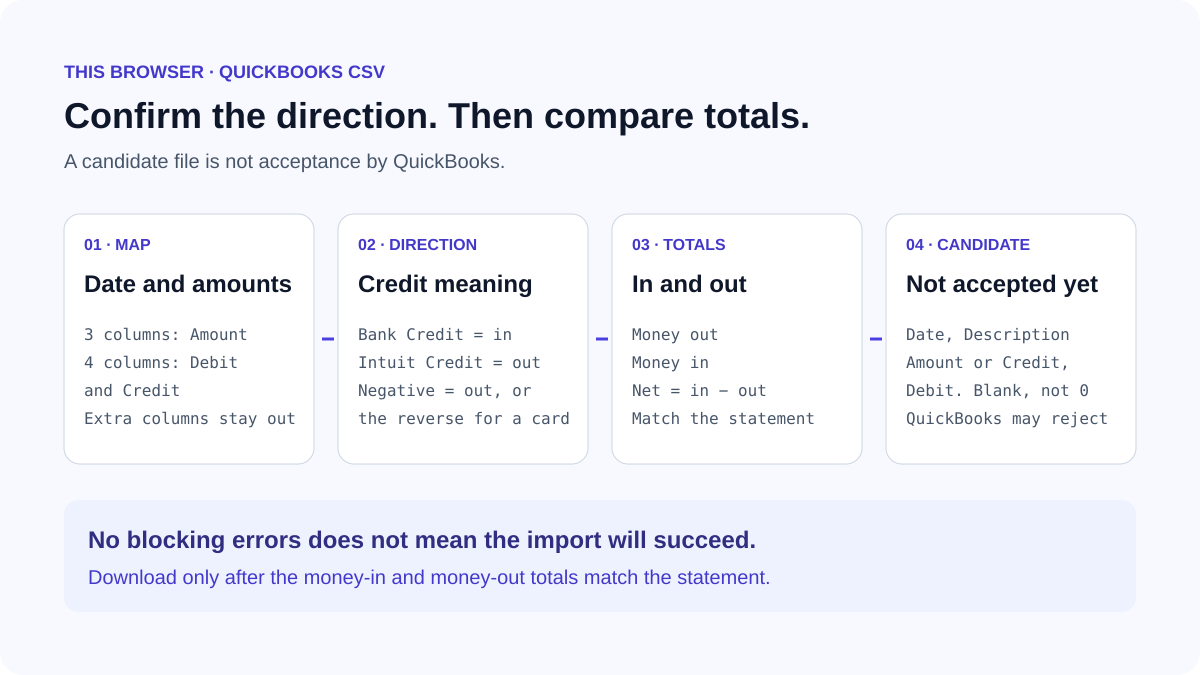
Intuit documents three-column and four-column bank CSV layouts. Source banks can use different debit and credit meanings, so a familiar header name alone is insufficient. PageUtil makes the chosen direction and candidate totals visible before you submit the file.
| Requirement | PageUtil | QuickBooks CSV import |
|---|---|---|
| Before upload | Map source columns and review candidate totals | Prepare the documented CSV layout |
| Import | Download a reviewed candidate | Select account, map and process the file |
| After import | Compare source and candidate evidence | Inspect accepted and rejected transactions |
Is PageUtil free, and what else do you need?
PageUtil QuickBooks CSV Validator is free to use without creating a PageUtil account. This covers the tool’s supported workflow and outputs; its technical limits still apply.
QuickBooks access and the supported import workflow remain necessary. Local preparation does not include a QuickBooks subscription or guarantee that a particular account accepts the candidate file.
Compare the complete task, including preparation, review and destination access. Consult the linked provider documentation for current terms; no unverified competitor price is assumed here.
About PageUtil and its free tools
A worked example to test the choice
A statement shows a 40.00 payment and a 120.00 deposit. Map the source fields and confirm that the candidate reports money out of 40.00 and money in of 120.00. If those totals are reversed, correct the orientation before downloading, even if every row otherwise parses.
How do you run the PageUtil workflow?
Open QuickBooks CSV Validator.
Select the appropriate QuickBooks profile and source date convention. Map date, description and either a signed amount or separate debit and credit columns. Review ambiguous dates and blocking rows, then compare the candidate totals with the statement. Import the reviewed file through the matching QuickBooks screen and inspect its processing result.
For the detailed procedure and interpretation, read How to Fix a QuickBooks Bank CSV Import.
What are the practical limits?
Duplicate-looking transactions can be legitimate. Do not remove them solely because dates and descriptions match. Local validation also cannot establish bank account selection, permissions or the destination’s duplicate decisions.
What should you verify before using the result?
Reconcile the accepted transactions with the statement and investigate any rejected rows before retrying. Retain the source export and the exact mapping so a second attempt uses the same assumptions.
Sources and comparison scope
Prepared on 18 November 2026 using the current PageUtil workflow and the linked official documentation, checked on 17–18 November 2026. The example is illustrative. Competitor descriptions are based on published documentation; this article does not report a comparative performance benchmark.
Continue troubleshooting
- How to Fix a QuickBooks Bank CSV Import
- ProperConvert Alternative for CSV to QBO
- PageUtil vs Xero Bank CSV Import Checks
- PageUtil vs Stripe Reports for Payout Reconciliation
- DataFeedWatch Alternative for One Time Feed Checks
- PageUtil vs Matrixify for Shopify Translation CSV Checks
- PageUtil vs Rewind for Shopify Theme Settings Recovery
- PageUtil vs ShipStation Product CSV Update Review
- PageUtil vs eBay Seller Hub for Bulk Upload Error Review
Related tools
Frequently asked questions
Should I trust the Debit and Credit column names?
Confirm their meaning against known statement transactions. Different source conventions can reverse money-in and money-out.
Can I infer the date order from 03/04/2026?
That value is ambiguous. Use the bank’s documented convention or an unambiguous source date before choosing the profile.
Should I delete duplicate-looking bank rows?
Investigate them first. Two transactions can share a date and description while representing separate real payments.
Does passing local checks mean QuickBooks accepted the file?
No. Read the actual import result and reconcile the account after uploading the reviewed candidate.
Is the PageUtil tool free to use?
Yes. PageUtil QuickBooks CSV Validator is free to use without a PageUtil account. QuickBooks access and the supported import workflow remain necessary. Local preparation does not include a QuickBooks subscription or guarantee that a particular account accepts the candidate file.