When should you choose PageUtil or Xero CSV import?
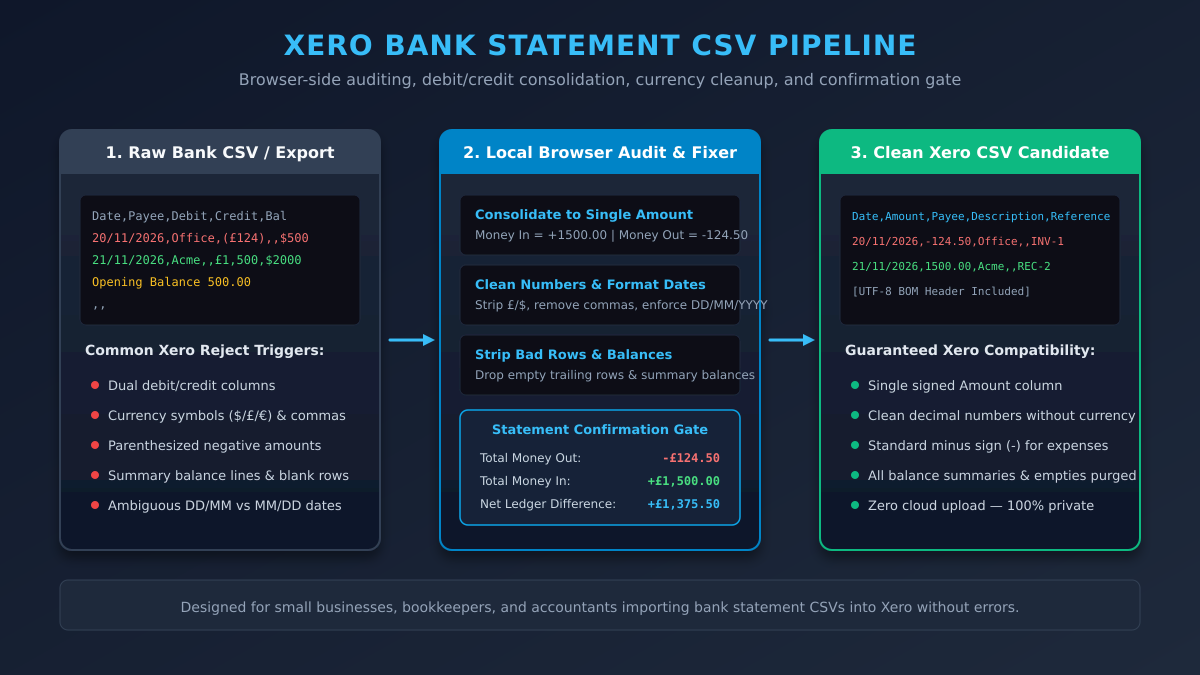
A source with separate withdrawals and deposits needs a deliberate conversion to a signed amount. Xero’s documented CSV import workflow supplies the destination context. PageUtil adds a local preview of how source values become candidate rows, which is especially useful for regional dates and credit-card exports.
| Requirement | PageUtil | Xero CSV import |
|---|---|---|
| Preparation | Local date, sign and column review | Documented bank CSV import format |
| Account context | Supplied source and chosen profile | Actual organization and bank account |
| Completion | Reconcile candidate totals | Review import results and account transactions |
Is PageUtil free, and what else do you need?
PageUtil Xero CSV Validator & Fixer is free to use without creating a PageUtil account. This covers the tool’s supported workflow and outputs; its technical limits still apply.
Xero access and the destination bank-account setup remain necessary. Include the work of obtaining a current template and reconciling the imported statement when comparing routes.
Compare the complete task, including preparation, review and destination access. Consult the linked provider documentation for current terms; no unverified competitor price is assumed here.
About PageUtil and its free tools
A worked example to test the choice
A source has Debit 75.00 on one row and Credit 200.00 on another. Under the chosen bank convention, the candidate should show -75.00 and 200.00. If the source is an inverted ledger export, confirm the convention with the statement before applying the same mapping.
How do you run the PageUtil workflow?
Open Xero CSV Validator & Fixer.
Choose the organization’s date profile, load the original CSV and inspect the column mapping. Review the amount orientation and any transformations to currency symbols or separators. Resolve blocking rows, inspect the candidate and compare money-in and money-out totals with the original statement before exporting.
For the detailed procedure and interpretation, read How to Fix a Xero Bank CSV Import.
What are the practical limits?
A local row check cannot identify the correct tenant bank account or make accounting judgments. An ambiguous date needs source evidence. Repeated rows require investigation, especially when the source period overlaps a previous import.
What should you verify before using the result?
Use Xero’s import preview and processing result, then reconcile accepted transactions with the original statement. Keep the candidate and rejected-row evidence so a retry does not unintentionally duplicate successful records.
Sources and comparison scope
Prepared on 18 November 2026 using the current PageUtil workflow and the linked official documentation, checked on 17–18 November 2026. The example is illustrative. Competitor descriptions are based on published documentation; this article does not report a comparative performance benchmark.
Continue troubleshooting
- How to Fix a Xero Bank CSV Import
- ProperConvert Alternative for CSV to QBO
- PageUtil vs QuickBooks CSV Import Checks
- PageUtil vs Stripe Reports for Payout Reconciliation
- DataFeedWatch Alternative for One Time Feed Checks
- PageUtil vs Matrixify for Shopify Translation CSV Checks
- PageUtil vs Rewind for Shopify Theme Settings Recovery
- PageUtil vs ShipStation Product CSV Update Review
- PageUtil vs eBay Seller Hub for Bulk Upload Error Review
Related tools
Frequently asked questions
Should money out be positive or negative?
For the signed-amount candidate, review the convention selected by the workflow and reconcile it against known payments and receipts.
Can I combine separate debit and credit columns?
Map both source columns and verify the resulting signed amounts. Resolve rows with contradictory values before importing.
Does a clean CSV prove the account balance is correct?
No. Reconcile the accepted transactions and statement balance in the destination account. Local formatting cannot establish completeness.
How should I handle an overlapping statement period?
Review previously imported transactions and the destination’s matching behavior before submitting the overlapping rows again.
Is the PageUtil tool free to use?
Yes. PageUtil Xero CSV Validator & Fixer is free to use without a PageUtil account. Xero access and the destination bank-account setup remain necessary. Include the work of obtaining a current template and reconciling the imported statement when comparing routes.