When should you choose PageUtil or Matrixify?
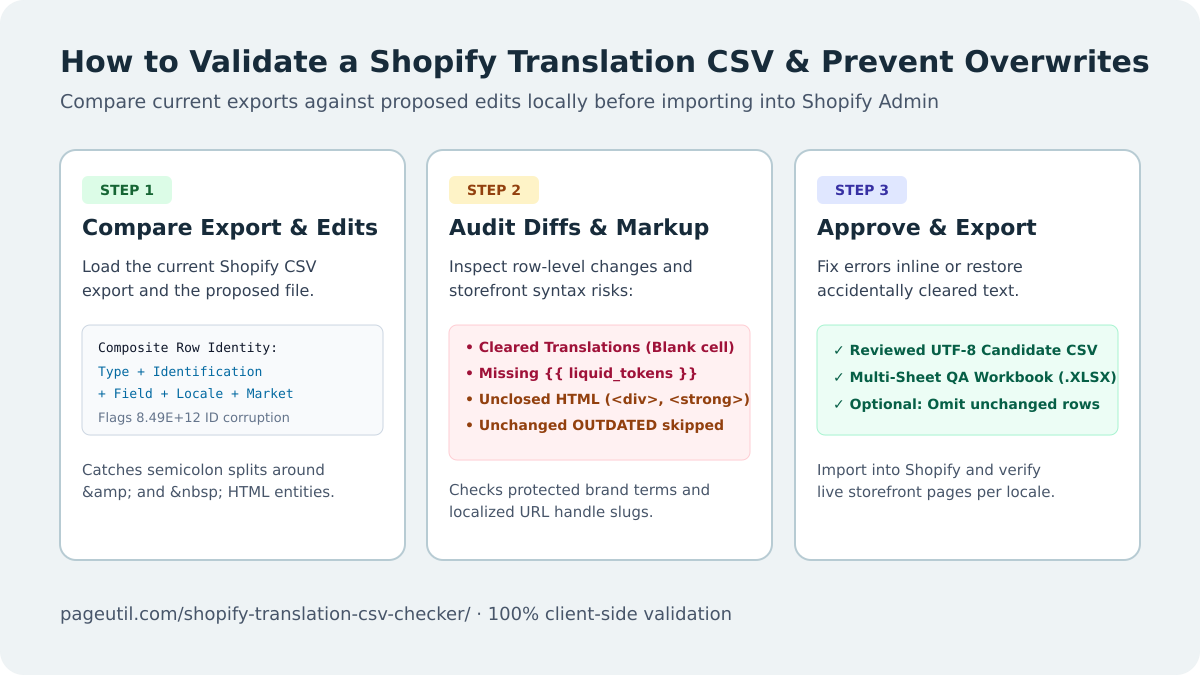
Matrixify documents translation-specific columns, including language and market behavior. PageUtil’s native Shopify comparison uses Type, Identification, Field, Locale and Market together to identify a row. Keep that identity intact while editing Translated content so the intended resource receives the intended translation.
| Requirement | PageUtil | Matrixify |
|---|---|---|
| Preparation | Compare native translation CSV states | Prepare the documented Matrixify translation format |
| Risk review | Clears, identity, placeholders and markup | Importer-specific mapping and processing |
| Live change | Import the reviewed candidate separately | Run the configured Shopify import |
Is PageUtil free, and what else do you need?
PageUtil Shopify Translation CSV Validator is free to use without creating a PageUtil account. This covers the tool’s supported workflow and outputs; its technical limits still apply.
For Matrixify, evaluate the current plan and the actual import/export scope. PageUtil’s comparison still relies on a current Shopify baseline and the authorized Shopify translation import workflow.
Compare the complete task, including preparation, review and destination access. Consult the linked provider documentation for current terms; no unverified competitor price is assumed here.
About PageUtil and its free tools
A worked example to test the choice
A French product description has a translation in the baseline, but the proposed row has an empty Translated content cell. Review it as a possible clear before import. A second row keeps the same translated text while its status is OUTDATED; Shopify’s documented skip behavior means reimporting unchanged text does not necessarily clear that status.
How do you run the PageUtil workflow?
Open Shopify Translation CSV Validator.
Export a fresh baseline from Shopify and compare it with the translator’s proposed file in PageUtil. Inspect cleared and overwritten rows, placeholder differences and HTML findings. Review protected glossary terms where relevant. Export only reviewed corrections and use the matching importer’s preview and result messages.
For the detailed procedure and interpretation, read How to Validate Shopify Translation CSV and Prevent Overwrites.
What are the practical limits?
The checker cannot determine linguistic quality or whether the translation fits every storefront layout. Importing through a different file schema requires explicit mapping. A local check also cannot confirm the store’s current language configuration or permissions.
What should you verify before using the result?
Preview representative translated pages, especially HTML-rich descriptions, placeholders and market-specific content. Keep the baseline, approved import and Shopify result together so skipped or failed rows can be investigated.
Sources and comparison scope
Prepared on 18 November 2026 using the current PageUtil workflow and the linked official documentation, checked on 17–18 November 2026. The example is illustrative. Competitor descriptions are based on published documentation; this article does not report a comparative performance benchmark.
Continue troubleshooting
- How to Validate Shopify Translation CSV and Prevent Overwrites
- ProperConvert Alternative for CSV to QBO
- PageUtil vs QuickBooks CSV Import Checks
- PageUtil vs Xero Bank CSV Import Checks
- PageUtil vs Stripe Reports for Payout Reconciliation
- DataFeedWatch Alternative for One Time Feed Checks
- PageUtil vs Rewind for Shopify Theme Settings Recovery
- PageUtil vs ShipStation Product CSV Update Review
- PageUtil vs eBay Seller Hub for Bulk Upload Error Review
Related tools
Frequently asked questions
Can I import a native Shopify CSV through any translation tool?
Confirm the importer’s documented schema first. Column names and language or market representations can differ.
Does an unchanged translation clear OUTDATED status?
Shopify can skip rows whose translated text is unchanged. Review the current import result and intended content update.
Why are translation identifiers important?
They help identify the exact resource, field, locale and market. Spreadsheet conversion or altered keys can break that match.
Does a placeholder check prove translation quality?
It checks structural evidence. A fluent translation and a correct storefront layout still need human review in context.
Is the PageUtil tool free to use?
Yes. PageUtil Shopify Translation CSV Validator is free to use without a PageUtil account. For Matrixify, evaluate the current plan and the actual import/export scope. PageUtil’s comparison still relies on a current Shopify baseline and the authorized Shopify translation import workflow.
