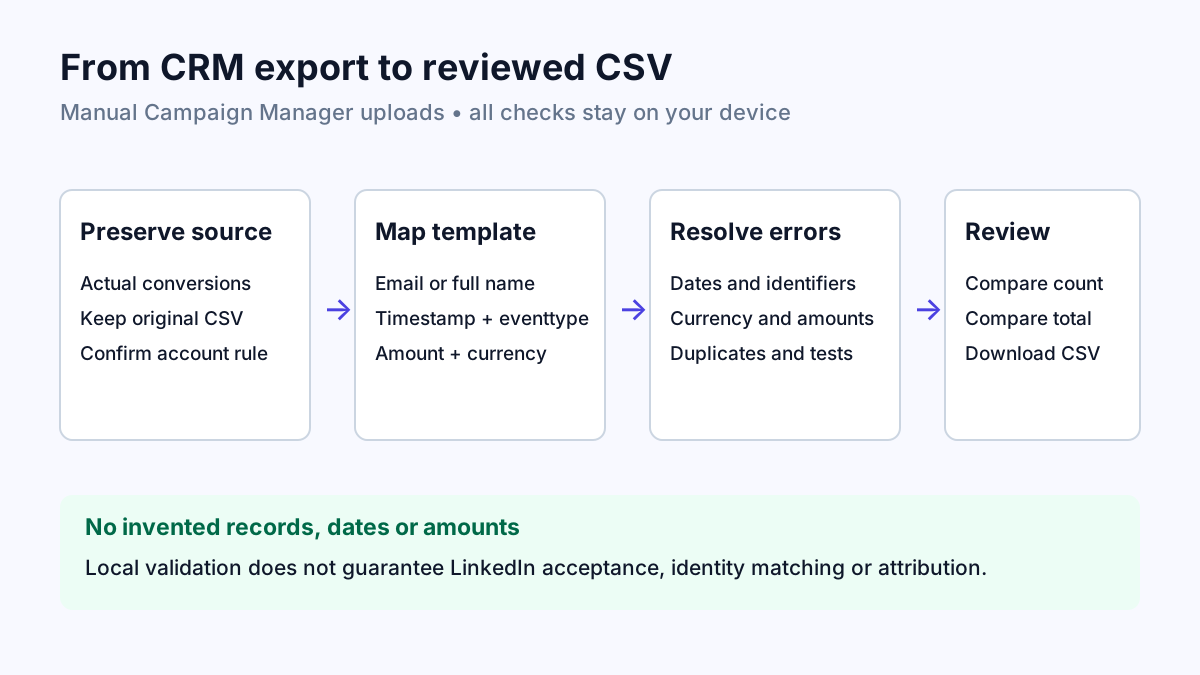
Start with the actual conversion records
Export completed conversions from your CRM. Keep the original file unchanged. Obtain the current CSV template from Campaign Manager and confirm the currency and event type configured in the conversion rule. This tool supports the manual CSV workflow; click IDs alone and Conversions API payloads are not supported.
Open the checker, enter the ad account currency and choose the actual rule event type. Upload CSV text or paste rows. Check the suggested mappings rather than assuming that a CRM field called Date means the conversion date.
email,firstname,lastname,employeecompany,title,country,timestamp,eventtype,amount,currency
[email protected],Ava,Patel,Northwind Analytics,Director,US,1792843200000,purchase,129.50,USD
Resolve dates without changing what happened
Choose the timezone for timestamps that have no offset. Choose day-first or month-first order when slash dates are ambiguous. The candidate exports UTC epoch milliseconds. Invalid, future or older-than-90-day records are blocked. Daylight-saving gaps or repeated local times require an explicit timestamp offset in the source.
A missing date is a source-data problem. The checker never substitutes the upload date or invents a recent date. Correct the record from authoritative CRM information or leave it out through the explicit exclusion option.
Read the report before considering export
Check every blocking row, exact duplicate and suspicious record. The manual CSV format needs an email or both first and last name. Amounts must be positive with at most two decimal places; currency must match the account. Country and name checks do not verify a person or their eligibility for upload.
| Finding | What to inspect |
|---|---|
| Wrong event type | Confirm the event code matches the configured rule and the real source activity. |
| Currency mismatch | Re-export amounts in the account currency from an authoritative system; do not relabel them. |
| Duplicates or shared timestamps | Determine whether these are repeated records or an export/sync time. |
| Missing amount or identifier | Recover the intended source value; this checker does not supply placeholders. |
Compare the candidate with your source report
Removing exact duplicates and excluding blocked rows are separate opt-in decisions. Review the excluded count and audit report. Optional local email hashing normalises plain emails before SHA-256 and preserves existing SHA-256 hashes. Hashing does not remove the need to have permission to use the records.
Compare the candidate row count and total amount with your CRM report for the same period and currency. Tick the confirmation only after that comparison. Download the reviewed CSV and inspect its headers and values before uploading.
Confirm the result in Campaign Manager
Use Measure, Conversion tracking and the intended CSV conversion rule in Campaign Manager. Upload the reviewed file and inspect LinkedIn’s processing result. A passing local report cannot guarantee identity matching, attribution, account permissions or acceptance.
The local checker supports 10 MB, 100,000 rows and 256 columns. Its safety limits are deliberately lower than the platform upload maximum. If the current template differs, stop and compare the requirements rather than renaming unknown fields until the upload appears to pass.
References
Use the linked specifications and product documentation to check behavior in your own environment.
Continue troubleshooting
Related tools
Frequently asked questions
Can the checker fix attribution or match rates?
No. It checks a local file against supported CSV rules. Matching and attribution happen in LinkedIn after upload.
Can a click ID replace the email in this CSV?
No. This manual upload checker requires email or both first and last name. Conversions API identifiers use a different format.
Are conversion records uploaded by PageUtil?
No. Parsing, checks, hashing and downloads run locally. Upload to Campaign Manager is a separate action you perform.