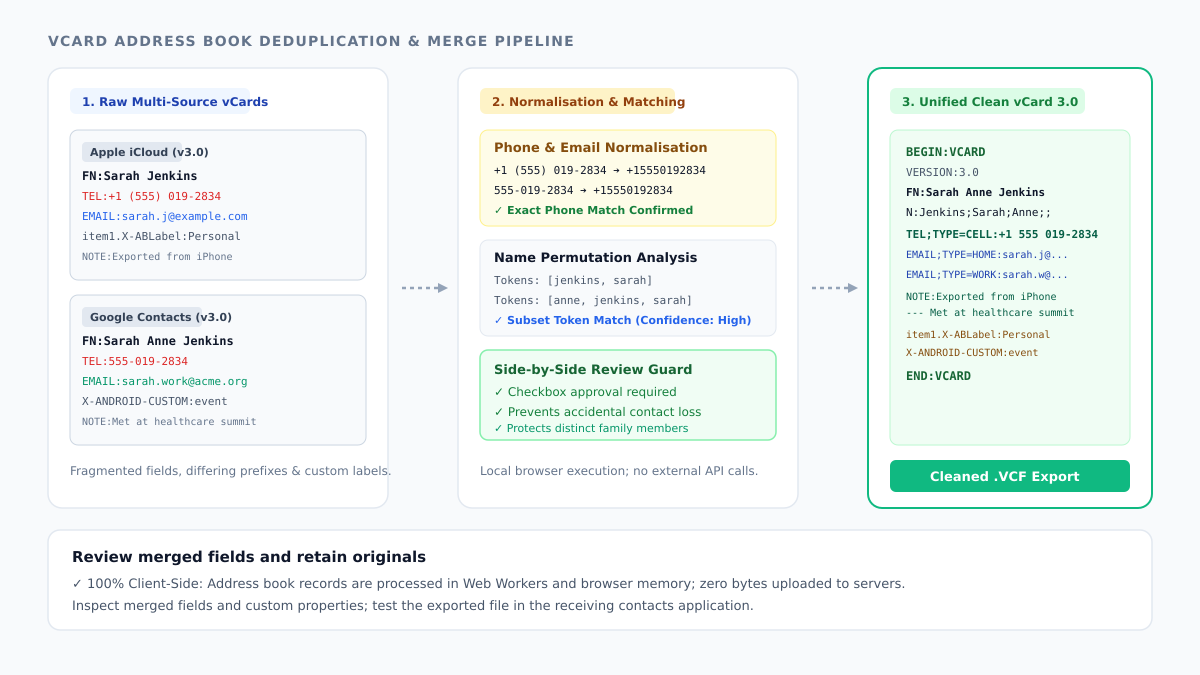
When should you choose PageUtil or Google Contacts?
Google Contacts provides duplicate merging within an account and documents that contacts in different Google Accounts cannot be merged together through that operation. PageUtil works with the exported VCF, which allows a review before adding records to a destination address book.
| Requirement | PageUtil | Google Contacts |
|---|---|---|
| Before import | Review a supplied VCF locally | Use account import and subsequent contact review |
| Existing account | Export the relevant records for file review | Merge duplicates in the account |
| Identity decision | Inspect candidate matches and retained fields | Inspect suggested and selected merges |
Is PageUtil free, and what else do you need?
PageUtil VCF Duplicate Remover is free to use without creating a PageUtil account. This covers the tool’s supported workflow and outputs; its technical limits still apply.
Google Contacts cleanup requires access to the relevant account. Compare account-side merging with reviewing an exported VCF, including the effort to preserve fields and import the reviewed result.
Compare the complete task, including preparation, review and destination access. Consult the linked provider documentation for current terms; no unverified competitor price is assumed here.
About PageUtil and its free tools
A worked example to test the choice
Two contact cards share a household phone number but have different names and email addresses. Treat the common phone as a candidate relationship, not an automatic identity decision. A third card repeats the same person’s old email and may require a deliberate field-preservation choice.
How do you run the PageUtil workflow?
Open VCF Duplicate Remover.
Keep the original VCF and inspect candidate duplicate groups. Compare names, phone numbers, emails and any important notes before accepting a merge. Review which values survive in the candidate export. Import a small sample into the intended address book and inspect the resulting contact fields.
For the detailed procedure and interpretation, read How to merge and remove duplicate VCF contacts.
What are the practical limits?
A matching name or shared phone cannot prove two records describe the same person. Destination address books may interpret labels and custom vCard properties differently. Verify critical fields after import.
What should you verify before using the result?
Reconcile original, merged and exported contact counts. Keep unresolved identity cases for manual review and retain the source VCF until the destination contacts are confirmed.
Sources and comparison scope
Prepared on 18 November 2026 using the current PageUtil workflow and the linked official documentation, checked on 17–18 November 2026. The example is illustrative. Competitor descriptions are based on published documentation; this article does not report a comparative performance benchmark.
Continue troubleshooting
- How to merge and remove duplicate VCF contacts
- dmarcian XML to Human Alternative for DMARC Reports
- MxToolbox Alternative for Email Header Analysis
- PageUtil vs ZeroBounce for Email List Cleanup
- MxToolbox Alternative for Generating SPF Records
- dmarcian Alternative for Generating DMARC Records
- PageUtil vs MxToolbox for Email Health Checks
- PageUtil vs Google Contacts CSV Import Mapping
Related tools
Frequently asked questions
Can two people share the same phone number?
Yes. Shared household or business numbers can create false duplicate candidates. Review additional identity fields.
Can Google merge contacts across separate accounts?
Its documented duplicate-merge workflow applies within an account. Plan any cross-account transfer and review separately.
Will all custom vCard fields survive import?
Check the destination’s field support and inspect a sample. Custom labels and properties can be interpreted differently.
Should I keep the original VCF?
Yes, until the reviewed output has been imported and verified. It preserves the source fields and unresolved identity evidence.
Is the PageUtil tool free to use?
Yes. PageUtil VCF Duplicate Remover is free to use without a PageUtil account. Google Contacts cleanup requires access to the relevant account. Compare account-side merging with reviewing an exported VCF, including the effort to preserve fields and import the reviewed result.