Why address books accumulate duplicate contacts across devices and platforms
Modern contact management is rarely confined to a single device. A professional smartphone user frequently maintains personal contacts in Apple iCloud, business contacts in Google Workspace or Microsoft Exchange, and legacy contacts stored directly on a physical SIM card or local device storage. When accounts synchronize across iOS, macOS, Windows, and Android, contact synchronization daemons regularly create separate records for the same individual rather than merging them.
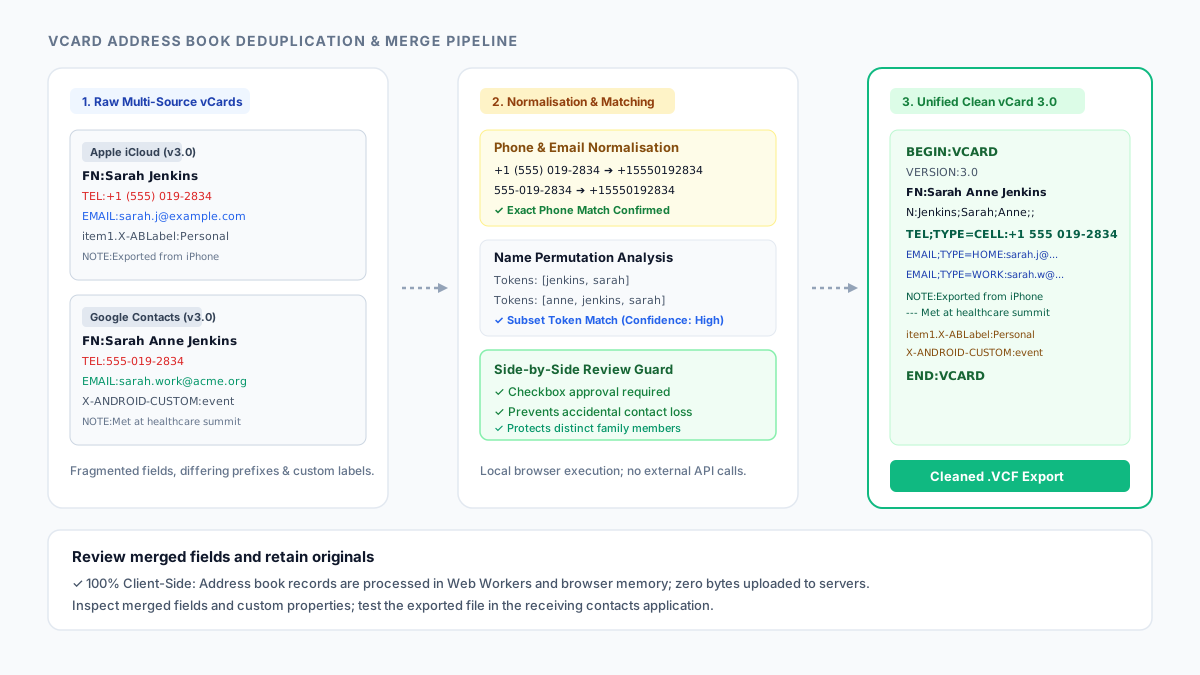
These duplicates rarely contain identical text. An iPhone might store a colleague as "Sarah Jenkins" with an international dialling prefix (+1 555-019-2834) and an Apple custom label (item1.X-ABLabel). An Android device might store the same individual as "Sarah Anne Jenkins" with a national phone number (555-019-2834) and a work email address. Simple line deduplicators such as Remove Duplicate Lines cannot identify or merge these records because the lines and property orders differ completely.
Worse, naive contact cleaner utilities often strip unfamiliar vCard fields—silently deleting birthdays, postal addresses, high-resolution contact photos, and corporate job titles during the cleanup process. Inspecting differences between raw vCard exports in Text Diff reveals that lossy cleaning tools routinely discard essential metadata.
How vCard standards differ across version 2.1, 3.0, and 4.0 specifications
The electronic business card format has evolved through several specification revisions overseen by the Internet Engineering Task Force (IETF): vCard 2.1 (IMC), vCard 3.0 (RFC 2426), and vCard 4.0 (RFC 6350). Each dialect defines distinct rules for parameter encoding, line folding, character escaping, and property syntax.
In legacy vCard 2.1, property parameters often omit explicit type keys (for example, TEL;CELL;VOICE:+15551234567 instead of TEL;TYPE=CELL,VOICE). In vCard 3.0 and 4.0, structured types require key-value syntax. Line folding in RFC 2425 mandates that long lines wrapped across multiple lines begin with whitespace (a space or horizontal tab), which parsers must unfold before evaluating values.
Furthermore, major mobile platforms inject vendor-specific extension properties. Apple Address Book uses item1.X-ABLabel and X-ABShowAs to store custom phone tags and company card flags. Android injects X-ANDROID-CUSTOM cursor items for contact events and messaging identifiers. An effective cleaner must parse and retain these properties losslessly.
| vCard Feature | vCard 2.1 (Legacy) | vCard 3.0 (RFC 2426) | vCard 4.0 (RFC 6350) |
|---|---|---|---|
| Parameter Syntax | TEL;CELL;VOICE:+1... | TEL;TYPE=CELL,VOICE:+1... | TEL;TYPE="cell,voice":tel:+1... |
| Line Folding Delimiter | CRLF followed by Space/Tab | CRLF followed by Space/Tab | CRLF followed by Space/Tab |
| Character Escaping | Backslash or quoted-printable | Backslash (\, \; \n \\) | Backslash (\, \; \n \\) |
| Mandatory Name Properties | N optional, FN optional | FN mandatory, N recommended | FN mandatory, N recommended |
| Apple Extension Grouping | Not standard | item1.TEL / item1.X-ABLabel | item1.TEL / item1.X-ABLabel |
| Android Custom Metadata | Not standard | X-ANDROID-CUSTOM properties | X-ANDROID-CUSTOM properties |
How to merge duplicate vCard files step by step
Open VCF Duplicate Remover in your browser. Drag and drop one or more .vcf or .vcard files into the upload area. If you are merging contacts from multiple devices, select your iCloud export and Google Contacts export simultaneously; the parser combines them in browser memory without sending bytes over the internet.
The engine normalizes telephone numbers by stripping punctuation and resolving country dialling prefixes (for example, matching national 10-digit numbers to +1 international counterparts). It standardizes email addresses and evaluates name token permutations to detect inverted naming conventions like "John Smith" and "Smith, John".
Review the Proposed Merges panel. High-confidence duplicates (matching telephone numbers or email strings) are automatically selected for merging. Review recommended items (matching names with differing contact details) can be verified individually. Inspect the side-by-side card comparison showing Record 1, Record 2, and the unified merged preview.
Click Download Cleaned VCF to save the consolidated, deduplicated address book. Import this cleaned file back into your primary contacts application (iCloud Contacts, Google Contacts, or Outlook).
// Example: Merging separate iPhone and Android vCards into a unified record
// Card 1 (iPhone export):
BEGIN:VCARD
VERSION:3.0
FN:Sarah Jenkins
TEL;TYPE=CELL:+1 (555) 019-2834
EMAIL;TYPE=HOME:[email protected]
item1.X-ABLabel:Personal Mobile
END:VCARD

// Card 2 (Android export):
BEGIN:VCARD
VERSION:3.0
FN:Sarah Anne Jenkins
TEL;TYPE=WORK:555-019-2834
EMAIL;TYPE=WORK:[email protected]
NOTE:Met at healthcare conference
END:VCARD

// Unified Cleaned vCard Output:
BEGIN:VCARD
VERSION:3.0
FN:Sarah Anne Jenkins
N:Jenkins;Sarah;Anne;;
TEL;TYPE=CELL:+1 (555) 019-2834
EMAIL;TYPE=HOME:[email protected]
EMAIL;TYPE=WORK:[email protected]
NOTE:Met at healthcare conference
item1.X-ABLabel:Personal Mobile
END:VCARD
Stop when
You have reviewed and approved all high-confidence merge proposals and verified any ambiguous name-only matches.
You have downloaded the clean, consolidated VCF file and verified that unique non-duplicate contacts remain fully intact.
Do not permanently delete your original address book exports until you have confirmed successful reimport into your mobile or desktop contacts application.
References
Use the linked specifications and product documentation to check behavior in your own environment.
Related tools
Frequently asked questions
Will running this duplicate cleaner upload my address book to a server?
No. All vCard parsing, phone number normalisation, record matching, and VCF file generation execute entirely inside your local browser. No personal phone numbers, names, or contact files are ever transmitted to any external server.
How does the cleaner differentiate between family members who share a home phone?
The tool shows side-by-side comparison cards for every candidate duplicate. If two family members share a home landline but have different names, you can uncheck the merge approval checkbox for that group to preserve them as independent contacts.
Can this tool merge contact files exported from both iPhone and Android?
Yes. You can upload multiple VCF files from differing platforms at the same time. The cleaner normalizes dialling formats across platforms, detects duplicates between iCloud and Google Contacts, and merges them into a single clean file.
Does the cleaner retain custom Apple labels, birthdays, and contact photos?
Yes. The cleaner aims to retain supported properties, including custom fields and photos. Compare the merged preview and exported values with the originals, then test reimport; conflicting fields and consumer support can affect what survives.