What to run
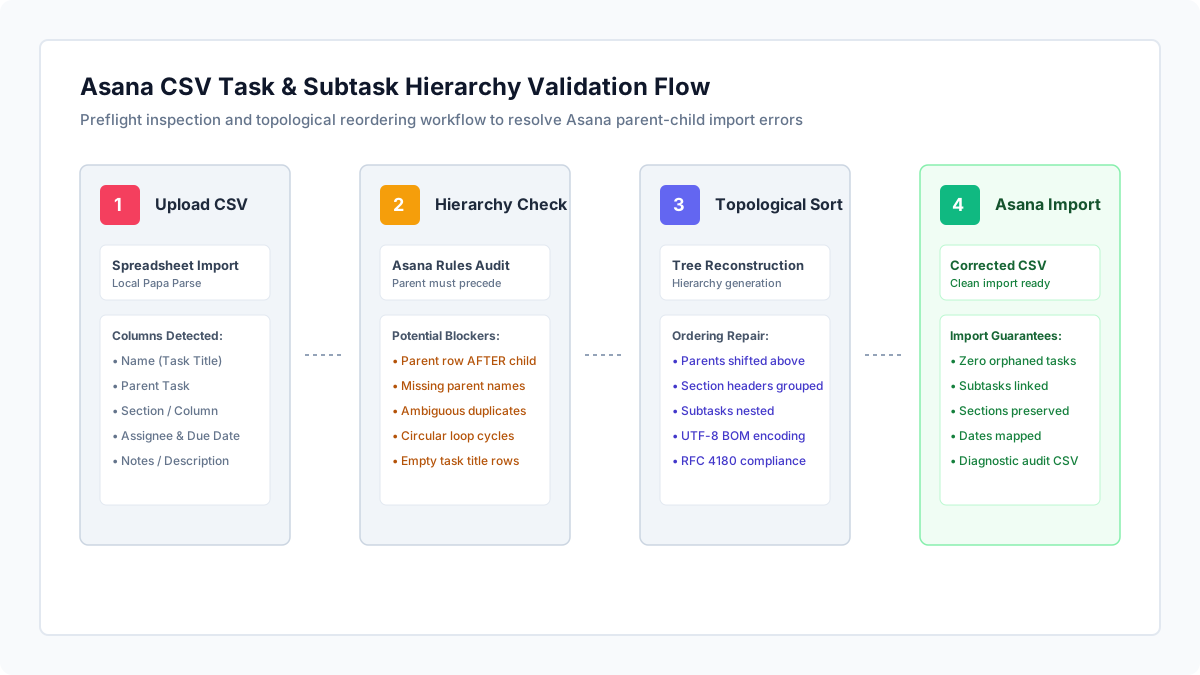
Open Asana CSV Import Checker and drop your project CSV into the upload area, or paste your spreadsheet records directly.
Processing executes entirely in your browser using local JavaScript. Task names, internal milestones, assignee email addresses, and client notes are never sent to external servers.
The validator maps your column headers to Asana standard fields (Name, Parent Task, Section/Column, Assignee, Due Date, and Notes) and verifies that every child task points to a valid, preceding parent task.
// Correct Asana CSV hierarchy ordering (Parent MUST precede Subtasks)
Name,Parent Task,Section/Column,Assignee,Due Date,Notes
Sprint 2 Planning:,,Planning,,,Milestone kickoff
Architecture Review,Sprint 2 Planning:,Planning,[email protected],2026-11-04,System diagrams
Review API Specs,Architecture Review,Planning,[email protected],2026-11-06,OpenAPI endpoints
Security Audit,Architecture Review,Planning,[email protected],2026-11-08,Threat model
How to read the result
Inspect the status banner and stat cards for Total Rows, Subtasks, Row Order Errors, and Missing Parents.
Diagnose the #1 Asana CSV bug: parent tasks ordered after subtasks. Asana documentation explicitly specifies that a parent task must appear on an earlier row than its subtasks. If a child task appears on line 4 but its parent task is on line 8, Asana cannot link them and creates an orphaned task instead.
Check for missing parent names and typos. Asana connects subtasks to parents by matching exact text in the Parent Task column. Extra spaces, spelling differences, or omitted parent rows prevent subtasks from attaching.
Review the Hierarchy Tree Preview tab to verify task, subtask, and section groupings visually. If any subtask is orphaned, it is highlighted with a warning badge.
Click Download Corrected CSV (Auto-Reordered) to export a sanitized spreadsheet where all tasks are sorted topologically so parents always precede their children.
| Visible Symptom in Asana | Root Cause in Spreadsheet | Actionable Fix |
|---|---|---|
| Subtasks imported as standalone top-level tasks | Parent task appears below its subtasks in CSV row order | Click Download Corrected CSV to automatically reorder rows so parents appear first |
| Parent task field left blank after import | Subtask Parent Task column contains a typo or references a task name not in the CSV | Correct spelling in Parent Task column to match exact Name of target parent task |
| Subtasks attached to the wrong parent task | Multiple parent tasks share the exact same Name across different sections | Make parent task names unique across the project (e.g. "Design - Mobile" vs "Design - Web") |
| Section headers imported as normal tasks | Section row is missing a trailing colon ":" or Section/Column heading | Add a colon at the end of section names (e.g. "Sprint Backlog:") or use Section column |
| Due date rejected or parsed incorrectly | Non-standard date formats (e.g. textual dates like "Nov 5th") | Format dates as YYYY-MM-DD or MM/DD/YYYY before importing |
What to open next
If your project CSV contains messy quotes, corrupted European semicolon delimiters, or line break issues, repair it first with CSV Fixer.
If you are migrating tasks between project management platforms, compare Atlassian issue structures with How to Check Jira CSV Parent References and Hierarchy.
If your team manages QA test cases alongside project sprints, check test suites with Azure DevOps Test Case CSV Validator.
Inside Asana: Open your target project, click the project header dropdown, select Import > CSV, and choose your corrected file.
Stop when
Stop when Row Order Errors and Missing Parents both reach zero, and your task tree in the preview tab reflects your intended project structure.
Remember that Asana CSV import creates tasks in the currently open project; workspace custom field mappings should be confirmed during Asana's import review step.
References
Use the linked specifications and product documentation to check behavior in your own environment.
Continue troubleshooting
Related tools
Frequently asked questions
Why does Asana require parent tasks to appear before subtasks in a CSV?
Asana processes CSV imports sequentially from top to bottom. If a subtask row is processed before its parent has been created, the importer has no existing task record to attach the subtask to.
Can subtasks in Asana have their own subtasks (multi-level nesting)?
Yes. Asana supports multi-level subtasks. In your CSV, set the child subtask Parent Task value to the immediate parent subtask Name, and ensure each level appears below its immediate parent.
How do I represent sections when importing tasks into Asana?
You can represent sections either by including a Section/Column header column, or by ending task names with a colon (for example, "Backlog:"), which Asana automatically converts into section dividers.