What to run
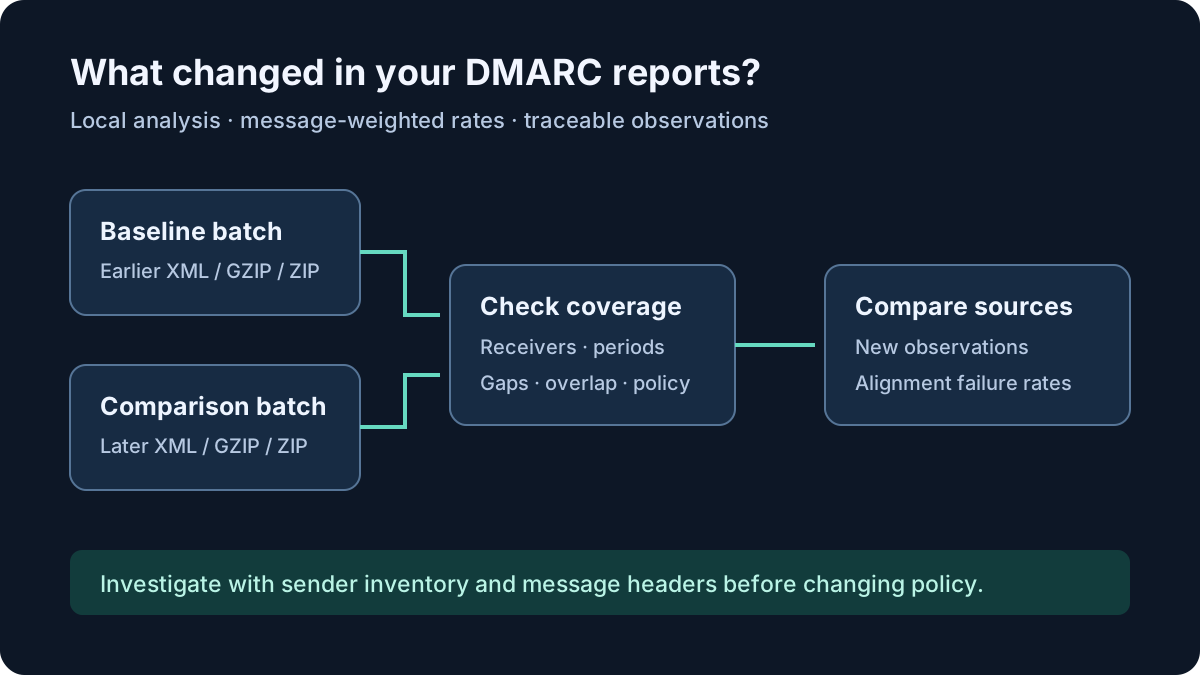
Open DMARC Report Analyser. Select the earlier XML, GZIP or ZIP files as the baseline and the later files as the comparison. Processing stays in the browser. Use the synthetic sample first to see an existing source develop failures and a different source appear.
Use the same policy domains and receiving organisations for both batches. A week of reports from one receiver is not equivalent to one day from several receivers. Check the UTC reporting periods rather than attachment names or the day an email arrived. Exact duplicate reports within a batch are counted once; conflicting report identities are excluded with a caution.
Review import cautions before using totals. A malformed XML file can be excluded while other reports remain usable. Reduce oversized batches rather than assuming omitted data was processed. ZIP files can contain multiple XML reports; nested archives are skipped.
For reproducible examples, download the DMARC Before-and-After Test Pack below. It includes synthetic source XML, expected message counts and failure rates, and a short interpretation guide. Extract the ZIP first; select only the XML inside one case’s baseline folder for Baseline reports and its comparison folder for Comparison reports. Do not import the whole pack as one batch.
The cases show an authorised sender failing before a configuration fix and passing afterwards, an unexpected IP in the second period, and apparent improvements caused by a missing reporting organisation or a shortened reporting window. Sender identities and configuration changes are fictional scenario context; the XML alone cannot establish ownership or the cause of a change.
Download the DMARC Before-and-After Test Pack (ZIP)
How to read the result
DMARC passes when aligned SPF or aligned DKIM passes. Read policy_evaluated for that receiver verdict. A raw SPF pass under auth_results can authenticate a provider’s own domain without aligning with your visible From domain. One failing mechanism therefore does not necessarily mean DMARC failed.
Percentages are weighted by message counts. If one row represents 900 passing messages and another represents 100 failures, the failure rate is 10 percent, not 50 percent. A move from 10 percent to 15 percent is an increase of five percentage points. Compare rates alongside the underlying volumes; a low-volume source can show a large percentage change.
New in comparison means the policy domain, visible From domain and source IP combination did not appear in the supplied baseline. It does not prove the sender is new to your organisation. Provider address pools, forwarding and incomplete baseline coverage all affect that observation.
Read gap, overlap and policy cautions, then expand report provenance. Overlapping reports can represent repeated observations, while missing days can hide intermittent senders. Reported disposition records the receiver’s action; none does not establish inbox delivery. Reports describe observations and do not authenticate their own contents.
What to open next
Export all report rows to retain receiver, report ID, UTC period, policy, source IP, alignment, raw authentication and override reasons. Export source changes for the complete comparison, including sources beyond the first 200 displayed rows. Search filters affect the displayed source table, not the export.
Match unexpected sources against your authorised sender inventory and examine representative message headers. Check current published records with DNS Lookup, remembering that today’s DNS may differ from the policy recorded in an older report. Do not automatically authorise an IP because it appears in aggregate data.
Use XML Formatter for local structure inspection of an individual report. Email Validator checks address syntax only; it cannot establish ownership of a reporting mailbox. For related DNS problems, read Two SPF records on one domain: find the conflict.
Stop when
You can account for the reporting periods, explain excluded files and trace each important change to its receiver observations. Confirm legitimate services using provider settings and message evidence before altering SPF, DKIM or enforcement policy.
Aggregate analysis alone cannot distinguish every legitimate forwarding path from abuse. Keep unexplained sources under review rather than treating a failure label as a blocking recommendation.
References
Continue troubleshooting
Related tools
Frequently asked questions
Why does raw SPF pass while DMARC fails?
Raw SPF can pass for a domain that does not align with the visible From domain. DMARC needs aligned SPF or aligned DKIM to pass.
Does a new IP prove spoofing?
No. It means the source combination was absent from your supplied baseline. Check sender inventory, coverage and representative message headers before classifying it.
Can I compare unequal reporting periods?
Yes, but review the time span and receiver coverage cautions. Raw totals and even failure rates can change because the reporting population differs.
Are local report contents stored?
The analyser keeps report data in browser memory for the current session. Clear the analysis or leave the page to discard it; downloaded CSV files remain on your device.