What to run
Choose the original feed and validate it locally. Filter by gtin to find length, character and checksum failures. Google accepts GTIN digit lengths of 8, 12, 13 or 14, with specific guidance to expand UPC-E and convert ISBN-10. Spaces and hyphens are ignored for the digit check; leading zeros remain part of the identifier.
For a reproducible checksum example, 4006381333931 has a valid check digit. Changing its last digit to 2 makes the checksum fail. This demonstrates arithmetic only: it is not evidence that this identifier belongs to your product or that you may advertise it. Do not copy example identifiers into a live catalog.
GTIN example: 4006381333931
Expected final digit: 1
Changed example: 4006381333932 → checksum failure
How to read the result
For the check-digit calculation, start with the digit immediately before the final digit, multiply alternating digits by three and one, and add the products. The check digit is the amount needed to reach the next multiple of ten. The validator reports the expected digit to explain a mismatch; it does not rewrite the identifier.
Check a failure against the barcode packaging, manufacturer records or authoritative identifier data. Any preceding digit might be wrong. Replacing the last digit can create an arithmetically valid identifier that still describes another item. Scientific notation, lost zeros and rounded numbers must be recovered from the original source rather than guessed.
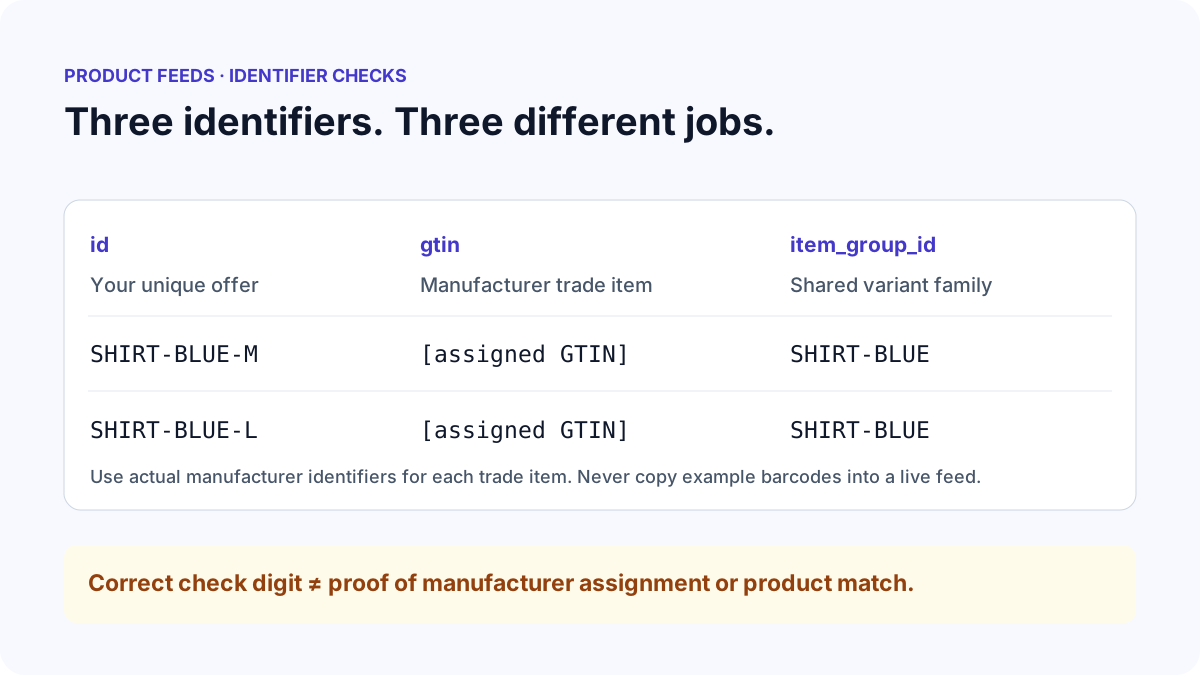
Duplicate product IDs are errors within the current file. Different variants need different id values, while their item_group_id can be shared. Repeated GTINs across records are not automatically classified as duplicate-ID errors: packaging, variants and the actual product relationship require context. Supplemental sources also require unique IDs, but their matches to account products cannot be checked locally.
| Attribute | Meaning | Expected uniqueness |
|---|---|---|
| id | Your stable product or offer identifier | Unique per product/variant in this file |
| gtin | Manufacturer-assigned trade-item identifier | Must match the actual trade item |
| item_group_id | A group of related product variants | Shared across members of a variant group |
| mpn | Manufacturer part number | Use the actual manufacturer value |
What to open next
If digits changed after opening an export in Excel, inspect the original bytes with CSV Fixer. Its text-cell workbook export can preserve existing identifiers during review. It cannot reconstruct digits or zeros already lost in a saved source. Keep identifiers as strings throughout your exporter and import workflow.
Some products have no assigned GTIN. Review the category-specific brand, MPN and identifier_exists requirements rather than generating a number or declaring every missing GTIN an error. If the source says identifier_exists is no while it includes a GTIN, verify the available identifiers before changing either field.
Download the issues report, correct the exporter and rerun the check. Continue with How to Fix Google Shopping Feed Errors when other attributes fail. Manufacturer assignment, product matching and account acceptance remain separate checks.
Stop when
Stop when the product ID is unique and stable, each supplied GTIN passes formatting checks and agrees with the actual manufacturer identifier, and variant groups contain the intended offers. Do not rename IDs on each export: stable IDs allow later updates to refer to the same product.
After normal submission, review Merchant Center for identifier or product-matching issues that the local arithmetic check cannot establish. A valid checksum is one piece of evidence, not proof that the whole product record is correct.
References
Use the linked specifications and product documentation to check behavior in your own environment.
Continue troubleshooting
Related tools
Frequently asked questions
Can I repair a GTIN by changing its check digit?
No. Any digit might be incorrect. Verify the complete manufacturer-assigned identifier rather than creating a different number that happens to pass the checksum.
Should variants share the same product ID?
No. Give each variant its own stable product ID and use item_group_id to associate the intended variant family. Match identifiers to the actual trade items.
Is a missing GTIN always an error?
No. Some products have no manufacturer-assigned GTIN. The appropriate identifiers depend on the category and product; never invent a GTIN to satisfy a warning.