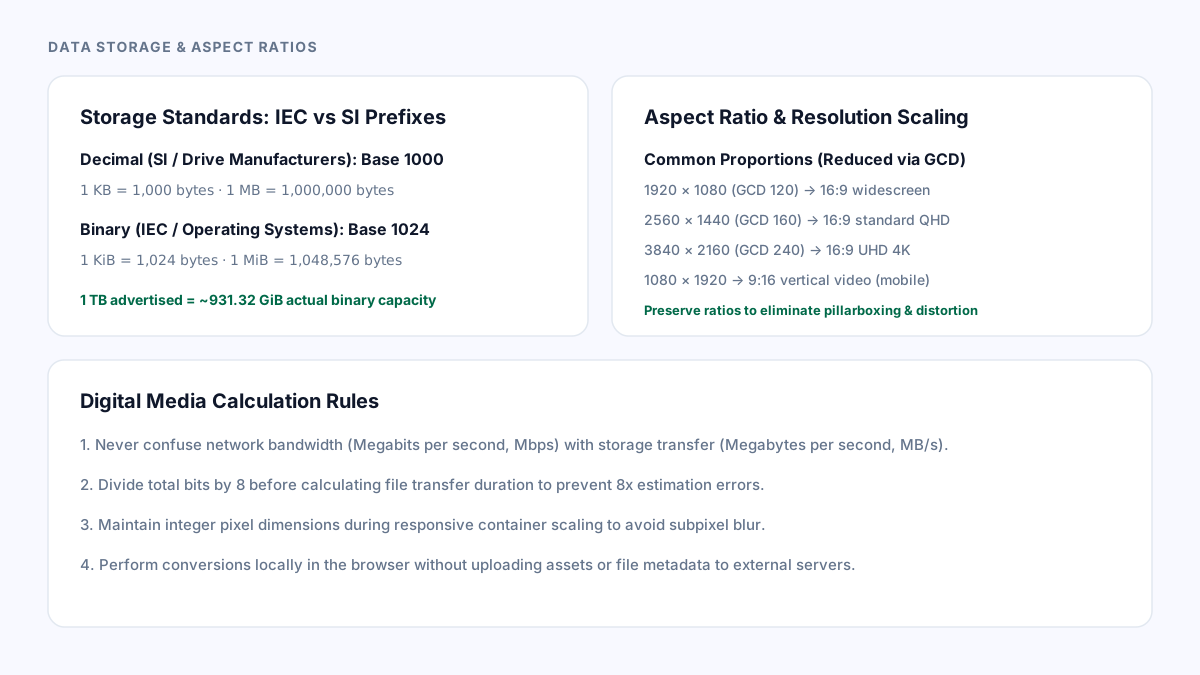
The binary vs decimal byte prefix collision (IEC vs SI)
When purchasing a hard drive or solid-state disk labeled "1 TB", users frequently open their operating system to find that only approximately 931 GB of usable space is reported. The unit conversion alone explains 1 TB being approximately 931.32 GiB. Filesystem metadata, partitions and reserved space can reduce the usable capacity further.
Hardware drive manufacturers measure capacity using the International System of Units (SI) decimal standard, where 1 kilobyte (KB) = 1,000 bytes, 1 megabyte (MB) = 1,000,000 bytes, and 1 terabyte (TB) = 1,000,000,000,000 bytes (powers of 10). Conversely, operating systems like Microsoft Windows historically measure memory and disk sectors using binary powers of 2, where 1 kilobyte = 1,024 bytes and 1 megabyte = 1,048,576 bytes.
To resolve this confusion, the International Electrotechnical Commission (IEC) established standard binary prefixes in IEC 80000-13: kibibyte (KiB = 1,024 bytes), mebibyte (MiB = 1,048,576 bytes), gibibyte (GiB = 1,073,741,824 bytes), and tebibyte (TiB = 1,099,511,627,776 bytes). Using Bytes Converter, you can effortlessly convert between raw bytes, SI decimal units, and IEC binary units without miscalculations.
Calculating aspect ratios and scaling display resolutions
In visual media and front-end engineering, an aspect ratio describes the proportional relationship between the width and height of an image, video, or display container. Preserving the source ratio avoids stretching. Fitting it into a differently shaped container can require letterboxing or pillarboxing; filling that container with object-fit: cover can crop content.
To determine the simplified aspect ratio of any resolution, divide both the width and height by their greatest common divisor (GCD) using the Euclidean algorithm. For example, in a standard Full HD display of 1920 × 1080 pixels, the greatest common divisor is 120. Dividing 1920 by 120 gives 16, and dividing 1080 by 120 gives 9, producing the standard 16:9 widescreen ratio.
When resizing assets for modern web layouts, Aspect Ratio Calculator lets you lock either the target width or height to calculate the exact corresponding dimension, ensuring crisp pixel rendering across mobile and desktop viewports.
// Aspect ratio calculation using the Euclidean GCD algorithm
function calculateAspectRatio(width, height) {
  function gcd(a, b) {
    return b === 0 ? a : gcd(b, a % b);
  }
  const divisor = gcd(width, height);
  return {
    ratio: `${width / divisor}:${height / divisor}`,
    widthFactor: width / divisor,
    heightFactor: height / divisor
  };
}
Common standard ratios and digital units
Modern multimedia workflows standardize around specific aspect ratios and unit conventions across platforms.
Standard widescreen video and YouTube default to 16:9 (such as 1920×1080, 2560×1440, and 3840×2160). Vertical mobile video formats for TikTok, Instagram Reels, and YouTube Shorts invert this to 9:16 (1080×1920). Photography frequently uses 3:2 (derived from 35mm film) or 4:3 (common in Micro Four Thirds and tablet displays), while square social media avatars use 1:1.
In networking and cloud hosting, always distinguish data transfer rates from storage capacity. Network providers quote bandwidth in megabits per second (Mbps), where 1 byte = 8 bits. At an ideal 100 Mbps, 1 decimal GB takes 1,000,000,000 × 8 / 100,000,000 = 80 seconds; 1 GiB takes about 85.9 seconds. Protocol overhead and changing throughput increase real transfer time.
| Measurement Domain | Standard Convention | Exact Formula / Ratio | Common Pitfall to Avoid |
|---|---|---|---|
| Decimal Storage (SI) | Disk manufacturers, cloud billing | 1 MB = 1,000,000 bytes (10^6) | Underestimating binary system requirements |
| Binary Storage (IEC) | Windows OS, RAM memory allocation | 1 MiB = 1,048,576 bytes (2^20) | Labeling binary mebibytes as decimal MB |
| Network Transfer | Broadband speeds, stream bitrates | 1 Byte = 8 bits (1 MB/s = 8 Mbps) | Forgetting to multiply or divide by 8 |
| Widescreen Display | Monitors, HDTV, web video players | 16:9 ratio (e.g. 1920×1080, 3840×2160) | Non-integer pixel rounding causing subpixel blur |
| Vertical Video | Mobile feeds, Stories, Shorts | 9:16 ratio (e.g. 1080×1920) | Cropping essential graphic elements outside 4:5 safe zones |
Verification and asset optimization
Before encoding video pipelines or deploying static imagery, verify your target aspect ratio against container CSS properties like aspect-ratio: 16 / 9 and object-fit: cover.
When calculating storage budgets for database backups or log retention, always verify whether your infrastructure provider bills in decimal gigabytes or binary gibibytes. A 10% discrepancy at the terabyte scale can lead to unexpected cloud storage overage fees.
PageUtil’s calculation tools run entirely in your local browser sandbox without uploading the values being converted. The public website can still use analytics cookies as described in its privacy policy.
References
Use the linked specifications and product documentation to check behavior in your own environment.
Continue troubleshooting
Related tools
Frequently asked questions
Why does a 1 TB hard drive only show 931 GB in Windows?
Drive manufacturers advertise size in decimal gigabytes (1,000,000,000,000 bytes), whereas Windows calculates binary gibibytes (1,073,741,824 bytes per GiB), resulting in approximately 931.32 GiB.
How do you calculate an aspect ratio from width and height?
Find the greatest common divisor of the width and height, then divide both numbers by that divisor. For example, 1920 and 1080 divided by 120 yields a 16 to 9 aspect ratio.
What is the difference between MB and MiB?
A megabyte (MB) represents exactly 1,000,000 bytes using the metric SI system, while a mebibyte (MiB) represents exactly 1,048,576 bytes using the binary IEC standard.