Retrieve evidence from the exact ingest job
Use the job ID from your integration, not a newly exported list of accounts. Save its object, operation, externalIdFieldName, API version and final state alongside the original upload. PageUtil accepts result CSVs without credentials and does not fetch job metadata. If you only have failed results, its failed count is a count of supplied rows, not the size of the entire job.
In an authorised REST client, request the following resources on your Salesforce instance. Replace vXX.X with your supported API version and jobID with the actual ingest job ID. Authentication belongs in that client, never in PageUtil. The first request returns job JSON; the remaining endpoints return CSV. Keep an unchanged copy of each file.
GET /services/data/vXX.X/jobs/ingest/jobID/
GET /services/data/vXX.X/jobs/ingest/jobID/failedResults/
GET /services/data/vXX.X/jobs/ingest/jobID/successfulResults/
GET /services/data/vXX.X/jobs/ingest/jobID/unprocessedrecords/
Endpoint contracts: failed, successful and unprocessed.
Job completion is not a transaction-wide rollback guarantee
An ingest client creates a job, uploads CSV data and marks the upload complete. Open means data can still be supplied. UploadComplete starts processing; poll the job until its terminal outcome. JobComplete means processing finished, not that every row succeeded. Failed and Aborted require examining all available result streams, not just reading a single job status.
Separate transport or job-setup errors from row failures. A malformed header can prevent a useful row-level report; a validation rule can reject particular records while others succeed. Successful changes are not undone simply because other records failed. Keep the original job metadata and reconcile supplied results against it before concluding that every input is accounted for.
Ingest workflow · Job creation and state definitions
Read each result format on its own terms
The source fields carry the values submitted for that row. Result metadata is additional evidence, not an upload template. Failed-result sf__Id is documented from API version 53; older failed files can therefore lack that column. The analyser requires sf__Error for failed files, and sf__Id plus sf__Created for successful files. It does not demand diagnostic columns from unprocessed files.
A CSV with only source fields could be the original upload or unprocessed output. Headers alone cannot distinguish them. Explicitly assign every file a role. Do not rename a Data Loader error column to sf__Error and assume the rest of its semantics now match this tool.
| Result | Generated metadata | Meaning | Retry treatment |
|---|---|---|---|
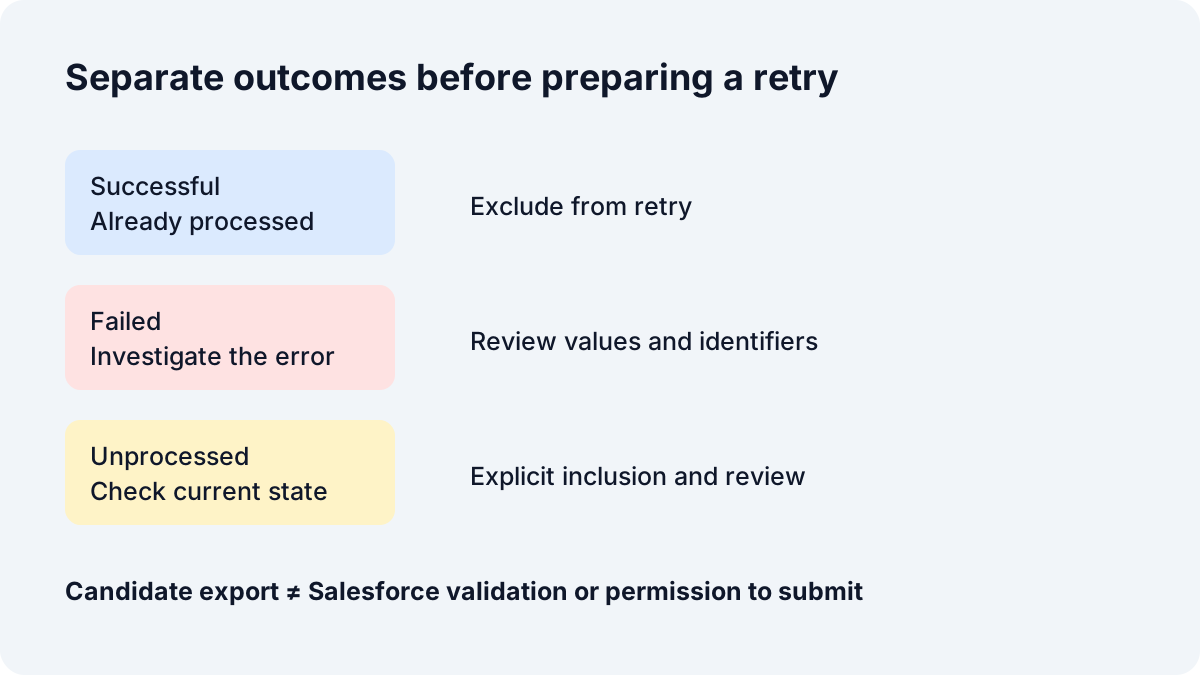
| failedResults | sf__Error; sf__Id in supported versions | Processing encountered an error | Investigate and review |
| successfulResults | sf__Id, sf__Created | The record was successfully processed | Exclude from candidate retry |
| unprocessedrecords | Source fields only | The record was not processed | Separate inclusion and destination-state review |
A failed row and a successful row
"sf__Id","sf__Error","External_Id__c","Name","Parent.External_Id__c","Description"
"","REQUIRED_FIELD_MISSING: Required fields are missing: [Name]","001","","","Synthetic demonstration"
"sf__Id","sf__Created","External_Id__c","Name","Parent.External_Id__c","Description"
"001000000000001AAA","true","004","Birch Cooperative","","Synthetic demonstration"Why failedResults does not match your original CSV row order
Salesforce explicitly does not guarantee original row order for failed, successful or unprocessed results. A spreadsheet join on row number can attach the wrong customer details to an error even when both files have the same number of records. Source record numbers shown by PageUtil identify a location within that file; they are not cross-file matching keys.
Example E makes the problem visible: the original has keys 001, 002, 003; the failed file has 003, 001, 002. Load both files, assign original and failed roles, analyse, and select External_Id__c. All three records match uniquely. Leave the key unselected and no match is asserted. Repeating a key or removing it produces an ambiguous or missing result instead of a guessed association.
Choose a stable identifier present in both files. PageUtil uses exact, case-sensitive strings for external IDs and preserves leading zeros. When the selected field is Id, valid 15/18-character Salesforce ID equivalents are compared without changing the original values. A source export that changes key case, strips zeros or transforms IDs can prevent matching. Do not normalise identifiers casually: case and uniqueness rules in Salesforce can differ from this deliberately conservative local comparison.
Compare the literal order in these shared fixtures:
"External_Id__c","Name","Parent.External_Id__c","Description"
"001","North","","Synthetic demonstration"
"002","South","","Synthetic demonstration"
"003","West","","Synthetic demonstration"
"sf__Id","sf__Error","External_Id__c","Name","Parent.External_Id__c","Description"
"","FIELD_CUSTOM_VALIDATION_EXCEPTION: Synthetic account policy rejected Name","003","West","","Synthetic demonstration"
"","FIELD_CUSTOM_VALIDATION_EXCEPTION: Synthetic account policy rejected Name","001","North","","Synthetic demonstration"
"","FIELD_CUSTOM_VALIDATION_EXCEPTION: Synthetic account policy rejected Name","002","South","","Synthetic demonstration"Salesforce documents the order limitation in each of the result endpoint usage notes.
Work an account upsert investigation from evidence to decisions
Load complete demonstration on the analyser, or download the four D files below and assign their roles. The fictional Account schema has a text external ID called External_Id__c and uses Parent.External_Id__c to refer to an existing parent by its external key. That field configuration is an assumption for the exercise, not a feature installed by PageUtil. Error wording is illustrative. These files have not been submitted to a Salesforce org.
Expected dashboard: 3 failed records, 1 successful record and 1 unprocessed record, with 5 source rows supplied. The three failure groups are INVALID_FIELD, REQUIRED_FIELD_MISSING and DUPLICATE_EXTERNAL_ID, one each. Select External_Id__c: five result records match their source uniquely, with no local duplicate keys. This does not prove that destination external IDs are unique.
Key 001 has an empty Name. Inspect its source match and obtain the name from the owning system. For this exercise, the agreed correction is Alder Books. Enter it as the candidate Name; the original stays empty. The F pair isolates that exact change so you can reproduce a byte-for-byte candidate export without pretending the other problems have been resolved.
Key 002 references P-MISSING. The nested message says the foreign key could not be resolved. Inspect the destination parent under the integration user and verify the relationship API name, external-ID field and intended parent value. Create or correct the parent through the authorised workflow if appropriate, then use its verified key. Guessing a plausible parent would fix neither referential integrity nor the business relationship.
Key 003 has DUPLICATE_EXTERNAL_ID even though 003 occurs only once in each supplied population. The reported ambiguity is in Salesforce: multiple records match that external ID. Query the destination and reconcile those entities with the data owner. Changing the source key merely to suppress the error could create a second account. Example C separately demonstrates repeated source keys and a missing key; these local findings are not proof of the same destination problem.
Key 004 already succeeded. Do not put it back into a retry. Key 005 was unprocessed. Its original values can be considered only after checking current state and freshness, with the unprocessed category explicitly selected. The tool cannot infer whether another integration has since created or updated it.
"External_Id__c","Name","Parent.External_Id__c","Description"
"001","","","Synthetic demonstration"
"002","Cedar Studio","P-MISSING","Synthetic demonstration"
"003","Maple Workshop","","Synthetic demonstration"
"004","Birch Cooperative","","Synthetic demonstration"
"005","Elm Library","","Synthetic demonstration"
"sf__Id","sf__Error","External_Id__c","Name","Parent.External_Id__c","Description"
"","INVALID_FIELD: Foreign key external ID P-MISSING not found for field External_Id__c in entity Account: Parent.External_Id__c","002","Cedar Studio","P-MISSING","Synthetic demonstration"
"","REQUIRED_FIELD_MISSING: Required fields are missing: [Name]","001","","","Synthetic demonstration"
"","DUPLICATE_EXTERNAL_ID: External_Id__c matches more than one record","003","Maple Workshop","","Synthetic demonstration"Reproduce the one-row reviewed candidate
- Reset; load F-failed.csv as failed.
- Select the row for retry, open its record, change candidate Name to Alder Books and mark that record reviewed.
- Choose upsert, External_Id__c, and include failed records.
- Review the destination-state checklist and confirm; export the candidate.
- Compare with F-reviewed-retry.csv below. Only Name changes; Salesforce metadata is absent.
"External_Id__c","Name","Parent.External_Id__c","Description"
"001","Alder Books","","Synthetic demonstration"
Relationship header contract: Relationship fields.
Use error codes as investigation routes, not automatic diagnoses
The following reference is generated from the same deterministic rules used by the analyser. An error can contain several codes; each remains visible, and group counts can exceed the number of failed records. Field references are reported only when message tokens match supplied source headers. A code does not prove which upstream business decision caused the failure.
No rule authorises automatic correction. The official status-code reference verifies the codes, while the investigation steps below are PageUtil guidance. Date and number problems can surface through type or integrity errors; PageUtil does not manufacture a more specific code from English wording. Unrecognised codes and messages without a code remain unclassified.
REQUIRED_FIELD_MISSING — Required fields
A required value is absent. Inspect Named fields, object requirements and conditional validation. Obtain the correct value from the source owner; do not invent defaults.
Reimporting unchanged data is unlikely to resolve this. Correct or resolve the cause first. Automatic correction: no. Salesforce status-code reference.
INVALID_OR_NULL_FOR_RESTRICTED_PICKLIST — Invalid values
A value is not accepted by a restricted picklist. Inspect Active values, record type and dependent picklist configuration. Map to an allowed value after confirming its business meaning.
Reimporting unchanged data is unlikely to resolve this. Correct or resolve the cause first. Automatic correction: no. Salesforce status-code reference.
FIELD_INTEGRITY_EXCEPTION — Invalid values / relationships
A field or relationship violates an integrity constraint. Inspect The complete message, field type and referenced record. Check the specific constraint; the code alone does not establish a root cause.
Reimporting unchanged data is unlikely to resolve this. Correct or resolve the cause first. Automatic correction: no. Salesforce status-code reference.
INVALID_CROSS_REFERENCE_KEY — References
A reference is invalid for this operation. Inspect Object type, destination org, deleted records and access. Look up the referenced record in the destination using the integration user.
Reimporting unchanged data is unlikely to resolve this. Correct or resolve the cause first. Automatic correction: no. Salesforce status-code reference.
MALFORMED_ID — References
An identifier is malformed. Inspect 15/18-character Salesforce IDs, truncation and spreadsheet conversion. Recover the original ID; never pad or guess an ID.
Reimporting unchanged data is unlikely to resolve this. Correct or resolve the cause first. Automatic correction: no. Salesforce status-code reference.
INVALID_FIELD — Fields / relationships
A field is invalid for the request. Inspect API field names and relationship external-ID headers. Check object describe metadata and relationship configuration before changing the header.
Reimporting unchanged data is unlikely to resolve this. Correct or resolve the cause first. Automatic correction: no. Salesforce status-code reference.
DUPLICATE_VALUE — Duplicates
A value conflicts with a uniqueness constraint. Inspect The named unique field and existing destination records. Reconcile duplicates with the record owner; deleting destination data is not an automatic fix.
Reimporting unchanged data is unlikely to resolve this. Correct or resolve the cause first. Automatic correction: no. Salesforce status-code reference.
DUPLICATES_DETECTED — Duplicates
Duplicate detection rejected a record. Inspect Duplicate rules and matching records. Review the matching rule and decide whether this is an existing entity.
Reimporting unchanged data is unlikely to resolve this. Correct or resolve the cause first. Automatic correction: no. Salesforce status-code reference.
DUPLICATE_EXTERNAL_ID — External IDs
An upsert key matches multiple destination records. Inspect External ID configuration and all destination matches. Resolve destination ambiguity. A duplicate key in this CSV is a separate local finding.
Reimporting unchanged data is unlikely to resolve this. Correct or resolve the cause first. Automatic correction: no. Salesforce status-code reference.
UNABLE_TO_LOCK_ROW — Locking
Salesforce could not acquire a required record lock. Inspect Concurrent jobs, shared parents and roll-up processing. Coordinate overlapping loads and reduce contention before a bounded retry.
A later retry may help after contention ends; first confirm current destination state. Automatic correction: no. Salesforce status-code reference.
INSUFFICIENT_ACCESS_OR_READONLY — Permissions
The operation lacks required access or targets read-only data. Inspect Integration-user permissions, sharing and field write access. Ask the administrator to check least-privilege access; do not bypass controls.
Reimporting unchanged data is unlikely to resolve this. Correct or resolve the cause first. Automatic correction: no. Salesforce status-code reference.
INSUFFICIENT_ACCESS_ON_CROSS_REFERENCE_ENTITY — Permissions / references
Access to a referenced entity is insufficient. Inspect Referenced parent and integration-user access. Verify the relationship and access in the destination org.
Reimporting unchanged data is unlikely to resolve this. Correct or resolve the cause first. Automatic correction: no. Salesforce status-code reference.
INVALID_FIELD_FOR_INSERT_UPDATE — Non-writeable fields
A field or field combination is not accepted for this write. Inspect Create/update field capabilities, audit fields and record type changes. Use describe metadata and the full message; remove a column only after reviewing its intent.
Reimporting unchanged data is unlikely to resolve this. Correct or resolve the cause first. Automatic correction: no. Salesforce status-code reference.
FIELD_CUSTOM_VALIDATION_EXCEPTION — Validation rules
A business validation rule rejected the values. Inspect Active rule conditions and the complete record, including unchanged fields. Resolve the business requirement with the rule owner; editing the named field alone may not suffice.
Reimporting unchanged data is unlikely to resolve this. Correct or resolve the cause first. Automatic correction: no. Salesforce status-code reference.
INVALID_TYPE_ON_FIELD_IN_RECORD — Value types
A supplied value has an incompatible type. Inspect Field metadata, date/time formats and numeric strings. Correct the representation while preserving its intended value and timezone.
Reimporting unchanged data is unlikely to resolve this. Correct or resolve the cause first. Automatic correction: no. Salesforce status-code reference.
NUMBER_OUTSIDE_VALID_RANGE — Value types
A numeric value is outside its allowed range. Inspect Precision, scale and business range. Recover the intended number; do not silently clamp or round.
Reimporting unchanged data is unlikely to resolve this. Correct or resolve the cause first. Automatic correction: no. Salesforce status-code reference.
STRING_TOO_LONG — Value types
A string exceeds a field limit. Inspect Field length and source text. Agree a shortening or alternate storage policy; never truncate automatically.
Reimporting unchanged data is unlikely to resolve this. Correct or resolve the cause first. Automatic correction: no. Salesforce status-code reference.
ENTITY_IS_DELETED — Missing records
The target record has been deleted. Inspect Destination record lifecycle and ID provenance. Confirm whether restoration or a different operation is appropriate.
Reimporting unchanged data is unlikely to resolve this. Correct or resolve the cause first. Automatic correction: no. Salesforce status-code reference.
NOT_FOUND — Missing records
The requested resource was not found. Inspect Full response context, object and ID. Check destination state and whether this is a job-level rather than row-level error.
Reimporting unchanged data is unlikely to resolve this. Correct or resolve the cause first. Automatic correction: no. Salesforce status-code reference.
CANNOT_EXECUTE_FLOW_TRIGGER — Automation
A flow or flow trigger could not execute. Inspect Flow error details, versions, permissions and downstream writes. Debug the failing flow with the administrator; do not disable business controls blindly.
Reimporting unchanged data is unlikely to resolve this. Correct or resolve the cause first. Automatic correction: no. Salesforce status-code reference.
CANNOT_INSERT_UPDATE_ACTIVATE_ENTITY — Automation / access
A create, update or activation failed; nested details are essential. Inspect Trigger or automation details and permissions mentioned in the message. Inspect nested errors and logs in Salesforce; this code is not proof of a trigger defect.
Reimporting unchanged data is unlikely to resolve this. Correct or resolve the cause first. Automatic correction: no. Salesforce status-code reference.
Failed and unprocessed require different decisions
A failed row was processed and encountered an error. An unprocessed row was not processed by that job. It is not a success, but it also has no row-level failure message to diagnose. An interrupted job can leave some records successful, others failed and others unprocessed; example D demonstrates those distinct populations without asserting a particular production interruption.
Retrieve unprocessed results for failed or aborted jobs. A missing file in your investigation means unknown coverage, not zero unprocessed rows. Do not fill gaps by subtracting a failed CSV count from an assumed upload total. Repeated file imports, truncated downloads and missing result batches can make that arithmetic misleading.
For an unprocessed candidate, check whether another run or integration already applied the same business event. Inspect stale values and current relationships before writing again. PageUtil deliberately requires separate inclusion and record review; an unprocessed row is not automatically safe to insert.
Unprocessed result semantics · Retry guidance for timeouts
Choose a retry operation before creating the CSV
A candidate is a proposed new write, not proof that Salesforce will accept it. An upsert can be repeatable with a stable, correctly configured unique key, but it is not automatically idempotent: automation can run again and stale data can overwrite newer changes. A successful prior insert makes replaying the whole input particularly dangerous.
PageUtil requires explicit record selection, enabled outcome categories, a review mark on every selected candidate and a final destination-state acknowledgement. Select only resolved records to leave unresolved failures out of the retry. A filter only narrows the investigation table; it never changes your selection. Select all filtered retry records is an explicit action that selects eligible rows across all matching pages. Successful rows cannot be selected. Editing a value clears its review mark. Reanalysing or changing a file role clears all edits and reviews.
Result metadata is removed. Original data headers and strings are retained; delete is the deliberate exception, exporting only Id. Update/delete require a real source Id column, not an inferred conversion from sf__Id. Upsert requires a selected output column with non-empty, non-duplicate keys. The tool does not verify that the field is configured as an external ID, or that any referenced entity exists. Update/delete Id values are checked for supported shape and checksum; case-altered or invalid IDs need the original authoritative value.
Different source field sets block combined retry output rather than merging schemas and silently adding blank cells. Equivalent headers in a different order are aligned by name. Repeated files and identical candidate rows are blocked; selected stable identifiers add duplicate and success-conflict checks for inserts. Keep one job, object and intended operation per investigation. Same-shaped files from unrelated jobs cannot be identified automatically. If a selected retry identifier also appears in supplied successful results, reconcile that conflict outside this session before preparing a new candidate.
| Operation | Primary risk | Check before a new job |
|---|---|---|
| Insert | Duplicate creation on replay | Current destination and business-event identity; no Id column |
| Update | Overwrite a newer value | Source Id, destination existence and value freshness |
| Upsert | Create instead of update, or ambiguous match | Configured external ID, unique destination match, stable business identity |
| Delete | Remove the wrong entity | Every source Id and authorised deletion intent; output only Id |
Independent pre-retry checklist
- Reconcile the exact job, org, object and all available result files.
- Exclude prior successes; confirm destination state even after a timeout.
- Resolve the data or configuration problem and review every changed value.
- Confirm operation-specific identifiers, blank values, parent references and stale fields.
- Use the export’s COMMA delimiter and CRLF line ending in the new job.
- Test an appropriate sample in a sandbox; submit through your authorised client.
- Retrieve the new result streams and reconcile them again.
When editing CSV is the wrong fix
Locking: overlapping jobs and child records sharing parents can contend for locks. Coordinate loads that touch the same records and organise data around shared parents. Bulk API 2.0 uses parallel processing; do not recommend a Bulk API 1.0 serial-mode switch as if it were a 2.0 setting. A delayed bounded retry can help a transient lock, but repeating the same competing workloads can recreate it.
Validation and permissions: a record can satisfy obvious CSV requirements yet fail an org-specific rule or lack write access. Review the rule conditions and integration-user permissions, including access to referenced parents. A visible field is not necessarily createable or updateable. These issues often require an administrator and cannot be established from the CSV alone.
Flows and triggers: inspect nested errors and Salesforce execution logs. A downstream write may be the actual failing operation, so the named field may not belong to the uploaded object. Test changes with the automation owner. Do not automatically disable rules, bypass permissions or strip columns to make an error disappear.
Timeouts: Salesforce recommends inspecting payload formatting, relationships, contention and custom logic, then considering smaller jobs and a new job containing failed and unprocessed records. Smaller jobs are a diagnostic strategy, not a guarantee. First retrieve successful results so partial changes are not replayed.
CSV: choose the actual delimiter per file. Supported choices are comma, tab, semicolon, pipe, caret and backquote. Quote fields containing the delimiter, quotes or newlines; double embedded quote characters. The parser accepts LF/CRLF and preserves empty strings, Unicode and numeric-looking identifiers. Export UTF-8. It rejects invalid encoding, duplicate/empty headers, inconsistent record widths and malformed quoting. A wrong delimiter may produce a one-column file, so confirm the role and metadata headers rather than assuming detection is proof.
An empty cell can have operation-specific implications in Salesforce. Preserve the original intent, including any explicit null markers used by your integration; do not turn blanks into guessed defaults. For date/time or numeric failures, check the destination field type and documented representation instead of applying a locale-dependent spreadsheet conversion.
Organise data to minimise lock contention · Troubleshooting ingest timeouts · Prepare CSV files · Delimiter and concurrency settings
Keep Bulk API 1.0 and other formats outside this workflow
Bulk API 1.0 is batch-oriented and has its own result contract. Its batch result ordering guidance must not be transferred to Bulk API 2.0. Data Loader exports can use different result columns depending on their workflow. This analyser supports only the documented 2.0 ingest result shapes; it does not convert 1.0 results, query exports or arbitrary Salesforce reports.
Hard delete, marketing-object ingest, refresh and consent imports are outside this version. This is a local evidence analyser, not a schema validator or API client. It cannot discover missing files, verify that files came from the same job, establish all downstream effects, validate destination uniqueness, or resolve business ownership. A syntactically valid candidate can still fail or cause an unintended change.
A decision tree for the next investigation
Use this sequence with or without PageUtil. Stop when evidence is insufficient rather than treating a download button as approval to write.
- Do you have failed results? If yes, group exact codes and retain original messages. If no, inspect job metadata and retrieve the right endpoint; no failed file does not prove success.
- Were any rows unprocessed? Retrieve that stream and keep it separate. Missing evidence remains unknown.
- Is the issue data, permissions, relationships or automation? Data goes to the source owner; access and rules to the administrator; references need destination lookups; automation needs logs and its maintainer.
- Can it be retried unchanged? Only after a reasoned transient-failure investigation. A repeated validation failure usually needs a change.
- Could the operation duplicate or overwrite records? Inspect current state, keys and prior successes. An insert replay is especially risky.
- Can every included record be reviewed? If not, keep investigating. If yes, prepare a candidate, validate in the appropriate environment and reconcile the new results.
Review changes together and resume an investigation
Select the records you intend to correct, then open Correct selected records together. Choose a field and an exact current value, including an empty string if appropriate. Enter the proposed replacement and preview it. The preview shows the first 25 changes and offers a complete CSV download. Applying a preview changes only the matching selected candidates, preserves source evidence and clears affected review marks. Undo last bulk change restores the prior candidate values; review is still required.
Full findings reports include original and candidate values, changed fields, review status, retry selection and source matches. They are diagnostic spreadsheets, not ingest files. Use them to review larger change sets and retain an explanation of what was proposed.
Download investigation JSON creates a portable file containing source evidence, edits, selection and operation settings. You must explicitly acknowledge downloading this sensitive, unencrypted data. Nothing is saved automatically in browser storage or on PageUtil servers. Reopen the file locally to continue: previous reviews and the final confirmation are cleared because destination state may have changed. Invalid or unsupported bundles leave the current session intact. Keep saved files under your organisation’s retention policy.
Download the exact examples, report and review checklist
All resources below are real files served by PageUtil. The complete ZIP includes the A–G CSVs, README, generated example findings and printable HTML checklist. The tool, this article and automated tests use these same fixtures. Example G includes dangerous-looking spreadsheet text as a defensive test; it must never execute in the analyser.
Full findings and grouped reports are spreadsheet-oriented diagnostics with formula-looking cells neutralised. Raw unprocessed and candidate retry downloads retain exact values for Salesforce and are not sanitised spreadsheets. Keep diagnostic reports out of the ingest workflow, and handle downloaded business data under your organisation’s retention policy.
Platform documentation reviewed on 7 November 2026. Examples are synthetic and tested locally against documented formats; no firsthand production Salesforce test is claimed. PageUtil built the analyser and is not affiliated with or endorsed by Salesforce.
- A · Required field, picklist and lock errors (A-simple-failed.csv)
- B · One successful account (B-successful.csv)
- B · One failed account (B-failed.csv)
- C · Upsert source: repeated and empty keys (C-original.csv)
- C · Upsert failures; destination ambiguity differs from local duplicates (C-failed.csv)
- D / complete demo · Original account source (D-original.csv)
- D / complete demo · Three failures (D-failed.csv)
- D / complete demo · One success (D-successful.csv)
- D / complete demo · One unprocessed account (D-unprocessed.csv)
- E · Source in 001, 002, 003 order (E-original.csv)
- E · Results in 003, 001, 002 order (E-failed.csv)
- F · Missing account name (F-failed.csv)
- F · Manually corrected candidate (demonstration only) (F-reviewed-retry.csv)
- G · Quotes, newlines, Unicode and formula-looking text (G-parsing-failed.csv)
- README.md
- complete-dataset.zip
- retry-checklist.html
- example-findings.csv
References
Use the linked specifications and product documentation to check behavior in your own environment.
Related tools
Frequently asked questions
Why can JobComplete coexist with failed records?
JobComplete describes completed processing, not universal row success. Read the result streams and job counts to determine record outcomes.
Why can a corrected CSV still fail?
The destination may have changed, another validation rule may become visible, or permissions, relationships and automation may still reject the operation. A local edit cannot verify those conditions.
Can I match records when there is no shared stable identifier?
This tool will not guess a match. You can still inspect the source values returned with each result, but reliable cross-file association needs additional evidence.