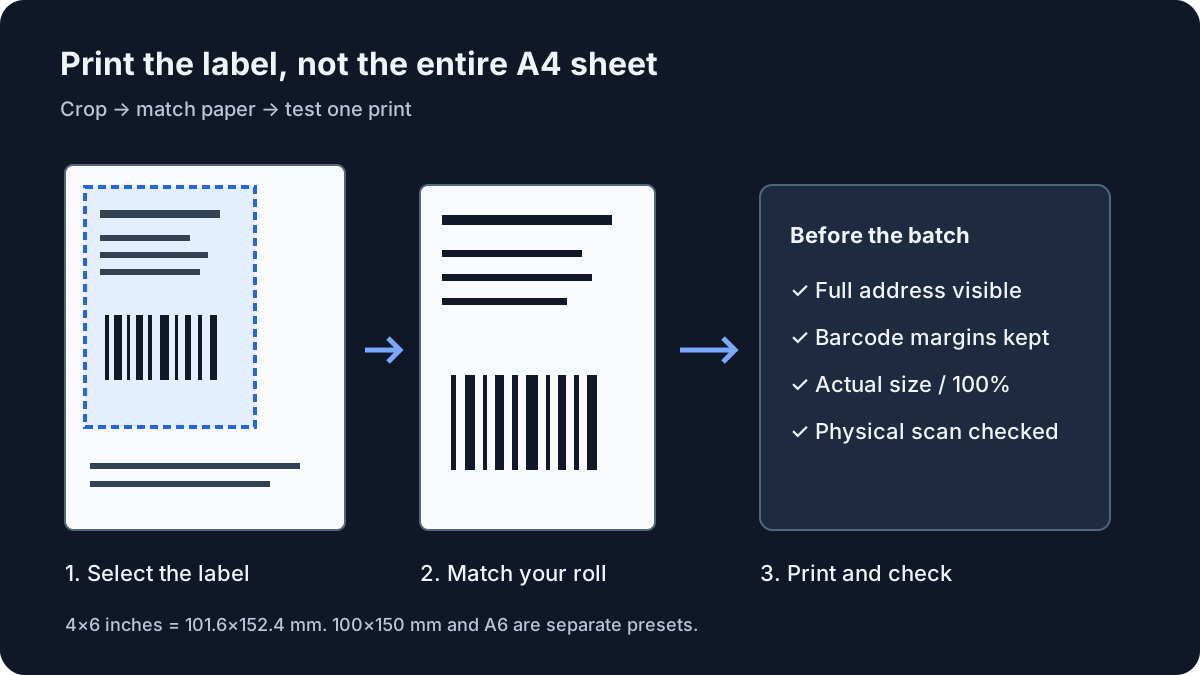
What to run
Save the original shipping PDF from your marketplace or carrier. If the service already offers the required thermal format, use that original download. Otherwise choose one or more PDFs in the resizer. It accepts up to 20 files, 20 MB each, 40 MB combined and 100 pages. Files are read on your device; no marketplace login or upload is required.
Select a page and drag a rectangle around the full label. Include addresses, tracking numbers, service marks, routing codes and the clear margins around every barcode. For keyboard use, enter Left, Top, Width and Height as percentages of the displayed page. Percentages refer to the source page before the additional output rotation.
Choose the exact output paper size and rotate the cropped label if needed. Start with zero extra margin, then add a small margin only when the printer clips the edges. Apply crop and rotation to all pages only when their layouts match. For a mixed batch, adjust each page separately and uncheck instruction-only pages. This version exports one label per included page; it does not split several labels from a single page.
| Preset | Physical dimensions | Use |
|---|---|---|
| 4×6 inches | 101.6 × 152.4 mm | Roll marked 4×6 inches |
| 100×150 mm | 100 × 150 mm | Roll marked 100×150 mm |
| A6 | 105 × 148 mm | Stock marked A6 |
How to read the result
Click Preview label to inspect the current page at 203 or 300 DPI. This is a raster preview of the same PDF conversion used for download, not a measurement of your printer. Check all four edges, every address line and the barcode margins. Changes to the crop or print settings clear the previous preview so it cannot be mistaken for the current result.
The crop is fitted proportionally and centred. Blank space is expected when its shape differs from the selected paper. Avoid forcing it to fill the sheet by stretching: that changes barcode geometry. Downloaded PDFs retain original text and vector drawing content; source scans and other bitmap images cannot gain detail from resizing.
If the label is still small, check whether the crop includes instructions or large unused margins. If it is sideways, use the rotation selector. If the wrong region appears on another page, the shared crop probably does not match that layout. Reopen that page and set its crop individually. Full-page shrinking alone does not extract a label from an A4 sheet.
What to open next
Download the merged PDF and open its print dialog. Set paper to the exact exported dimensions, choose Actual size or 100%, and disable extra headers or footers if the viewer offers them. A PDF print preference cannot force a printer driver to use the right roll size. Adobe documents the difference between Actual size and Fit in the reference below.
Print one label and scan its barcode with the equipment used in your workflow where possible. Inspect readability, missing lines, clipping and excessive darkness. If the output is poor, compare with the original carrier PDF before changing the crop again. The converter does not certify postage, validate tracking data or diagnose thermal printer hardware.
Use Save crop preset only after checking a layout you reuse. It stores one set of crop coordinates and rotation in this browser, without PDF contents or filenames. Use saved crop applies it to the current page; apply to all remains a separate action. Clear releases the files from the workspace but keeps the explicitly saved preset.
Stop when
Stop adjusting when the full label fits, the output paper matches the roll, and a physical test print is readable and scans. Review all pages before printing a mixed batch. Barcode decoding on a screen alone cannot establish physical printer or carrier acceptance.
If a PDF is password-protected or contains visible annotations or form fields, export an unlocked, flattened copy from a PDF editor first. Do not upload customer addresses to an unrelated service just to remove a restriction. Cropping is not redaction: content outside the visible crop can remain embedded in the downloaded PDF, so do not use this tool to remove confidential information before sharing a document.
References
Use the linked specifications and product documentation to check behavior in your own environment.
Related tools
Frequently asked questions
Why does my shipping label print tiny?
The printer may be fitting a whole A4 or Letter sheet onto thermal paper. Crop the label area first, then match the output and printer paper sizes and print at Actual size.
Does a 300 DPI preview improve a blurry source?
No. It changes the preview raster resolution only. Low-resolution source images remain limited by their original detail, while original vector content stays vector in the PDF.
Will every Vinted or carrier PDF use the same crop?
No. Marketplace, country and carrier layouts can differ or change. Review each page and use a shared crop only when the label positions and orientations match.