In this guide
Read from the beginning for a first introduction, or jump to the syntax you need. All patterns use JavaScript rules unless a portability note says otherwise.
What is a regular expression?
A regular expression, usually called regex, is a small language for describing text patterns. Instead of listing every acceptable string, you describe what its parts look like: letters, numbers, separators, repetitions, and positions. A regex engine interprets that description against an input string.
You can search for text, extract pieces into captures, check whether input has an expected shape, split text, or replace matches. Those are different operations on the same pattern. Finding a match somewhere is not the same as validating the entire input.
Regex has several dialects. This guide explains JavaScript, the default engine in Regex Tester. The editor also offers PCRE2, Python, Rust, Go, .NET and Java; select the engine used by your application. Patterns copied from PCRE, Python, Java, or .NET may require changes. Browser support also matters for newer JavaScript features.
| Pattern | Meaning | Result |
|---|---|---|
cat | The literal sequence c, a, t | Finds cat inside concatenate as well as cat |
cat|dog | Either of two alternatives | Finds cat or dog |
\d+ | One or more ASCII digits | Finds 345 in box-345 |
^\d+$ | Digits occupying the entire input, without m | Accepts 345; rejects box-345 |
Pattern, flags, and JavaScript notation
A regex has a pattern and optional flags. Enter the pattern by itself in PageUtil’s Pattern editor, and enter or toggle flags separately. Do not paste the surrounding slash delimiters or put the flags at the end of the pattern.
In JavaScript source, slash delimiters create a regex literal. A RegExp constructor takes a string, so backslashes must survive JavaScript string escaping before the regex engine sees them. JSON adds its own string escaping too. Spaces in a JavaScript regex are meaningful; there is no general free-spacing or comment flag.
// Same pattern in three places:
// PageUtil Pattern: \d+       Flags: g
const literal = /\d+/g;
const constructed = new RegExp("\\d+", "g");
const values = [..."box-345 item-12".matchAll(literal)];
// Full matches: "345", "12"
Reference: MDN RegExp.
Literal characters and escape sequences
Ordinary characters match themselves in sequence. Syntax characters introduce operations; escape them when you want their literal meaning. A slash normally needs escaping in a JavaScript slash-delimited literal, but is ordinary text in the tester’s pattern field.
Inside a character class some meanings change. Dot is literal inside brackets and a leading caret negates the class. Prefer Unicode-aware mode for new patterns: it rejects many ambiguous escapes that legacy mode silently treats as literal characters.
| Syntax | Meaning | Example or note |
|---|---|---|
\ . * + ? ^ $ { } ( ) | [ ] | Syntax characters outside classes | \. matches a literal dot; \\ matches a backslash |
\n \r \t \f \v | Line feed, carriage return, tab, form feed, vertical tab | \r?\n matches a common Windows or Unix line ending |
\0 | NUL character | Do not follow it with another digit |
\cA … \cZ | ASCII control characters | \cJ is line feed |
\xHH | Two hexadecimal digits for a character | \x41 matches A |
\uHHHH | Four hexadecimal digits for a UTF-16 code unit | \u0041 matches A |
\u{H…} | Unicode code point; requires u or v | \u{1F600} matches 😀 |
Reference: MDN character escapes.
Character classes, ranges, and shorthand sets
A character class normally consumes one character from a set. A range describes character values, not alphabetical sorting or a locale. To match multiple characters from the set, follow the class with a quantifier.
ASCII digit shorthand does not include every Unicode numeral. Word shorthand is mostly ASCII letters, digits, and underscore, with a few additional case-folding matches under Unicode-aware ignore-case matching. It is not a general definition of words in every language. Use Unicode properties when that is your intent.
In ordinary classes put a literal hyphen at an edge or escape it. Unicode-set mode has stricter punctuation rules: escape literal hyphens and reserved punctuation there. A backspace escape inside brackets is not a word-boundary assertion.
| Syntax | Meaning | Example or note |
|---|---|---|
. | Any character except line terminators by default | s includes line terminators; u/v handles code points |
[abc] | One of a, b, or c | [abc]+ can consume abc |
[a-zA-Z0-9_] | Union of ranges and a literal underscore | ASCII word characters |
[^abc] | One character other than a, b, or c | Can include line terminators |
\d / \D | ASCII digit / non-digit | \d is [0-9] |
\w / \W | Word character / non-word character | See the Unicode qualification above |
\s / \S | JavaScript whitespace or line terminator / its complement | Includes more than the ordinary space character |
[\b] | A backspace character | \b outside brackets means word boundary |
[] / [^] | Empty set / any character | The empty set never matches |
Reference: MDN character classes.
Quantifiers: how many times?
A quantifier repeats the atom immediately before it: a character, class, or grouped subpattern. It does not automatically repeat the entire preceding sequence. For example, ab+ repeats b, while (?:ab)+ repeats the pair.
Greedy quantifiers try more repetitions first; lazy quantifiers try fewer first. Either can expand or give back characters so the rest of the pattern can succeed. Lazy does not mean faster or safer. JavaScript has no generally supported possessive quantifiers or atomic-group syntax.
| Syntax | Count | Example |
|---|---|---|
a* | Zero or more | Matches an empty string, a, aa, … |
a+ | One or more | Requires at least one a |
a? | Zero or one | colou?r finds color and colour |
a{3} | Exactly three | aaa |
a{3,} | At least three | aaa or more |
a{2,4} | Two to four | aa, aaa, or aaaa |
a*? / a+? / a?? / a{2,4}? | Lazy versions | Try the minimum count before increasing it |
<.*> on <a><b> matches the whole string. <.*?> first matches <a>. Neither is a general HTML parser.
Reference: MDN quantifiers.
Alternation and precedence
The vertical bar separates alternatives. At a candidate position the engine tries branches in their written order. If the remaining pattern fails, it may try another branch. It does not simply choose the longest branch.
Repetition binds to an atom, concatenation forms a sequence, and alternation separates sequences. Use grouping to express the intended scope of alternatives and anchors.
| Pattern | Meaning | Common surprise |
|---|---|---|
cat|dog | cat OR dog | Matches either anywhere in the sample |
^(?:cat|dog)$ | Entire input must be cat or dog, without m | The anchors apply to both alternatives |
^cat|dog$ | cat at the start OR dog at the end | Does not validate only cat or dog |
a|ab | Try a before ab | On ab, the first match is a |
(?:) | Empty grouped sequence | Matches a position without consuming text |
Reference: MDN disjunction.
Groups and captures
Groups let you treat a subpattern as one unit. Capturing groups also record the text they consumed. Numbered captures start at 1, in the order their opening parentheses appear. The full match is result 0. Named captures also have numbers.
A repeated capturing group retains the capture from its last participating iteration. An optional group that did not participate is unmatched; an empty group did participate but captured an empty string. Those states have different meanings. Captures inside lookarounds can extend outside the full match range.
| Syntax | Purpose | Example or result |
|---|---|---|
(abc) | Capture a subpattern | (item)-(12) records item and 12 |
(?:abc) | Group without adding a capture | (?:ab)+ repeats a pair |
(?<word>\w+) | Name a capture | The group can be accessed as word and by number |
(a)?(b*) | Optional versus empty capture | On empty input: group 1 unmatched, group 2 empty |
(ab)+ | Repeated capture | On abab: full match abab, group 1 ab |
Reference: MDN capturing groups.
Backreferences: repeat captured text
A backreference matches the value of a capture, rather than running its original pattern again. This lets you require repeated text or matching delimiters. Ignore-case matching also affects comparisons made by a backreference.
In JavaScript a reference to an unmatched group succeeds as empty text. In Unicode-aware mode an invalid numbered reference is an error; legacy mode can instead interpret it as an octal escape. Use existing groups and avoid depending on that legacy behavior.
| Syntax | Meaning | Example |
|---|---|---|
\1 | Text captured by group 1 | ([a-z]+)-\1 matches red-red but not red-blue |
\k<word> | Text captured by named group word | (?<word>[a-z]+)-\k<word> |
(["'])(.*?)\1 | Close with the opening quote character | Simple quoted text; does not handle escaped quotes |
Reference: MDN backreferences.
Anchors, boundaries, and zero-width matches
An assertion checks the current position without consuming a character. Anchors check input or line boundaries; word boundaries check the transition between word and non-word characters. The beginning and end of input can act as word boundaries too.
JavaScript’s word-boundary rule uses its word-character definition, not a language-aware word segmenter. For Thai, Chinese, or more general natural-language text, a Unicode property or Intl.Segmenter may better express what you need.
A successful assertion can produce an empty full match. PageUtil draws a marker at that position and advances global searches correctly, including astral code points with u or v. Zero-width match is different from no match.
| Syntax | Condition | Example |
|---|---|---|
^ | Beginning of input; with m, beginning of a line | ^ERROR |
$ | End of input; with m, end of a line | done$ |
\b | Word / non-word boundary | \bcat\b excludes concatenate |
\B | Position that is not a word boundary | \Bcat\B finds cat within concatenate |
Without m, JavaScript $ requires the actual end of input; it does not have the trailing-newline exception found in some other engines. Use ^…$ without m to validate the whole input.
Reference: MDN input boundaries.
Reference: MDN word boundaries.
Lookahead and lookbehind
Lookarounds require or forbid context next to a match without adding that context to the full match. Positive lookarounds require their inner pattern to succeed; negative lookarounds require it to fail. These assertions can be combined with consuming tokens.
A positive lookaround can capture text even though it does not consume it for the full match. A successful negative lookaround does not supply participating captures from its failing inner pattern. JavaScript supports variable-length lookbehind, but other engines may impose different restrictions.
| Syntax | Condition | Example |
|---|---|---|
(?=…) | Required following context | \d+(?=USD) finds 12 in 12USD |
(?!…) | Forbidden following context | foo(?!bar) finds foo in foobaz, not foobar |
(?<=…) | Required preceding context | (?<=USD)\d+ finds 12 in USD12 |
(?<!…) | Forbidden preceding context | (?<!-)\b\d+\b finds 12 in item 12, but not item-12 |
Reference: MDN lookahead.
Reference: MDN lookbehind.
All eight JavaScript flags
Flags change matching behavior or the information returned. Each can appear only once, and order is not significant. u and v are mutually exclusive. PageUtil disables flag toggles the browser does not support and reports invalid manually entered flags.
Global and sticky RegExp objects are stateful in JavaScript: exec and test use and update lastIndex. PageUtil starts each run at zero. Its g mode collects matches; without g it shows one match. Combining g and y collects only consecutive matches from the current position, stopping at the first gap.
| Flag | Effect | What it does not mean |
|---|---|---|
d | Return full-match and capture indices | Does not change matches; PageUtil adds it internally when available |
g | Global: collect successive matches | Does not require the pattern to match the entire input |
i | Ignore case using JavaScript case-folding rules | Not locale-sensitive sorting or accent removal |
m | Let ^ and $ match line boundaries | Does not make dot match line terminators |
s | Dot-all: dot can match line terminators | Does not change anchor behavior |
u | Unicode-aware parsing and code-point matching | Does not make every class Unicode-wide |
v | Unicode-aware mode with set operations and string properties | Cannot be combined with u |
y | Sticky: match exactly at lastIndex | Does not search forward past a non-match |
Reference: MDN RegExp flags and lastIndex.
Unicode properties, code points, and text offsets
JavaScript strings use UTF-16 code units. Some characters, such as many emoji, occupy two code units. Unicode-aware regex mode treats a surrogate pair as one code point for matching, but returned offsets still count code units. A visible character can also comprise several code points, such as a letter plus a combining accent.
Unicode properties describe categories or scripts. Property names and values are exact and case-sensitive. JavaScript does not support every shorthand used by other engines. Unicode mode does not normalize text: precomposed and combining spellings can differ. Normalize deliberately when your application needs equivalence.
| Pattern | Meaning | Flags |
|---|---|---|
\p{Letter}+ | One or more Unicode letters | u or v |
\p{Number} | A Unicode number character | u or v; broader than an ASCII digit |
\p{Script_Extensions=Greek}+ | Characters associated with the Greek script | u or v |
\P{Letter} | Complement of a character property | u or v; case folding differs between these modes with i |
\p{RGI_Emoji} | An emoji string property, potentially several code points | v; runtime Unicode data matters |
On 😀, . without Unicode mode consumes one surrogate at a time; with u it consumes the whole code point and reports range [0, 2). Neither mode makes dot a general grapheme-cluster matcher.
Reference: MDN Unicode property escapes.
Unicode sets with v
Unicode-set mode adds intersection, subtraction, nested classes, and finite strings inside character classes. Ordinary adjacent members form a union. Use nested brackets when combining different set operators; do not mix subtraction and intersection at the same level.
Some punctuation that was literal in ordinary classes must be escaped with v. String-valued properties are a special feature of v; their complements are not available through a string-valued negative property escape. A negated class cannot contain operands that may match multi-character strings.
| Pattern | Meaning | Flags |
|---|---|---|
[\p{Letter}&&\p{ASCII}] | Letters that are also ASCII | v |
[\p{ASCII}--[0-9]] | ASCII characters except digits | v |
[\q{yes|no}] | Either finite string yes or no | v |
[[a-f]&&[^c]] | a through f, excluding c | v |
Reference: MDN Unicode set classes.
Scoped flag modifiers and engine differences
Newer JavaScript runtimes can enable or disable i, m, and s for a group using a modifier. This changes only that group’s matching rules, creates no capture by itself, and leaves outer settings in effect elsewhere. Browser support must be checked before relying on it.
A parser and a browser can support different generations of syntax. PageUtil executes with the browser’s native engine and reports when its explanation parser cannot explain a valid pattern. Unicode-set and scoped-modifier features should be tested in the browsers where your application will run.
| Syntax | Meaning | JavaScript guidance |
|---|---|---|
(?i:abc) | Ignore case inside this group | In supporting runtimes |
(?-i:abc) | Require case even with outer i | In supporting runtimes |
(?im-s:…) | Enable i and m; disable s for this group | Only i, m, s can be scoped |
(?i) / (?x) | Unscoped or free-spacing settings in some dialects | Not general JavaScript pattern syntax |
(?>…) / a++ | Atomic group / possessive repetition in some engines | Not generally supported JavaScript syntax |
\A / \z / \Z / \R / \K / \X | Engine-specific or newer proposed escapes | Do not assume portable support; legacy JS may treat an unknown escape as a literal |
Reference: MDN scoped modifiers.
A complete pattern, token by token
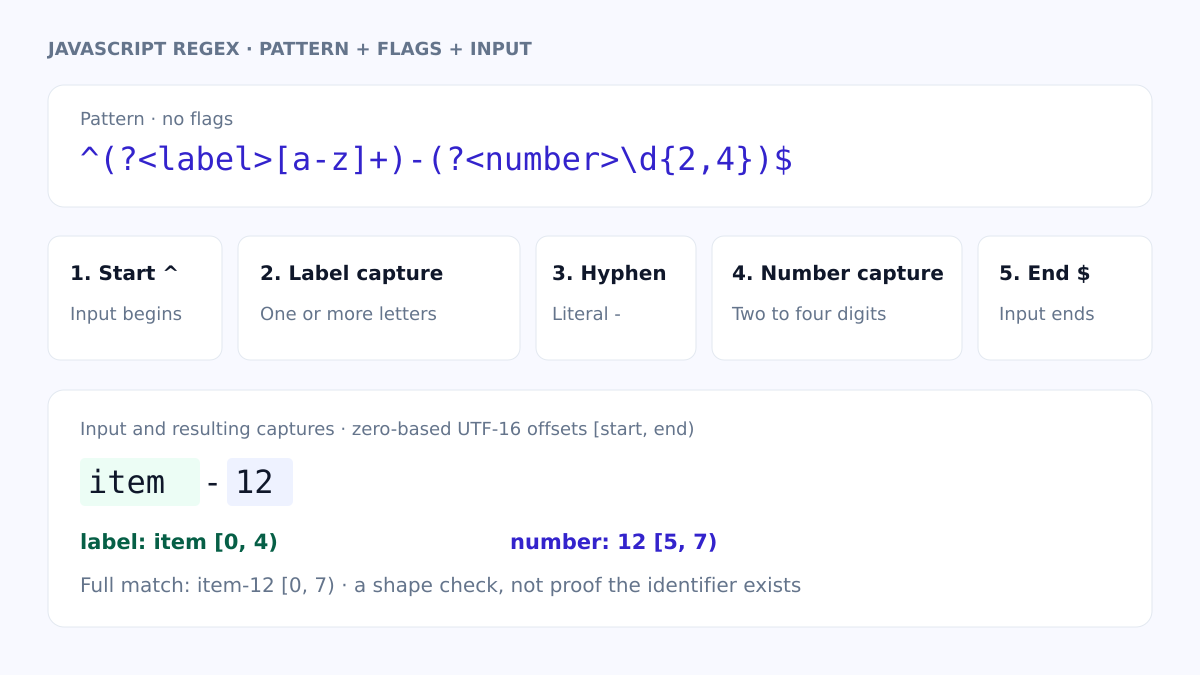
Suppose an identifier must contain lowercase ASCII letters, a hyphen, and two to four digits. We want the label and number as separate fields. Anchoring the pattern makes this validation rather than a search for a substring.
Try the pattern below in Regex Tester with no flags, then add i and test an uppercase label. Remove the anchors and paste several identifiers to see the difference between validation and extraction.
^(?<label>[a-z]+)-(?<number>\d{2,4})$| Element | Role | For item-12 |
|---|---|---|
^ | Require the start of input | Position 0 |
(?<label>…) | Capture the label by name | item at [0, 4) |
[a-z]+ | At least one lowercase ASCII letter | item |
- | Literal separator | Hyphen at [4, 5) |
(?<number>\d{2,4}) | Capture two to four ASCII digits | 12 at [5, 7) |
$ | Require the end of input | Position 7 |
The full match is item-12 at [0, 7). box-345 also matches; box-3, box-12345, and prefix item-12 fail. This validates an identifier shape, not whether the identifier exists.
Replacement strings are a separate language
A replacement template is not a regex pattern. JavaScript interprets dollar tokens in string replacements. Use PageUtil’s Replacement mode to preview the transformed sample and copy the result.
Only matches are replaced; surrounding unmatched text stays. Without g only the first match is replaced. An unmatched existing capture contributes empty text. A numbered token that does not name an existing capture can stay literal or fall back to a valid shorter number; a missing named token behaves differently when named captures exist. Prefer explicit, existing group names.
| Token | Inserts | Example |
|---|---|---|
$$ | A literal dollar sign | $$5 produces $5 |
$& | The full match | [$&] brackets each match |
$1 … $99 | An existing numbered capture | $2 inserts group 2 |
$<name> | An existing named capture | $<label> inserts the label |
$` | The original input before the match | May duplicate a long prefix |
$' | The original input after the match | May duplicate a long suffix |
Pattern (?<label>[a-z]+)-(?<number>\d+), flags g, replacement $<label>: $<number>: item-12 and box-345 becomes item: 12 and box: 345.
Reference: MDN replacement rules.
Using regex in JavaScript code
Choose an API that returns what you need. When you need every match with captures, matchAll is often convenient. A match call with g returns full-match strings rather than a per-match capture tree. Regex-based splitting can include captured separators in its returned array.
Reusing a global or sticky regex with test can produce surprising alternating results because lastIndex changes. Reset lastIndex or use a fresh/non-global expression when repeatedly checking independent inputs. Native exec loops must explicitly advance after zero-length matches; matchAll handles that iteration rule.
| API | Returns or does | Typical use |
|---|---|---|
re.test(text) | Boolean | A yes/no check |
re.exec(text) | One match with captures, or null | Stateful iteration with g/y |
text.match(re) | First match details without g; full-match strings with g | Simple searches |
text.matchAll(re) | Iterator of detailed matches; requires g for a RegExp argument | Extract all captures |
text.search(re) | First match offset or -1 | Locate text |
text.replace(re, replacement) | New string | Transform matches |
text.replaceAll(re, replacement) | New string; RegExp argument must have g | Replace all matches |
text.split(re) | Array of pieces | Split on patterned separators |
Reference: MDN RegExp APIs.
Use the engine-aware workbench
Pattern and Test text form the editor; Results contains matches, explanations and match downloads. Use Test cases to check expected results, and Saved work to save or reopen a workspace. Builders and file processing are grouped below, with engine comparisons at the bottom. Choose CSV to reveal CSV download options; Make CSV downloads safe for Excel adds an apostrophe before formula-like values, and can be switched off for unchanged data.
Choose Editor engine, enter the pattern and test text, and use that engine’s flags. JavaScript updates as you type; other engines run when you choose Test regex. Match, Replacement and Split use each engine’s semantics. Extraction templates are JavaScript-only. Do not assume that a flag or replacement token means the same thing in another engine.
Expand Expected result / unit test to add an assertion, then Run all tests. First-match, whole-input, count, capture-array and output assertions check different properties. Record current results as expectations creates a snapshot to review, not independent proof of correctness. Partial results are inconclusive where a complete result is required.
Compare all seven engines uses the selected editor engine as the baseline and retains separate flags. Inspect differences in captures, spans, output and assertions; an error or timeout is not agreement. The execution debugger records PCRE2 callout events only, not JavaScript or another selected engine.
Java loads CheerpJ from its vendor CDN on an explicit run; the other runtime files load from this site. Matching happens on your device. Runtime loading and execution have separate deadlines. Stop test appears while work is running and stops it without deleting your inputs. Clear workspace removes the current inputs and saved draft; named library entries remain separate. Edits also stop pending work. Drafts and named library entries stay in browser storage. Downloads contain private patterns and test texts; review them before sharing.
Export runnable tests uses the selected engine. JavaScript uses Node 22+, Python uses unittest, Rust uses the pinned WASM package under Node, and Go/.NET/Java exports require their native SDK as well as Node 22+. PCRE2 exports evidence JSON rather than a runnable standalone test. Unasserted or incomplete cases are explicitly skipped.
Testing, debugging, and backtracking
Start with a literal example, then add one rule at a time. Use PageUtil’s Explanation tab to connect tokens to source ranges and its match tree to inspect captured values. Ranges are zero-based with an exclusive end. Clicking a capture selects its text.
Keep examples that should match and examples that should fail. Add tests for empty input, missing separators, one-too-short and one-too-long values, line breaks, Unicode, optional groups, and text surrounding a valid substring. PageUtil’s expected full-match and group tests inspect the first match only. Run all tests to check every local tab.
Backtracking explores alternate paths when a match fails. Nested repetitions or alternatives that match the same prefixes can create enormous amounts of work, especially on nearly matching input. For example, (a+)+$ can reconsider many ways of dividing a long run of a characters when a final exclamation mark makes it fail. A short pattern can still be slow. Prefer bounded repeats and unambiguous separators, and test failing inputs as well as successes.
PageUtil terminates its isolated worker at the selected deadline, cancels superseded runs, and labels capped match results as partial. A timeout means the run was interrupted, not that the pattern matches nothing. This protection applies to the tester; copied code needs its own resource limits. Local workspace downloads include your samples.
When regex helps, and when another tool helps more
Regex works well for bounded identifiers, consistent log fields, simple search rules, and extraction from predictable plain text. It is less suitable for understanding recursive document structure, implementing a full programming-language parser, or deciding whether a date actually exists in a calendar.
Use a JSON or HTML parser for structured documents, a URL parser for URLs, and explicit calendar rules for dates. For a single address, Email Validator provides a dedicated syntax check. For a literal one-off edit, Find and Replace avoids having to express regex rules.
A successful sample proves only that this pattern matched that input with those flags. Keep the input specification and representative tests alongside the pattern so the next person can understand what it promises.
Related tools
Frequently asked questions
Why does a pattern match part of my input instead of checking all of it?
The engine searches for a matching substring by default. Use start and end anchors without multiline mode when the entire input must follow the rule. Global mode means collect more matches; it does not mean validate everything.
Why does my pattern work in another tester but fail here?
Choose the engine used by your application in Editor engine. JavaScript uses your browser’s RegExp implementation; PCRE2, Python, Rust, Go, .NET and Java have separate runtimes and semantics. Check the selected engine, its flags and replacement syntax before comparing results.
Does Unicode mode mean a dot matches one visible character?
It means a dot matches a code point, including a surrogate pair. A visible character can contain several code points. Returned positions still use UTF-16 code units.
Are lazy quantifiers safe from catastrophic backtracking?
No. Lazy changes the order in which repetition lengths are tried, not the number of possible paths in a difficult pattern. Test near-misses and use resource limits where untrusted input can reach the regex.