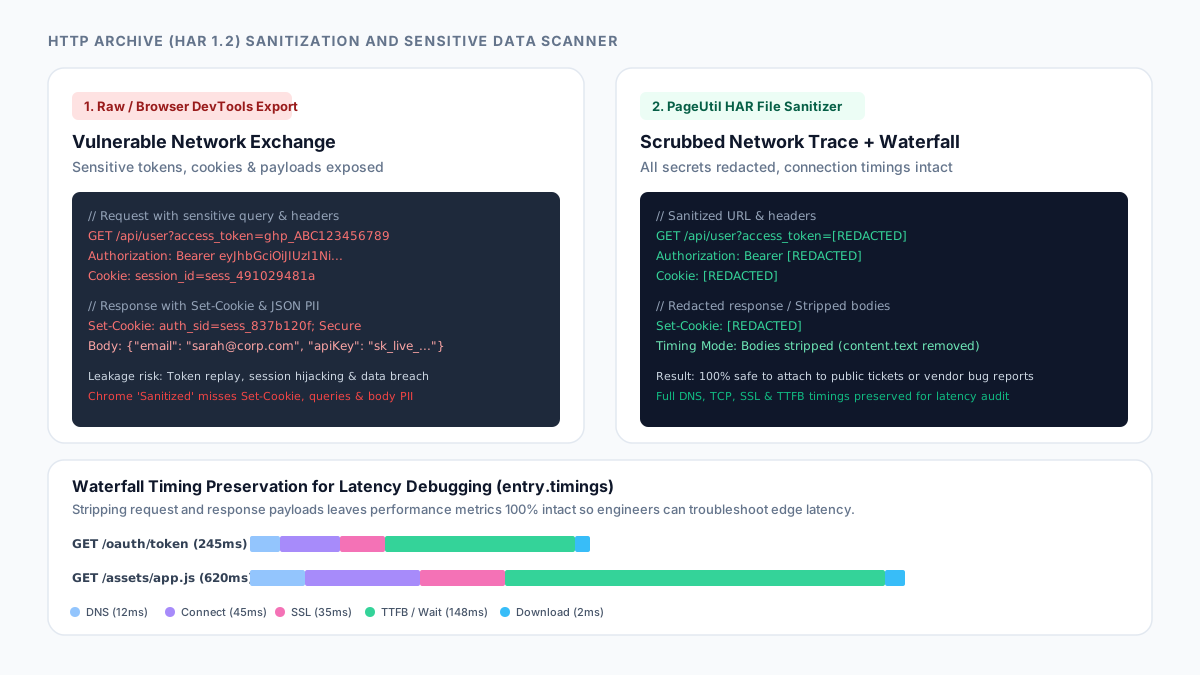
Why browser HAR exports leak credentials, session tokens, and customer data
An HTTP Archive (defined in the W3C HAR 1.2 specification) is a structured JSON serialization of every network exchange recorded during a browser session. When you open Chrome DevTools, Edge, or Firefox and export a network trace, the browser captures the exact HTTP wire traffic: complete request URLs, all request and response headers, URL query parameters, POST upload payloads, and the full uncompressed text of every response body.
If an engineer logs into an application or reproduces an issue while recording, the resulting .har file contains sensitive credentials in cleartext. This includes Authorization headers carrying long-lived Bearer tokens or Base64-encoded credentials (which you can inspect in JWT Decoder), active session identifiers inside Cookie headers (such as connect.sid or PHPSESSID), and API keys. Because HAR files are plain JSON, anyone with read access to a support ticket, bug tracker, or Slack channel can extract those session tokens and impersonate the user or replay authenticated API transactions.
Beyond authentication tokens, HAR archives capture business data. Every REST API response or GraphQL query response is stored in response.content.text. Customer profile payloads, credit card metadata, employee email addresses, internal microservice hostnames, and database error traces are permanently embedded inside the recording.
The critical blind spots of Chrome’s built-in sanitized HAR export
Modern Chromium browsers provide an export option labeled "Export HAR (sanitized)". While this is an improvement over raw exports, its redaction mechanism is strictly limited to a tiny allowlist of standard request headers. Chrome only strips the request Cookie header and the request Authorization header.
This narrow scope leaves significant security vulnerabilities in the exported file. First, Chrome does not sanitize Set-Cookie headers in the response headers collection (entries[].response.headers). When an application responds to a login request or refreshes an authentication ticket, the server assigns the new session token via Set-Cookie; an attacker can grab this token from the response header even if the request header was stripped.
Second, Chrome completely ignores URL query parameters. Single-page applications, analytics webhooks, and OAuth redirects frequently pass secrets in the query string (e.g., ?access_token=..., ?api_key=..., or ?code=...). Third, Chrome does not inspect or sanitize request bodies (postData) or response bodies (content). Passwords submitted in JSON payloads and private records returned by APIs remain completely visible.
Finally, custom authorization headers—such as X-Api-Key, X-Auth-Token, and X-Amz-Security-Token—are passed through untouched because they do not match the exact header name Authorization.
| Data Field Location | Chrome DevTools Raw | Chrome DevTools Sanitized | PageUtil HAR File Sanitizer |
|---|---|---|---|
| Request Authorization header | Exposed (cleartext token) | Omitted | Redacted (Bearer / Basic credential audit) |
| Request Cookie header | Exposed (active sessions) | Omitted | Redacted (per-cookie key-value mask) |
| Response Set-Cookie header | Exposed (new session IDs) | Exposed (still present) | Redacted (prevents token hijacking) |
| Custom auth headers (X-Api-Key) | Exposed | Exposed | Detected & redacted across all custom variants |
| URL query parameters (?token=) | Exposed in URL & query array | Exposed in URL & query array | Scrubbed from request.url and queryString |
| POST request bodies (passwords) | Exposed in postData.text | Exposed in postData.text | Scrubbed for secrets or stripped entirely |
| Response bodies (customer PII) | Exposed in content.text | Exposed in content.text | Deep JSON key redaction or body stripping |
| Waterfall timing metrics | Preserved | Preserved | 100% preserved (DNS, SSL, TCP, TTFB) |
How to scan, sanitize, and audit a HAR file before sharing
Open HAR File Sanitizer in your browser and drag your .har file into the drop zone (or load the sample batch to explore a realistic recording). The file is parsed locally in browser memory without sending bytes across the network.
The tool recursively traverses every entry in log.entries. It analyzes request URLs to identify sensitive query string keys (such as access_token, api_key, auth, password, and session) and replaces their values with [REDACTED]. It audits request and response headers (which you can also analyze with HTTP Headers) to redact Authorization, Cookie, Set-Cookie, and vendor-specific authentication keys.
Next, the scanner runs heuristic token detectors across all text nodes and payloads. It flags and masks high-entropy API keys—including AWS Access Key IDs (AKIA...), GitHub Personal Access Tokens (ghp_...), Stripe secret keys (sk_live_...), and Google Cloud API keys (AIza...). It also detects PII such as email addresses and Luhn-validated credit card sequences.
Review the Risk Assessment Report at the top of the page. It summarizes critical and high-severity findings by category. You can filter findings by severity, click into specific requests to inspect what was redacted, and download the sanitized .har archive or copy an itemized Markdown risk report for your records.
// Example: Redacting an OAuth token exchange entry in HAR JSON
Before Sanitization:
{
  "request": {
    "method": "POST",
    "url": "https://api.example.com/v1/user?api_key=sec_prod_991823",
    "headers": [
      { "name": "Authorization", "value": "Bearer eyJhbGciOiJIUzI1Ni..." },
      { "name": "Cookie", "value": "session_id=sess_49102; user=sarah" }
    ],
    "postData": {
      "text": "{\"password\":\"Secret123!\",\"email\":\"[email protected]\"}"
    }
  }
}

After Sanitization (PageUtil HAR File Sanitizer):
{
  "request": {
    "method": "POST",
    "url": "https://api.example.com/v1/user?api_key=[REDACTED]",
    "headers": [
      { "name": "Authorization", "value": "Bearer [REDACTED]" },
      { "name": "Cookie", "value": "[REDACTED]" }
    ],
    "postData": {
      "text": "{\"password\":\"[REDACTED]\",\"email\":\"[REDACTED]\"}"
    }
  }
}
Debugging latency waterfalls without leaking response payloads
In many engineering escalations—such as diagnosing CDN edge cache hit ratios, TCP connection delays, SSL negotiation overhead, or time-to-first-byte (TTFB) spikes—the actual content of the response body is completely irrelevant. The infrastructure or CDN engineer only needs the timing breakdown: blocked, dns, connect, ssl, send, wait, and receive.
To share network recordings with zero risk of leaking confidential application data, switch the Payload & body handling setting to Strip all request & response bodies (Timing Debugging Mode).
In this mode, the sanitizer strips request.postData.text and response.content.text entirely, while preserving the full entries array, HTTP status codes, method, URL structure, and millisecond timing measurements. This reduces multi-megabyte HAR files down to compact archives that upload instantly to support portals without exposing private business logic or customer records.
References
Use the linked specifications and product documentation to check behavior in your own environment.
Continue troubleshooting
Related tools
Frequently asked questions
Why does Chrome export sanitized HAR still leak session tokens?
Chrome built-in sanitized export only omits request Authorization and Cookie headers. It does not sanitize Set-Cookie headers in responses, tokens in URL query strings, or credentials in POST bodies, allowing session hijacking if those records are shared.
Can third-party support teams debug latency without seeing response bodies?
Yes. By stripping all request and response bodies while preserving the timings object, support engineers receive complete DNS, SSL, TCP, and TTFB latency metrics without accessing any confidential application data.
How does the tool prevent sensitive query parameters from leaking?
The sanitizer parses the request URL and replaces values of known sensitive query parameters (such as token, api_key, auth, session, and password) with [REDACTED] in both the URL string and the queryString parameter array.
Does PageUtil store or transmit my uploaded HAR file?
No. All decompression, JSON traversal, pattern scanning, and redactions occur entirely inside your browser memory using Web Workers. Network traces never leave your device.
Can automated sanitizers guarantee complete anonymization?
No automated scanner can guarantee 100% anonymization because proprietary token formats, bespoke hashes, or confidential business text can resemble normal identifiers. Always review the itemized risk report before public sharing.