What is cron, and how does it work?
Cron is a background scheduler on Unix-like systems. A cron job pairs a calendar pattern with a command: for example, running a report script every weekday morning. A crontab is the table of these jobs. The cron service checks the calendar and starts a command when its schedule matches.
An expression describes when to run. It does not contain your program or guarantee its success. PageUtil creates and previews expressions in your browser; install the schedule on a machine or service that actually provides a scheduler to execute it.
Cron is a calendar scheduler, rather than a delay measured from the end of the last run. It can start a new invocation while the previous one is still running. Long jobs may need a lock or a scheduler concurrency policy.
Read the five fields
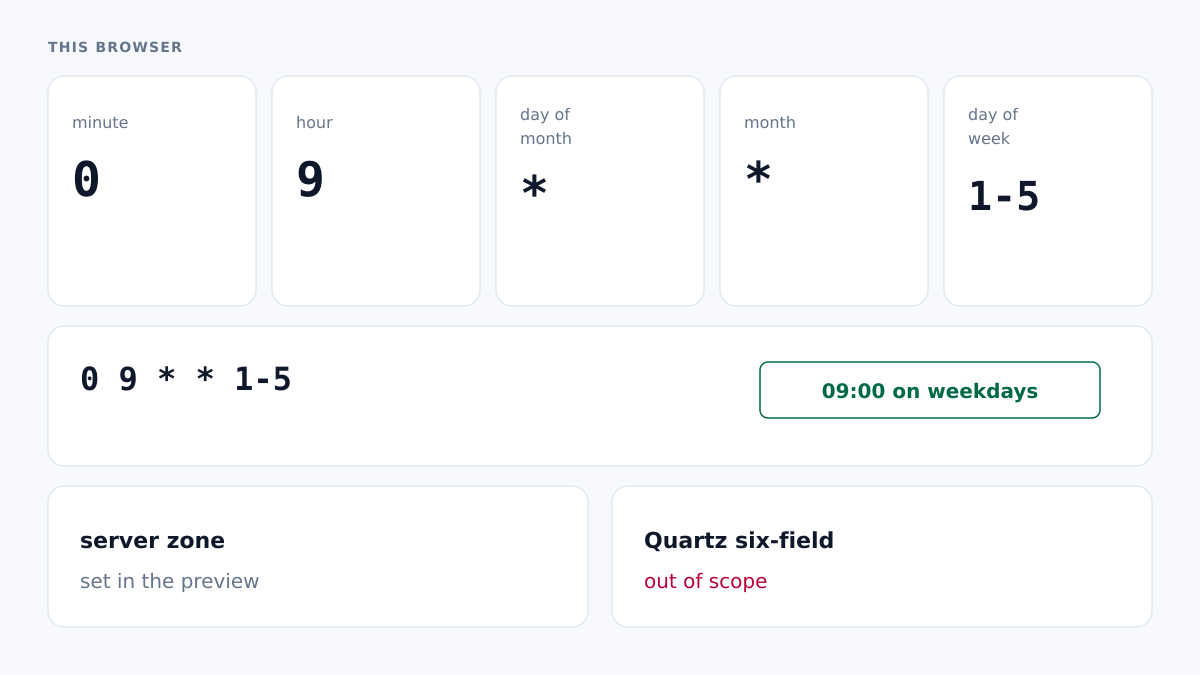
Standard Unix cron uses five fields separated by spaces: minute, hour, day of month, month and day of week. Hours use a 24-hour clock. A star means every allowed value in that position.
Read 0 9 * * 1-5 as minute 0, hour 9, every date, every month, Monday through Friday. It runs once at 09:00 each weekday, rather than every minute throughout the ninth hour.
| Field | Allowed values | Example |
|---|---|---|
Minute | 0–59 | 0 = start of the hour |
Hour | 0–23 | 9 = 09:00 |
Day of month | 1–31 | 1 = first day |
Month | 1–12; JAN–DEC where supported | 1 = January |
Weekday | 0–7; SUN–SAT where supported | 1–5 = weekdays; 0 and 7 = Sunday |
Stars, lists, ranges and steps
A comma selects several values. A hyphen selects an inclusive range. A slash takes steps within the field. Combine them to make schedules such as 0,30 9-17 * * 1-5: on the hour and half-hour from 09:00 through 17:30 on weekdays.
Steps restart at a field boundary. */15 minutes selects 0, 15, 30 and 45 in every hour. */40 selects 0 and 40, with only a 20-minute gap to the next hour. */2 in day-of-month starts at day 1 and resets monthly; it is not a continuous 48-hour timer.
| Syntax | Meaning |
|---|---|
* | Every value |
0,15,30,45 | A list of four values |
9-17 | Every value from 9 through 17 |
*/5 | Every fifth value, starting at the field minimum |
9-17/2 | Hours 9,11,13,15,17 when used in the hour field |
Create a schedule and check its runs
Open Cron Generator. Start with a preset, paste an expression, or use the five field controls. Every value, Every N values, and Specific / list / range cover the common patterns. Valid expression edits also update the builder.
Read the explanation and choose the timezone used by your scheduler. Inspect the next five runs and their UTC equivalents, then copy the expression. Choosing a timezone here changes the preview only; the copied five-field expression contains no timezone setting.
The generator accepts month and weekday names and expands common calendar shortcuts such as @daily to five fields. It rejects seconds and Quartz-only symbols. @reboot is a startup instruction with no calendar preview. Run searches cover up to eight years and stop slow calculations.
| Expression | Meaning |
|---|---|
*/5 * * * * | Every five minutes |
0 * * * * | At the start of each hour |
30 2 * * * | Daily at 02:30 |
0 9 * * 1-5 | Weekdays at 09:00 |
0 0 * * 0 | Sunday at midnight |
0 0 1 * * | First of each month |
0 0 1 1 * | January 1 |
0 0 29 2 * | February 29 in leap years |
Day rules, timezones and daylight saving
When both day-of-month and weekday are restricted, classic Unix cron usually matches either condition. 0 9 1 * 1 runs at 09:00 on the first of the month and on Mondays. It does not mean “only when the first is a Monday.” The generator explicitly describes this OR rule.
Cronie/Vixie implementations give wildcard day fields special treatment. If a day field starts with *, both day conditions must match. The generator follows this convention for a day-of-month step combined with a weekday. Verify these rules against your target scheduler.
The timezone belongs to the scheduler configuration. Check your machine or service settings. Some implementations support CRON_TZ, but support is not universal. Use Time Zone Converter to compare a run with another person’s local clock.
Daylight saving can remove or repeat a wall-clock hour. Daemons can skip, shift or suppress duplicate runs around those transitions. Preview uses cron-parser and browser timezone data; verify the behavior on your server. UTC avoids seasonal clock changes when local wall-clock timing is unnecessary.
A job on day 31 skips shorter months; it is not a last-day-of-month schedule. February 29 runs in leap years. For a last-day schedule, use a scheduler with that explicit feature or a script that checks the calendar.
Install a cron job
On a Unix-like machine with cron installed, crontab -e opens your user’s schedule. Add the five fields followed by a command, save the file, then inspect it with crontab -l. Back up existing entries before changing them.
The example below runs a report on weekdays. Replace the executable, script and log paths with real paths on your machine. Cron often has a smaller environment than your terminal, so use absolute paths and set any required working directory or environment variables.
The optional command field in the generator assembles a user-crontab line; it never executes it. System crontabs such as /etc/crontab commonly include an additional username before the command. Do not paste a user-crontab line there unchanged.
crontab -e

# Weekday report in the scheduler’s timezone
0 9 * * 1-5 /usr/bin/python3 /home/me/report.py >> /home/me/report.log 2>&1

# Inspect after saving:
crontab -l
Troubleshoot a job that does not run
Confirm the expression, installed crontab, intended user and server timezone. Check that the cron service is running. Look at service logs and the command’s output log.
Try the command as that user. Check executable permissions, absolute paths, environment variables, working directory and access to output files. A valid expression cannot fix a program failure. An unescaped percent sign in a traditional crontab command has special input behavior; check your manual when using date formats or URLs containing it.
Prevent overlapping invocations when a job takes longer than its schedule interval. For guaranteed catch-up after downtime, retries or dependency tracking, choose a scheduler that explicitly offers those features.
Cron dialects and sources
Unix cron, Quartz and cloud schedulers differ. Some add seconds or a year, change weekday numbering, or support ?, L, W and #. Check the documentation of the system that executes your job. The older Cron Parser remains available for reading numeric five-field expressions.
- Cronie crontab manual
- Cronie source: wildcard day-field flags
- cron-parser: timezone and next-run calculation
- Crontab.guru schedule examples
Related tools
Frequently asked questions
Does a cron expression contain the program it runs?
No. An expression describes when to run. It does not contain your program or guarantee its success.
What are the five fields in standard Unix cron?
Standard Unix cron uses five fields separated by spaces: minute, hour, day of month, month and day of week. Hours use a 24-hour clock.
Does a timezone choice in Cron Generator change the copied expression?
Choosing a timezone here changes the preview only. The copied five-field expression contains no timezone setting.