Check the website
Open Is This Website Down, paste the exact URL and select Check now. A bare domain such as example.com is checked using HTTPS. Keep the path if a particular page is failing; a working homepage does not prove that page works.
Read the HTTP status, URL actually checked, final URL and check timestamp. Use Copy diagnostic summary if you need to share evidence with support.
Interpret your result
Reachable means the URL responded successfully from PageUtil’s checking location. HTTP error means a server answered with an error. Could not confirm means the probe could not complete the request. Read the specific error before deciding what to do.
| Result | What it tells you | What to do next |
|---|---|---|
| 2xx — Reachable | The requested URL responded successfully to this check. | If it fails locally, try another browser or network. |
| Redirect | The URL redirects elsewhere; the checker follows it and reports the final response, or says the chain could not complete. | Inspect the destination with Redirect Checker. |
| 404 — HTTP error | A server answered, but the requested page was missing. | Check the path or try the homepage. |
| 403 / 429 — HTTP error | Access was refused or rate limited. The probe may be blocked. | Check manually in your browser. |
| 5xx — HTTP error | A server or gateway returned an error. | Retry and check the service’s official status page. |
| Timeout / connection failure — Could not confirm | This probe could not complete the request. Connection failures can include TLS failures. | Verify from another network or checking location. |
| DNS failure — Could not confirm | The name could not be resolved or its public address could not be verified by this check. | Inspect records with DNS Lookup and check domain configuration. |
Website works here but not for you
First check the spelling, protocol and path. Try the homepage, then the exact failing URL. A 404 on one path is a missing page, not evidence of a whole-site outage.
Try a private browser window or another browser. If that works, review extensions and saved site data. If login or checkout is failing despite HTTP 200, test that action directly: the checker does not run the application.
Switch from Wi-Fi to mobile data, or try another network. If that works, investigate the original network’s DNS resolver, VPN, proxy or firewall. Compare public records with DNS Lookup before changing settings. Avoid bypassing browser certificate warnings.
Website fails here too
Retry after a short wait and consult the service’s official status page for an incident report. Verify from another network or an independent checking location. Repeating a check from the same Cloudflare service does not establish worldwide downtime.
For 403 or 429, open the URL manually: security rules or rate limits may block automated requests. For DNS failures, compare A, AAAA and CNAME records with the hosting provider’s configuration, and check nameservers and domain expiry. For redirects, use Redirect Checker to find a loop or incorrect destination.
If you own the website, correlate the timestamp and exact URL with hosting and CDN logs. For 5xx, review application errors, upstream connectivity and recent deployments. For connection failures, check DNS, firewall rules and TLS configuration. Share the diagnostic summary with hosting support.
Example results
Illustrative example: Reachable, HTTP 200, check duration 120 ms. The URL answered successfully at the recorded time. This is not a page-load measurement and does not prove login works.
Illustrative example: HTTP error, Page not found, HTTP 404 on /old-page. Try the homepage and verify the path before reporting an outage.
Illustrative example: HTTP error, Server error, HTTP 503. A server or gateway answered but could not serve this request. Retry and check the official status page.
Illustrative example: Could not confirm, Timeout, no HTTP status. Try an independent network or location; the result cannot distinguish an offline host from selective blocking.
How PageUtil checks availability
Use the methodology below to understand the scope of a result. For individual codes, open HTTP Status Codes.
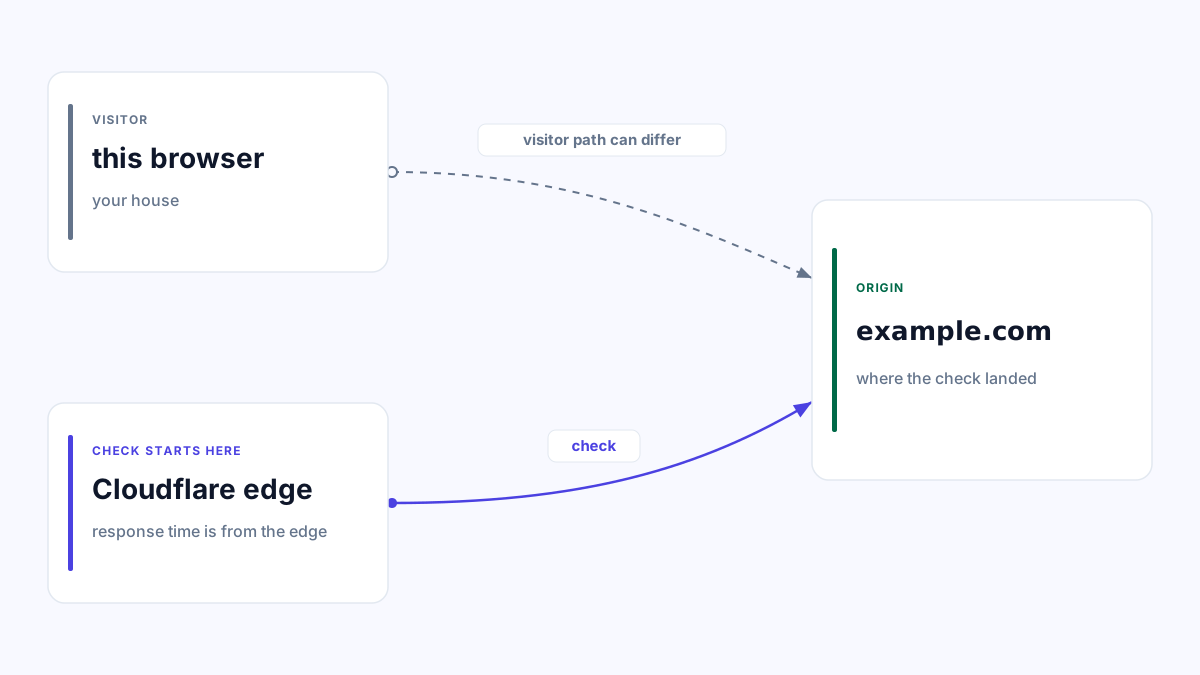
PageUtil makes an HTTP GET request from a Cloudflare Worker, a service running on Cloudflare’s network. There is no HEAD fallback. It follows at most 10 redirects and verifies public DNS addresses before each connection. Each DNS request has a limit of 3 seconds within the 8-second check budget; remaining time limits the HTTP request.
“Check duration” measures elapsed time from the start of the probe through DNS safety checks, connections, redirects, response headers and body cancellation. On failure it measures time until the check stopped. It excludes downloading and rendering the page, images, scripts and browser interactions.
DNS resolution or verification failures show “Could not confirm”. TLS and other connection failures share a connection-failure result because the fetch API does not reliably identify the cause. A 403 or 429 shows “HTTP error” with a blocked-probe warning. Private, loopback and reserved addresses are rejected.
The API response uses Cache-Control: no-store, and PageUtil does not retain or reuse results. The destination’s own CDN or HTTP cache may still serve its response; DNS answers may be cached by the resolver. Each submission is one observation, not ongoing monitoring. The precise execution location is unavailable, so no city or worldwide coverage is claimed.
A successful HTTP response does not verify login, checkout, APIs or JavaScript functionality. Test those actions separately in a browser.
Related tools
Frequently asked questions
Does a 404 mean the site is down?
No. A server answered, but that particular page was missing. The checker shows HTTP error, with Page not found underneath. Check the exact path or try the homepage.
Why might a site be reachable here but fail for me?
PageUtil checks from Cloudflare’s network. Your DNS resolver, browser, VPN, firewall or network may take a different path. Try a private browser window and mobile data. A single successful check does not prove worldwide availability.
Why does a timeout say Could not confirm?
The probe did not complete the request. The host might be offline, or it might block Cloudflare while serving other visitors. Verify from another network or genuinely independent checking location before concluding there is an outage.
Does a 5xx response mean the entire website is down?
A 5xx response means a server or gateway answered with an error for this request. The checker shows HTTP error and Server error. Other pages or regions may still work; retry and consult the service’s official status page.