In this guide
Jump to the pattern shape you are reviewing, or read straight through before tuning a slow expression. Every example uses JavaScript regex behavior and can be tried in Regex Tester.
Why a regex gets slow
Most regular expressions are fast because the engine can move through the input with limited choices. Trouble starts when the same text can be matched in many different ways and the final part of the pattern fails. A backtracking engine then tries another split, and another, until it proves there is no match.
JavaScript uses a backtracking RegExp engine. That means pattern shape matters. A one-line regex can be harmless on matching input and painfully slow on a near miss. When you are unsure, paste both the success and failure cases into Regex Tester and watch the timeout status, elapsed time, match count, and captured ranges.
Performance tuning is not about making every token clever. It is about removing ambiguity, limiting how much text a repeated part can consume, anchoring when you mean validation, and making failure happen early.
| Symptom | Common cause | First optimization |
|---|---|---|
Timeout on a near match | Nested repeats or overlapping alternatives | Make the repeated pieces mutually exclusive |
Match is much larger than expected | Greedy dot or broad class crosses delimiters | Use a negated delimiter class or explicit boundary |
Many partial matches before the right one | Unanchored validation pattern searches every start position | Add ^ and $ when the whole input is the target |
Replacement freezes on big pasted text | Global pattern can match empty or retry many paths | Prevent empty iterations and test long failures |
Works in one engine but not another | Engine-specific syntax or missing atomic features | Use JavaScript-supported rewrites in Regex Tester |
Killer 1: nested quantifiers
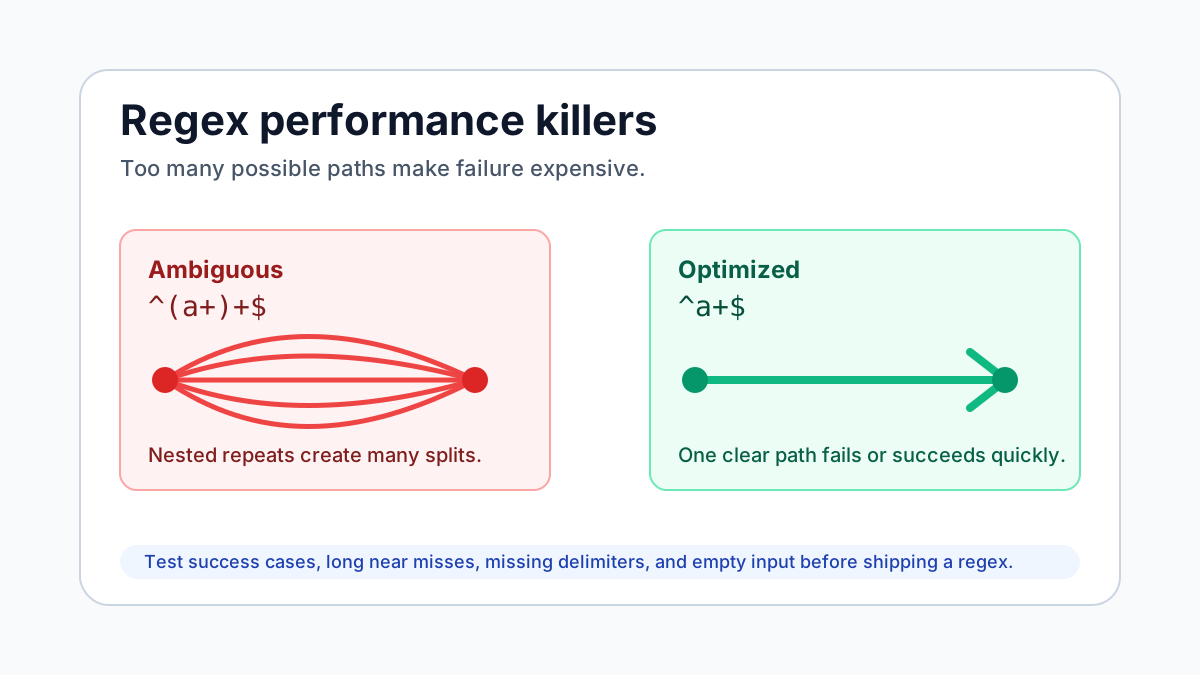
Nested quantifiers are the classic catastrophic-backtracking shape. The outer repeat and inner repeat can divide the same run of characters in many ways. If the required suffix is missing, the engine may explore a huge number of partitions before failing.
The dangerous version below looks like it validates a run of a characters. It becomes expensive when the input is many a characters followed by something that prevents the final anchor from succeeding. Try the failing case in Regex Tester with the deadline set low, then compare it with the rewrite.
The fix is to avoid repeating a repeated token when one repeat expresses the same language. If the inner part is a real unit, make sure the unit has an unambiguous separator or a bounded length.
Bad:
^(a+)+$

Failing sample:
aaaaaaaaaaaaaaaaaaaaaaaa!

Better:
^a+$| Bad shape | Why it hurts | Safer shape |
|---|---|---|
^(\w+\s?)+$ | The optional space lets words be repartitioned many ways | ^\w+(?:\s+\w+)*$ |
^(.+)+$ | Dot-plus nested inside plus has many equivalent splits | ^.+$ |
^([a-z]*)*$ | Both repeats can match empty and the same letters | ^[a-z]*$ |
^(?:\d+,?)+$ | The optional comma makes boundaries ambiguous | ^\d+(?:,\d+)*$ |
Killer 2: overlapping alternatives
Alternation is ordered, but backtracking can revisit later branches when the rest of the pattern fails. When alternatives share prefixes, especially inside a repeat, the engine may retry the same region in many branch combinations.
A performance-friendly alternation makes the choice clear as early as possible. Factor common prefixes out, order specific branches before fallback branches, and avoid putting a broad alternative next to a narrower one that can match the same text.
Use Regex Tester to compare the branchy version and the factored version on long input that almost matches. The right failure sample often reveals the issue faster than a success sample.
Risky:
^(foo|foobar|foobaz)+$

Better:
^foo(?:bar|baz)?(?:foo(?:bar|baz)?)*$

Often clearer:
^(?:foo(?:bar|baz)?)+$| Pattern | Issue | Rewrite idea |
|---|---|---|
(a|aa)+$ | Both branches can consume the same run of a characters | a+$ when all you need is a run of a |
(cat|catalog|catch) | cat succeeds first, then later tokens may force retries | cat(?:alog|ch)? |
(.*foo|.*bar) | Each branch scans with a broad dot-star | .*(?:foo|bar) |
(https?://|http://) | The http:// case overlaps with the optional-s branch | https?:// |
Killer 3: broad greedy wildcards
A dot-star is convenient and often too permissive. It can cross delimiters, swallow more than intended, then backtrack one character at a time while the rest of the pattern tries to recover. Lazy dot-star can still scan and retry; it only changes the order of attempts.
Prefer a token that describes what may appear between delimiters. For quoted text, use a class that excludes the quote. For tags, stop at the next greater-than sign if you are doing a small extraction. For structured HTML or JSON, use a parser rather than turning the regex into a document parser.
When you build or review these patterns, keep Regex Tester open with samples that include two delimiters, missing closing delimiters, and extra surrounding text.
Risky:
<.*>

Better for a small tag-shaped token:
<[^>\r\n]*>

Risky:
".*"

Better for a simple double-quoted field:
"[^"\r\n]*"| Instead of | Use when possible | Reason |
|---|---|---|
.* | [^\n]* | Stop at a line break when matching one line |
.*?END | [^E]*(?:E(?!ND)[^E]*)*END | Tempered scans can help when the delimiter is multi-character |
(.+)-(.+) | ([^-]+)-([^-]+) | The hyphen is the real separator |
^.*ERROR.*$ | ^.*\bERROR\b.*$ | A word boundary can reduce false positives |
Killer 4: unanchored validation patterns
A validation regex should usually describe the whole input. Without anchors, the engine is allowed to try the pattern at position 0, then position 1, then position 2, and so on. If the pattern itself is expensive, multiplying it by every possible start position hurts.
Anchors also prevent accidental success. A pattern like \d{4}-\d{2}-\d{2} can find a date-looking substring inside a larger bad value. If your code accepts that as valid input, you have both a correctness problem and more matching work than needed.
In Regex Tester, turn off the g flag when checking whole-input validation examples, then use ^ and $ without m unless line-by-line validation is intentional.
Search:
\d{4}-\d{2}-\d{2}

Validation:
^\d{4}-\d{2}-\d{2}$

Line-by-line validation with m:
^\d{4}-\d{2}-\d{2}$| Intent | Pattern shape | Notes |
|---|---|---|
Find any email-looking text | [^\s@]+@[^\s@]+\.[^\s@]+ | Search can be unanchored |
Validate the whole field | ^[^\s@]+@[^\s@]+\.[^\s@]+$ | Anchors prevent substring success |
Validate one token in a CSV column | (?:^|,)([A-Z]{3}\d{4})(?=,|$) | Use delimiter assertions around the token |
Validate every line | ^(?:[A-Z]{3}\d{4})(?:\r?\n[A-Z]{3}\d{4})*$ | Often clearer than relying on m alone |
Killer 5: empty matches in global scans
A pattern that can match empty text is not automatically wrong, but it is easy to misuse in global matching and replacement. JavaScript APIs advance after empty matches to avoid an infinite loop, but you can still get surprising counts, zero-width replacements, and repeated work at every position.
Ask whether the repeated token should require at least one character. If yes, prefer plus over star. If empty is meaningful, constrain where it can occur with anchors, lookarounds, or a more precise surrounding pattern.
PageUtil marks zero-width matches in Regex Tester. That makes it a useful place to catch patterns that appear to "match everything" because they are succeeding between characters.
Often accidental:
\d*

Better when you need numbers:
\d+

Often accidental:
.*

Better when a line must contain something:
.+| Pattern | Can match empty? | Question to ask |
|---|---|---|
\d* | Yes | Should there be at least one digit? |
[A-Z]? | Yes | Is the optional letter only valid in context? |
^|, | Yes at the start | Do you want a delimiter token or a position? |
\b | Yes | Are you matching a word position, not a word? |
Optimization checklist
Start with the input contract. Maximum length, allowed separators, whether line breaks are allowed, and whether the pattern is search or validation all matter more than micro-optimizing a single token. Put those decisions into the pattern so the engine has less guessing to do.
Then test the failure path. A regex that succeeds quickly on a perfect example can still be unsafe on the string that is one character away from success. In Regex Tester, keep separate tabs for a normal match, a normal rejection, a long near miss, empty input, and text with missing delimiters.
Finally, set runtime limits in the application that will execute the regex. PageUtil uses an isolated worker deadline for the tester. Your backend, batch job, browser feature, or import pipeline needs its own input length limits and timeout strategy.
| Do this | Why it helps | Example |
|---|---|---|
Anchor validation patterns | Avoids retrying at every start position | ^[A-Z]{3}\d{4}$ |
Replace dot-star with negated classes | Prevents crossing delimiters | "[^"]*" |
Use separators outside repeated fields | Makes token boundaries unambiguous | ^\w+(?:,\w+)*$ |
Bound untrusted repeats | Caps the amount of work and memory | ^[\s\S]{0,2000}$ |
Avoid nested repeats over the same text | Removes combinatorial splits | ^[a-z]+$ instead of nested groups |
Prefer parsers for structured formats | Regex cannot cheaply model recursive syntax | Use URL, JSON, XML, or HTML parsers |
Worked rewrites you can test
The fastest way to learn regex performance is to rewrite real suspicious patterns. Copy each "before" pattern into Regex Tester, add the sample, then swap in the "after" pattern. The visual match list usually makes the reason for the improvement obvious.
These examples use JavaScript syntax and ordinary browser support. JavaScript does not generally support atomic groups or possessive quantifiers, so the rewrites focus on unambiguous structure rather than engine-specific escape hatches.
1. CSV-like ids
Before: ^([A-Z0-9]+,?)+$
After:  ^[A-Z0-9]+(?:,[A-Z0-9]+)*$
Fail:   ABC123,DEF456,

2. Parenthesized text on one line
Before: \(.*\)
After:  \([^()\r\n]*\)
Fail:   (first) middle (second

3. Repeated path segments
Before: ^(/?.+)+$
After:  ^/(?:[A-Za-z0-9._~-]+/)*[A-Za-z0-9._~-]*$
Fail:   /aaaaaaaaaaaaaaaaaaaaaaaaaaaaaaaaaaaa!

4. Simple key=value lines
Before: ^(.+)=(.*)$
After:  ^([^=\r\n]+)=([^\r\n]*)$
Fail:   missing separator
Open Regex Tester with one of these examples, then add your own long near-miss sample before trusting the pattern in production code.
A debugging workflow for slow regex
When a pattern times out, reduce it until the slowness disappears, then add tokens back one by one. The risky piece is often a repeated group, an optional separator, a broad wildcard, or an alternation where several branches can consume the same prefix.
Use sample design deliberately. Keep a tiny passing sample, a tiny failing sample, a realistic long sample, and a pathological near miss. Put them in separate workspaces or test texts in Regex Tester so future edits are measured against the same evidence.
If the pattern protects a public endpoint, also add input length limits before the regex runs. A better regex is good; a better regex plus a maximum input size is much better.
| Move | What to look for | Next action |
|---|---|---|
Remove one quantifier | Does the timeout vanish? | Rewrite nested or adjacent repeats |
Replace dot with a delimiter class | Does the match become smaller? | Keep the narrower token |
Anchor the pattern | Does failure get faster? | Keep anchors for validation |
Split into two checks | Can cheap checks reject bad input first? | Use string includes, length, or parser checks before regex |
Try a parser | Is the format nested or escaped? | Stop using regex as the main parser |
When speed is not the only goal
Readable regex is often faster to maintain and safer to change. A pattern that is slightly longer but names the separators and boundaries is usually better than a compact expression with hidden ambiguity.
Security-sensitive regex should be reviewed like code. Keep the intended input length, examples, and failure cases next to the pattern. If the regex is used for validation, confirm that a substring match is not accidentally accepted.
For quick experiments, Regex Tester is the right place to inspect matches. For production safety, combine the optimized pattern with representative tests, length caps, and a runtime timeout where your platform allows one.
Related tools
Frequently asked questions
Does a lazy quantifier fix catastrophic backtracking?
No. Lazy quantifiers try shorter matches first, but they can still explore many alternatives. Remove ambiguity instead: narrow the token, add separators, or rewrite nested repeats.
Why is the failing input slower than the matching input?
A successful match can stop as soon as one path works. A failing near match may require the engine to prove that every plausible path fails.
Can JavaScript use atomic groups or possessive quantifiers?
They are not generally supported in JavaScript RegExp. Use unambiguous structure, negated delimiter classes, anchoring, and input limits instead.
Is elapsed time in Regex Tester a benchmark?
No. It is a useful warning signal for that browser, pattern, input, and deadline. Treat timeouts and large slowdowns as evidence to rewrite and test in your actual runtime.